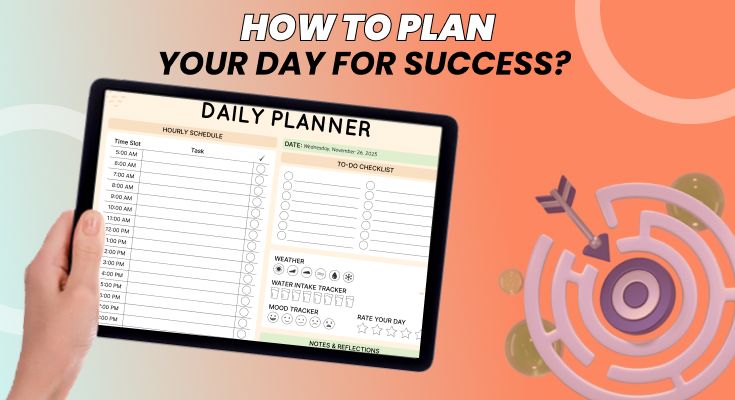
Feeling overwhelmed by a never-ending to-do list? Struggling to make real progress despite long hours of work? The problem isn’t your effort, it’s your plan. How you structure your day determines whether you accomplish your priorities or just stay busy.
Planning your day isn’t about writing a long list of tasks; it’s about creating a clear roadmap that turns your goals into action. By understanding how your brain works, prioritizing effectively, and scheduling with intention, you can stop reacting to distractions and start taking control of your time.
In this guide, you’ll discover practical, science-backed strategies to plan each day with focus, energy, and purpose so you can get more done without the stress that makes it easy to plan your day effectively.
Why Daily Planning Works: The Science Behind Structured Days
Daily planning isn’t just a productivity trick; it’s a cognitive strategy backed by decades of psychological and behavioral research. Understanding the science behind it helps you stay consistent, even when motivation dips.
1. The Decision Fatigue Problem
Every small decision you make drains your mental energy. Research by Roy Baumeister shows that willpower and decision-making strength work like a battery; they get depleted throughout the day.
Why It Matters
- Too many decisions lead to mental exhaustion, making it harder to focus.
- High-stakes decisions (like judges granting parole) are statistically better earlier in the day, when mental energy is highest.
- Many successful people reduce “micro-decisions” (e.g., Steve Jobs’ identical outfits) to conserve brainpower.
How Daily Planning Helps
- Planning the night before moves tomorrow’s decisions from your tired evening brain to paper.
- You wake up with a clear roadmap, reducing stress and saving your best mental energy for meaningful work.
- This is where daily planner templates become invaluable. They eliminate the morning question: “What should I work on first?”
2. The Zeigarnik Effect: How Open Loops Drain Your Brain
Psychologist Bluma Zeigarnik discovered that incomplete tasks create mental tension; your brain keeps them in active memory like “open tabs.”
Signs of the Zeigarnik Effect
- Thinking about tasks when you’re trying to sleep.
- Feeling mentally cluttered even when you’re not working.
- Constantly afraid you’ll forget something important.
How Daily Planning Solves It
- Writing tasks down creates closure, reducing mental load.
- Research by Baumeister and Masicampo shows that making a specific plan is enough to relieve mental tension.
- A clear to-do list frees up your memory and boosts your focus and clarity, especially with to-do list planner templates.
3. Implementation Intentions: Why Specific Plans Increase Success
Psychologist Peter Gollwitzer’s research shows that people are far more likely to follow through when they specify when, where, and how they’ll complete a task.
The Power of Specificity
- Vague goal: “Exercise more” → ~35% follow-through
- Specific goal: “Exercise at 7 AM for 20 minutes in my living room” → over 90% follow-through
How Daily Planning Uses This Psychology
- Converts vague goals into actionable steps.
- Reduces friction and uncertainty.
- Makes your next move automatic, not optional.
- Can be enhanced with health planner templates to structure and track your routines.
Example
- Instead of: “Work on the report.”
- Use: “Work on Section 3 of the report from 9:00–10:30 AM at my desk with my phone on airplane mode.”
How to Plan Your Day Effectively: The Complete Step-by-Step Guide
Step 1: Set Clear Daily Goals Before You List Tasks
Most people start planning by asking, “What do I need to do today?” But this question leads to a laundry list of activities disconnected from any larger purpose.
Start instead with: “What would make today a success?” This shifts your focus from activity to outcome, from being busy to being effective.
Goals vs. Tasks: A Critical Distinction
A task is an activity you perform. A goal is a result you achieve. Understanding this difference transforms how you plan. Many people find it easier to set outcome-based goals using editable layouts such as the goal planner templates, which guide you in defining measurable results rather than just listing tasks.
| Task (Activity) | Goal (Outcome) |
|---|---|
| Write report | Complete draft ready for manager review |
| Attend the team meeting | Align the team on Q1 priorities and assign owners |
| Call clients | Secure 2 contract renewals this week |
| Review documents | Identify and flag all compliance issues before the Friday deadline |
| Study for the exam | Master chapters 5-7 enough to explain concepts without notes |
When you frame your day around outcomes, you naturally filter out low-value busywork. You stop confusing motion with progress.
The 1-3-5 Rule: A Realistic Daily Framework
One of the most practical frameworks for daily planning is the 1-3-5 rule, popularized by The Muse. Each day, commit to completing:
- 1 Big Thing: Your most important task that meaningfully advances a major goal. This is non-negotiable; everything else can flex around it.
- 3 Medium Things: Important tasks that support your priorities but don’t require the same deep focus. These take 30-60 minutes each.
- 5 Small Things: Quick wins, administrative tasks, emails, and housekeeping items. These keep life running smoothly without consuming your best hours.
The power of 1-3-5 is constrained. Nine tasks are ambitious but achievable. It forces prioritization because you simply can’t fit everything. And it creates psychological momentum; completing your planned tasks feels satisfying in a way that crossing off 4 items from a 25-item list never does. If you prefer working inside a structured layout, the schedule maker can help you visually slot your 1-3-5 tasks.
The MIT Method: Most Important Tasks First
An even simpler approach: identify your 3 Most Important Tasks (MITs) each day and protect time for them before anything else. No meetings, no emails, no distractions until at least one MIT is complete.
The rule: Your MITs should be tasks that, if completed, would make you feel the day was a success, even if nothing else got done. Tools like a daily task journal can help you track and prioritize MITs consistently.
Step 2: Prioritize Tasks Using Proven Frameworks
Not all tasks deserve equal attention. The difference between productive people and merely busy people often comes down to one skill: knowing what to work on first, and crucially, what to ignore entirely.
The Eisenhower Matrix: Make Smarter Decisions, Not Faster Ones
This classic framework helps you cut through noise by sorting tasks into four categories based on urgency and importance:
Quadrant 1 — Urgent + Important: Do Now
Crises, deadlines, urgent problems.
Your move: Handle immediately.
Quadrant 2 — Not Urgent + Important: Plan
Strategy, skills, long-term goals, exercise, and prevention.
Your move: Schedule protected time.
This is the quadrant that builds your future.
Quadrant 3 — Urgent + Not Important: Minimize
Interruptions, routine emails, drop-ins, unnecessary meetings.
Your move: Delegate, batch, or strict timeboxing.
Quadrant 4 — Not Urgent + Not Important: Remove
Scrolling, busywork, low-value tasks.
Your move: Eliminate ruthlessly.
Most people live in Q1 and Q3, reacting. High performers live intentionally in Q2.
Eat the Frog: Win the Day Before It Starts
Your “frog” is the task you’re most likely to avoid but will make the biggest difference if completed. Do it first thing in the morning, before messages, before distractions, before your day gets hijacked.
Why it works:
- Highest willpower in the morning
- Removes mental dread
- Creates momentum
- Ensures meaningful progress even on chaotic days
One hard win early > ten easy wins later.
The ABCDE Method: Quick Prioritization When You’re Overloaded
When your list feels overwhelming, this system cuts through the clutter fast:
- A = Must do (serious consequences if ignored)
- B = Should do (minor consequences)
- C = Nice to do (optional)
- D = Delegate (avoid doing it yourself)
- E = Eliminate (doesn’t belong on your list)
Rule: Never touch a B if an A is pending. Never start a C while B is waiting.
Step 3: Time Block Your Calendar for Deep Focus
Time blocking is the practice of scheduling specific tasks into dedicated slots on your calendar. Instead of a floating to-do list, you create a concrete, realistic map for your day. Tools like a weekly layout, such as the weekly schedule maker, make this easier to visualize.
Why Time Blocking Beats Traditional To-Do Lists
Traditional to-do lists have a fatal flaw: they don’t account for time. A list with 15 tasks implies they’ll all get done today, but if each task averages 45 minutes and you have 6 hours of available work time, you’ve set yourself up for failure before you’ve started.
Time blocking forces reality into your planning. When you assign each task a specific slot, you immediately see what’s achievable and what isn’t. Conflicts become visible. Overcommitment becomes obvious.
Research from Dominican University found that people who wrote down their goals and scheduled specific times to work on them were 42% more likely to achieve them compared to those who merely thought about their goals.
How to Time Block Your Day: Step-by-Step
- Identify your biological peak hours. Most people have 2-4 hours of peak cognitive performance daily. For many, this is mid-morning (9-11 AM) before the post-lunch slump. For night owls, it might be evening. Track your energy for a week to identify your pattern.
- Block deep work first. Reserve your peak hours for your most cognitively demanding tasks, your “frog” and Quadrant 2 priorities. Use 60-90 minute blocks (the brain’s natural focus cycle) with no meetings, no Slack, no email.
- Batch similar tasks together. Context switching kills productivity. Group-related activities: all emails in one 30-minute block, all phone calls in another, all administrative tasks together. This minimizes the cognitive cost of switching between different types of work.
- Schedule transition time. Add 5-15 minutes between blocks for mental reset, bathroom breaks, and travel between meeting rooms. Back-to-back blocks without a buffer lead to exhaustion and cascade delays.
- Leave 20% of your day unscheduled. Life is unpredictable. Clients call with urgent requests. Kids get sick. Meetings run over. Scheduling 100% of your time guarantees failure. Build in buffer blocks that can absorb surprises without derailing your plan.
- Color-code your calendar. Use different colors for different task types: deep work (green), meetings (blue), administrative (yellow), and personal (purple). A glance at your calendar should reveal whether your week is balanced or dominated by one category.
Sample Time-Blocked Daily Schedule
Here’s what a well-structured day might look like for a knowledge worker:
| Time | Activity Block |
|---|---|
| 6:00 – 7:00 AM | Morning routine: Exercise, breakfast, shower, dress |
| 7:00 – 7:15 AM | Daily planning review: Confirm priorities, visualize the day |
| 7:30 – 9:30 AM | 🐸 DEEP WORK BLOCK #1: “Eat the Frog” Most important task |
| 9:30 – 9:45 AM | Break: Walk, stretch, get coffee, hydrate |
| 9:45 – 10:30 AM | Communication batch: Process email, respond to Slack, return calls |
| 10:30 – 12:00 PM | DEEP WORK BLOCK #2: Second priority task |
| 12:00 – 1:00 PM | Lunch break: Eat away from the desk, take a walk, recharge |
| 1:00 – 2:30 PM | Meetings block: Collaborative work, 1:1s, team syncs |
| 2:30 – 2:45 PM | Break: Afternoon energy reset (walk, stretch, snack) |
| 2:45 – 4:00 PM | Medium-priority tasks: Medium tasks from the 1-3-5 list |
| 4:00 – 4:30 PM | Buffer block: Catch-up time or small tasks if nothing urgent |
| 4:30 – 5:00 PM | Small tasks: Quick wins, admin, inbox zero attempt |
| 5:00 – 5:15 PM | Daily shutdown ritual: Review, plan tomorrow, mentally close work |
Key insight: Notice how the two deep work blocks are protected during peak morning hours. Meetings and lower-focus tasks are pushed to the afternoon when energy naturally dips.
Step 4: Break Large Tasks into Manageable Action Steps
People procrastinate because tasks are unclear, not because they’re lazy. “Work on the project” is vague; your brain can’t begin. Convert every task into the next physical action using tools that help break tasks into smaller steps, such as the project planner templates.
The 2-Minute Rule: Clarity Creates Action
David Allen’s Getting Things Done (GTD) methodology includes a powerful heuristic: If a task takes less than 2 minutes, do it immediately. If it takes longer, break it down until the first step is crystal clear.
The key question to ask: “What is the very next physical action?” Not “work on presentation,” but “open PowerPoint and create title slide.” Not “plan event,” but “email venue to confirm availability for March 15.”
This specificity removes the mental friction of starting. Your brain doesn’t have to figure out what “work on” means; it just has to execute a clear instruction.
Example: Breaking Down a Complex Project
Vague task: “Prepare Q4 strategy presentation.”
Problem: This task is paralyzing because it’s actually 15+ sub-tasks masquerading as one item.
Actionable breakdown:
- Review last quarter’s presentation for structure template (15 min)
- Pull Q3 results data from analytics dashboard (10 min)
- Outline 5 key messages for Q4 strategy (20 min)
- Draft slides 1-5: Q3 recap and lessons learned (30 min)
- Draft slides 6-10: Q4 goals and initiatives (45 min)
- Create data visualizations for ROI projections (25 min)
- Draft slides 11-15: Resource requirements and timeline (30 min)
- Add speaker notes for each slide (20 min)
- Review and polish design consistency (15 min)
- Practice full presentation once through (25 min)
Notice how each sub-task includes a time estimate. The original task felt like a 4-hour monster. The breakdown reveals it’s actually 3.5 hours of work, but spread across 10 achievable chunks that can be scheduled across multiple days.
The Swiss Cheese Method for Overwhelming Tasks
When a task feels too big to start, use the Swiss Cheese method: poke holes in it by completing tiny sub-tasks whenever you have a few minutes. Can’t write the whole report? Write one paragraph. Can’t clean the entire house? Clear one counter.
Each small action reduces the task’s size and, more importantly, reduces the psychological intimidation factor. Starting becomes easier once you’ve already started.
Step 5: Minimize Distractions and Protect Your Focus
According to Gloria Mark’s research at UC Irvine, the average knowledge worker is interrupted every 11 minutes. Worse, it takes an average of 23 minutes to fully regain deep focus after each interruption. The math is brutal: most people never achieve sustained focus at all.
Create a Distraction-Free Environment
- Silence all notifications. During deep work blocks, turn off all non-essential alerts. Phone on airplane mode or in another room. Computer notifications disabled. Slack is set to Do Not Disturb. Every notification is a potential 23-minute focus loss.
- Close unnecessary browser tabs. Each open tab competes for attention and represents an unfinished thought. Keep only what’s essential for your current task. Better yet, use a separate browser profile for work with no social bookmarks.
- Use website blockers. Tools like Freedom, Cold Turkey, or Focus@Will can block distracting sites during scheduled focus hours. Remove the option to “just check” Twitter for a second.
- Communicate your focus hours. Let colleagues know when you’re unavailable. “I check messages at 10 AM and 3 PM” sets expectations. Most “urgent” requests can wait 2 hours.
- Designate a workspace. If possible, have a dedicated area for focused work. Your brain will learn to associate that physical space with concentration, making it easier to enter focus mode.
- Use visual signals. Headphones (even without music) signal “don’t interrupt.” A closed door or “focus time” sign can do the same in an office environment.
The Pomodoro Technique: Structured Focus Sessions
Developed by Francesco Cirillo in the late 1980s, the Pomodoro Technique uses timed intervals to structure focus and rest:
- Choose a task to work on
- Set a timer for 25 minutes (one “pomodoro”)
- Work with complete focus until the timer rings
- Take a 5-minute break
- After 4 pomodoros, take a longer 15-30 minute break
- Repeat throughout the day
The technique works because it makes focus finite. Knowing a break is coming in 25 minutes makes it easier to resist the urge to check your phone. The ticking timer creates gentle accountability. And the forced breaks prevent burnout while maintaining sustainable productivity.
The 10-Minute Rule for Procrastination
When you’re resisting a task, commit to working on it for just 10 minutes. Set a timer. If you still want to stop after 10 minutes, you can, but you rarely will. The hardest part of most tasks is starting; once you’re engaged, momentum takes over.
Step 6: Schedule Strategic Breaks to Maintain Energy
Productivity isn’t about working nonstop; it’s about working smart. Research from the Draugiem Group using the DeskTime productivity app found that the most productive employees don’t work longer; they work more intensely for shorter periods with deliberate breaks.
The magic ratio? The top 10% of productive workers averaged 52 minutes of focused work followed by 17 minutes of complete rest. They weren’t just taking a break; they were fully disengaging from work during those breaks.
Types of Breaks That Actually Refresh
- Movement breaks: Walk, stretch, do jumping jacks, or take the stairs. Physical movement increases blood flow, oxygenates the brain, and releases tension from sitting. Even a 5-minute walk can boost creativity by up to 60% according to Stanford research.
- Nature breaks: Step outside, look at trees, or even view nature photographs. Studies show that brief nature exposure reduces cortisol, lowers blood pressure, and restores depleted attention (a phenomenon called Attention Restoration Theory).
- Social breaks: Brief, positive interactions with colleagues can boost mood and motivation. Humans are social creatures; isolation is draining. A quick chat by the coffee machine isn’t wasted time; it’s recharging time.
- Mindfulness breaks: 5-10 minutes of deep breathing, meditation, or body scanning can reset your mental state. Apps like Calm or Headspace offer quick guided sessions designed for work breaks.
- Creative breaks: Doodling, playing an instrument for a few minutes, or doing a puzzle engage different brain networks than work tasks, providing genuine cognitive rest.
What NOT to Do During Breaks
Not all breaks are created equal. Some activities feel like rest but actually create new mental load:
- Social media scrolling: The infinite scroll, comparison triggers, and information overload leave you more depleted, not refreshed.
- News consumption: Negative headlines activate stress responses and hijack attention long after you’ve stopped reading.
- Email checking: This isn’t a break, it’s work. Every email you read during a break creates a new open loop demanding attention.
- Complaining sessions: Venting about work with colleagues might feel cathartic, but actually intensifies negative emotions and extends rumination.
Step 7: End Each Day with Review and Reflection
The daily review is where continuous improvement happens. Without reflection, you repeat the same mistakes and inefficiencies indefinitely. With reflection, each day builds on the lessons of the last.
The Daily Shutdown Ritual
Cal Newport, author of “Deep Work” and “A World Without Email,” advocates for a formal shutdown ritual that creates a hard boundary between work and personal time. Here’s a 10-15 minute process to close each workday:
- Capture loose ends. Review any notes, sticky notes, or mental threads from the day. Transfer anything important to your task management system so nothing falls through the cracks.
- Review today’s accomplishments. What did you complete? What moved forward? Acknowledging progress, even a small win, builds momentum and satisfaction.
- Update your task list. Mark completed items. Note what didn’t get done and why. Reschedule incomplete tasks to specific future dates.
- Check tomorrow’s calendar. Review any meetings, deadlines, or commitments. Identify conflicts or preparation needed.
- Identify tomorrow’s top 3 priorities. What are your MITs for tomorrow? What’s your frog? Write them down so you wake up with clarity.
- Say “Shutdown complete.” A verbal cue signals to your brain that work is done for the day. This seemingly silly step helps prevent evening rumination about unfinished tasks.
Weekly Planning Review
In addition to daily reviews, schedule 30-60 minutes weekly (Sunday evening or Monday morning works well) for a higher-level assessment:
- Review last week: What went well? What didn’t? What did you learn?
- Check progress on quarterly and annual goals. Are you on track?
- Identify the week’s 3-5 key outcomes you want to achieve
- Schedule time blocks for major priorities before the week fills with reactive tasks
- Identify any adjustments needed to your planning system
The Reflection Questions That Drive Improvement
Ask yourself these questions during your daily and weekly reviews:
- What was my most productive hour today? What made it work?
- Where did I get distracted? What triggered it?
- Did I work on what mattered most, or did urgency hijack my priorities?
- What task took longer than expected? How can I estimate better?
- What will I do differently tomorrow/next week?
If you want to plan your week in the same way, then make sure to read this guide How to Plan Your Week.
What Tools Should You Use for Effective Daily Planning?
The right planning tool matches your style. Some people thrive with digital systems that sync across devices; others need the tactile engagement of pen and paper. There’s no universally “best” tool, only the best tool for you.
Digital Planning Tools
- PlanWiz: Customizable digital planner templates that combine task management with calendar integration. Ideal for those who want structure without complexity. Includes daily, weekly, goal-tracking, and family planner templates.
- Todoist: Clean, intuitive task manager with natural language input (“Call mom every Sunday at 5 pm”), project organization, and powerful filtering. Great for GTD practitioners.
- Notion: A highly customizable workspace that combines notes, tasks, databases, and calendars. Best for those who enjoy building their own systems. Steeper learning curve but limitless flexibility.
- Google Calendar: The default for time blocking. Seamless sync across devices, easy sharing for meetings, and integration with virtually every other productivity app.
- TickTick: Combines task management with calendar view and a built-in Pomodoro timer. Good all-in-one option with a clean interface.
- Things 3: Beautiful, minimalist task manager for Apple devices. Excellent for personal task management with an intuitive design.
Paper-Based Planning Systems
- Bullet Journal (BuJo): Flexible analog system using any notebook. You create your own layouts for daily logs, monthly spreads, and collections. Great for creative types who want complete control.
- Full Focus Planner: Michael Hyatt’s structured planner with quarterly goal-setting, weekly previews, and daily pages. Includes the “big 3” framework and ideal week templates.
- Passion Planner: Combines goal-setting with daily/weekly scheduling in a guided format. Includes reflection prompts and monthly check-ins.
- Hobonichi Techo: Japanese planner famous for its thin Tomoe River paper and one-page-per-day format. Minimalist design allows complete customization.
Digital vs. Paper: How to Choose
| Choose Digital If You… | Choose Paper If You… |
|---|---|
| Need reminders and notifications | They are easily distracted by digital devices |
| Want to access your plan from any device | Remember better when you write by hand |
| Reschedule tasks frequently | Want a screen-free planning ritual |
| Need to share calendars with others | Enjoy the tactile experience of planning |
| Want to search past plans easily | Want to customize layouts completely |
Pro tip: Many productive people use both digital for calendar and reminders, paper for daily task planning and reflection. The tactile act of writing engages different cognitive processes than typing, potentially improving memory and commitment.
Frequently Asked Questions
The most effective time to plan is the evening before, typically as part of a 10-15 minute shutdown ritual. Planning at night leverages the Zeigarnik Effect. Writing down tomorrow’s tasks tells your brain it can stop holding onto them, allowing for better sleep. You also wake up with clarity and purpose rather than spending precious morning willpower on planning decisions. If evening planning doesn’t fit your routine, plan first thing in the morning before checking email or messages.
Night-before planning is generally more effective for three reasons: (1) Decision fatigue research shows that willpower depletes throughout the day, so evening planning conserves morning energy for actual work. (2) Your subconscious can process tomorrow’s challenges while you sleep, often generating solutions. (3) You eliminate the common trap of “planning paralysis” that delays morning productivity. However, keep a brief 5-minute morning review to adjust for anything that changed overnight.
Time blocking is scheduling specific tasks into dedicated calendar slots, transforming a floating to-do list into a concrete plan for when each task happens. To implement: (1) Identify your 2-4 peak productivity hours. (2) Block deep work during those times in 60-90 minute sessions. (3) Batch similar tasks together. (4) Schedule transition time between blocks. (5) Leave 20% of your day unscheduled for unexpected tasks. Research shows people who schedule specific times for goals are 42% more likely to achieve them.
The best planner app depends on your needs. For simple task management: Todoist (clean interface, natural language input). time blocking: Google Calendar (universal sync, easy sharing). customization: Notion (build your own system). all-in-one planning with templates: Planwiz (structured templates with calendar integration). Apple users: Things 3 (beautiful design, intuitive). The best app is whichever one you’ll actually use consistently; its features matter less than adoption.
Conclusion: Start Planning Smarter Today
The difference between productive people and everyone else isn’t talent, willpower, or working longer hours. It’s having a system that turns good intentions into consistent action.
Here’s what to do next:
- Tonight, spend 10 minutes planning tomorrow
- Identify your one “frog”, the task you’ll tackle first
- Block 90 minutes of uninterrupted time for deep work
- End tomorrow with a quick review and repeat
Try this for one week. You’ll notice less stress, clearer focus, and more meaningful progress on what actually matters.
Your future self will thank you for the 10 minutes you invest tonight.
Ready to free start? Explore PlanWiz’s free daily planner templates designed to put these strategies into action with ready-to-use layouts for time blocking, the 1-3-5 rule, and daily reviews.