
As a fitness coach, managing clients, scheduling, and tracking progress can become overwhelming. Thankfully, iPad planners offer a streamlined solution. These digital tools help you stay organized, track your clients’ fitness journey, and improve communication. By centralizing all aspects of your coaching, the iPad planner for fitness coach allows you to focus more on your clients and less on administrative tasks, ultimately boosting productivity and ensuring a smoother workflow.
What Are the Roles of iPad Planner for Fitness Coaches?
The digital iPad planner app brings a revolutionary change to fitness coaching practice. An iPad planner streamlines your processes because it stores everything you need which includes client information and workout strategies plus your appointments.
- Digital Planning in Fitness Coaching: The use of technology enhances productivity levels for fitness coaches who utilize iPad planners to merge their operational tasks into a single comprehensive system. These tools enhance the organization as well as productivity while enabling coaches to provide streamlined individualized service.
- Centralized Resource Management: The capabilities of iPad planners unite entire client information including personal details and assessment reports with workout records under one unified platform. Coaches need only one system to handle all relevant data which allows them to retrieve necessary information efficiently while keeping their sessions organized.
- Efficient Workout & Progress Tracking: Through iPad planners coaches track client outcomes along with workout activities and achievement objectives. Time-sensitive observations give immediate insight into success or failure measurements to help instant adjustments. The system helps clients stay motivated while proving their fitness development.
- Time Management: Using an iPad as a planner makes it simpler to handle schedules and meet deadlines. Coaches can schedule client meetings, set automatic follow-up alerts, and prevent meeting conflicts. For even better results, explore time management tips to improve task prioritization and boost your overall efficiency.
- Communication with Clients: The iPad planning tool provides easy communication because coaches can deliver direct messages together with reminders and updates through its platform. The instant messaging system allows coaches to disseminate customized workout plans and progress reports which generates better client engagement.
- Data-Driven Decisions: An iPad-based planner ensures coaches obtain real-time client data to support their informed decision-making process. This system tracks a timespan of client development for recognizing patterns along with improvement opportunities.
How to Maximize Productivity with a Smart iPad Planner
Fitness coach productivity emerges from organized strategies that bring efficiency to every aspect. Using a smart iPad planner enables business automation because it centralizes essential tasks including client management and scheduling alongside task tracking and time allocation responsibilities. Proper strategies enable you to invest your time wisely and monitor client requirements to achieve better business results. The following guide demonstrates how you can optimize your iPad planner.
Organize and Streamline Client Information
A coach needs organized client information for efficient performance. An iPad planner provides a unified storage area to hold both personal information together with fitness levels and specific objectives. The organization of clients through categories related to their fitness progress or their goals or preferences helps customization of workouts and individual need tracking.
Utilize Scheduling Tools
As a scheduling solution, iPad developers provide users with management tools for planning medical sessions more efficiently. The scheduling tools make it simple to book appointments while you also have executive control over appointment adaptations client follow-up notifications and work allocation for business growth. Such features keep you focused while ensuring you never miss critical business meetings thus improving daily productivity and organization.
Syncing Across Devices
Data synchronization between iPads iPhones and Macs maintains current data accessibility independent of the device currently in use. Frequent automatic connections between devices allow you to view client information and workout schedules or manage schedules without limitations regarding time and place.
Incorporate Task Management Features
Your daily work process becomes much more efficient by integrating task management applications into your iPad planning system. An iPad planner allows users to track their to-do lists and establish deadlines as well as reminders for professional and personal assignments. Dividing your work functions with this method enables better focus on essential tasks to prevent important matters from being forgotten while improving your efficiency. For even greater productivity, explore various planning organization ideas that can help streamline your workflow and optimize your planning system.
Use Time-Tracking and Analytics Tools
Time-tracking applications with analytics features on iPad enable users to track their productive periods while working with clients and performing business operations. Examining these analytical insights enables you to properly distribute resources between therapeutic sessions business functions and personnel development initiatives.
Tips for Fitness Coaches to Boost Client Engagement & Retention
A fitness coach needs to keep clients because sustained client connections bring long-term success. The capabilities of an iPad planner enable users to deliver improved client interactions along with personalized service delivery and enhanced progress tracking. The following list includes methods that will enhance both client engagement and retention levels.
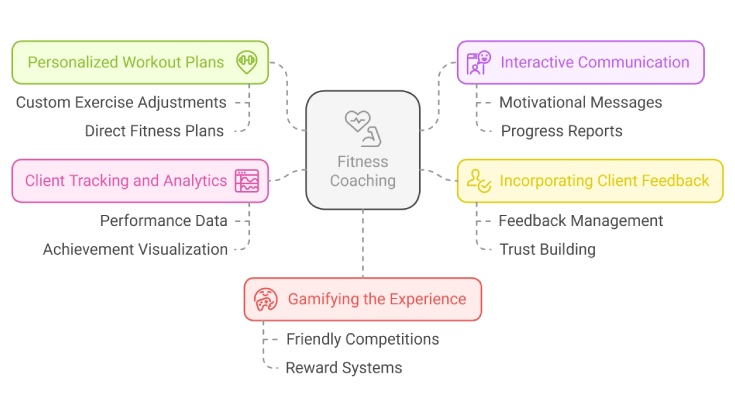
Personalized Workout Plans
iPad planners let coaches create personalized workout strategies that meet the specific needs and objectives of their clients. The ability to make easy changes between exercises and set and rep counts enables coaches to supply clients with personalized approaches. Clients receive their fitness plans directly from iPad software which promotes their engagement and commitment to their fitness journey.
Interactive Communication
The use of an iPad as a planner enables quick and efficient communication with clients. Coaches use their own mobile devices to communicate work-related content like motivational messages progress reports and workout reminders immediately. Clients stay motivated and goal-focused through welcome alerts and direct messaging enabled by the iPad planner. Efficient communication both deepens client relations and improves accountability levels while helping retain clients within the program.
Incorporating Client Feedback
A vital aspect for sustained client involvement involves gathering their feedback making sure iPad planners facilitate easy workout feedback management to aid satisfaction tracking and prevention of necessary changes. Active listening combined with appropriate feedback response demonstrates to clients that coaches prioritize their progress which leads to increased client trust and retention.
Client Tracking and Analytics
The iPad planning tool enables coaches to observe their clients’ performance data along with their key achievements without difficulty. When data appears visually in front of clients it allows them to witness their progress in workout performance and weight loss as well as strength gain development. The data delivered by iPad planners helps coaches revise exercises while fostering a sense of client achievement leading to higher expectations that members will follow their fitness plans.
Gamifying the Experience
A gamified coaching experience creates an enjoyable method to excite clients about their motivational progress. The iPad offers applications that help coaches implement friendly networks. While establishing performance goals and offering rewards that build upon client achievement. Through interactive methods, the coaching process becomes more fun and clients stay accountable while insisting on their overall performance and goal engagement.
Best Practices for Using an iPad Planner as a Fitness Coach
Using an iPad planner as a fitness coach can greatly enhance your efficiency and organization. By following best practices, you can ensure seamless client management, optimized workflows, and personalized training plans, helping you provide better service and grow your coaching business.
Choosing the Right App
Your search for an iPad planner app needs to focus on finding one that syncs properly with fitness coaching requirements. Planwiz provides an outstanding software solution that lets users maintain client workouts together with their progress tracking and scheduling functions from a single interface. Select mobile applications that optimize your business flow and enable configuration to match your poaching methods.
Using Cloud-Based Solutions
Fitness coaches benefit substantially from using apps stored in the cloud. They maintain the safety of your data backups and provide complete data access from any location including gym studios and residence or outdoor settings. Cloud storage enables you to protect significant client information and maintains automatic file synchronization between your devices.
Stay Organized with Templates
Fitness coaches find fitness planner templates to be their most valuable tool. Pre-made workout plans nutrition logs and progress reports await your use. When you need them through the creation or download of standardized formats. The use of templates in content organization allows you to save time maintain consistent output and deliver personalized professional results to your clients during every session.
Consistency in Data Entry
A successful iPad planner requires consistent data entry to achieve its full potential. Complete accurate updates of client data including workouts and progress together with personal information because this maintains precision that helps you deliver optimal coaching. Steady data registration produces an organized perspective on client advancement which helps you design more informed choices.
Utilizing Multi-Tasking Features
The iPad offers multiple application usage features that enhance your work efficiency. Multiple apps can operate at the same time on the iPad while you conduct research for new exercises and check client records with the ability to build workout plans without screen switching. With this feature, you can handle every coaching aspect through a single platform to achieve smooth workflow transitions.
Create Customizable Templates for Workout Plans with iPad Planner.
The ability to create specific workout designs through iPad planners proves effective for coaches to improve operation flow and generate individualized training plans for their clients. These templates enable coaches to construct personalized workouts by adjusting exercise choices together with set number and repetition counts and rest periods between them. Which results in satisfied clients who achieve their fitness targets more effectively.
Benefits of Customization
Each fitness endeavor requires individual workout programs to direct clients toward their particular goals. The use of personalized workout plans built for individual fitness capabilities and choice preferences and development stages leads to workouts that are hard yet realistic to perform. The use of personalized methods boosts client motivation while lowering accident risks and develops sustainable outcomes which creates a sense of strong support for each client.
How to Design a Template
Designing a customizable workout template on your iPad planner is easy and efficient. Follow these simple steps:
- Choose Your Platform: Select an app that supports customizable templates, like Planwiz or other fitness planner tools.
- Create a Template: Start by selecting fields like:
- Exercise Name: Include the specific exercises tailored to the client’s needs.
- Sets & Reps: Provide a structure for each exercise, adjusting as needed for client fitness levels.
- Rest Time: Ensure the rest intervals match the intensity of the workout.
- Adjust for Each Client: Customize the number of sets, reps, rest time, and exercises based on their fitness goals. Save templates to reuse or modify for future sessions.
Nutrition and Recovery Plans
A holistic fitness plan goes beyond just workouts. Integrating nutrition and recovery within the template ensures clients are supported in all areas of their fitness journey.
- Nutrition: Add sections for meal plans, macronutrient goals, or hydration reminders.
- Recovery: Include tips for post-workout stretches, sleep recommendations, or rest days to enhance recovery. This comprehensive approach creates a more personalized, effective fitness plan for your clients.
Using Template Libraries
Members of the fitness industry can select pre-designed planner templates from iPad planner apps which enable them to tailor workout programs specifically for their clients. Professional templates within library collections enable users to personalize their content without sacrificing valuable time because they maintain consistent formatting. The apps Planwiz and Trainerize enable coaches to modify exercises as well as sets and reps within built-in workout structures found in their customizable templates.
Optimize Your Fitness Coaching Business with iPad Planner
The adoption of iPad planning systems enhances your fitness coaching operations because it reduces essential administrative procedures. Your business can onboard clients more quickly when it uses digital features that operate through your iPad. The elimination of paperwork through this system delivers a professional and seamless initiation for all clients. Your business will experience more efficient client communication through automation as it sends session reminders while managing payments and follows up to maintain client interaction.
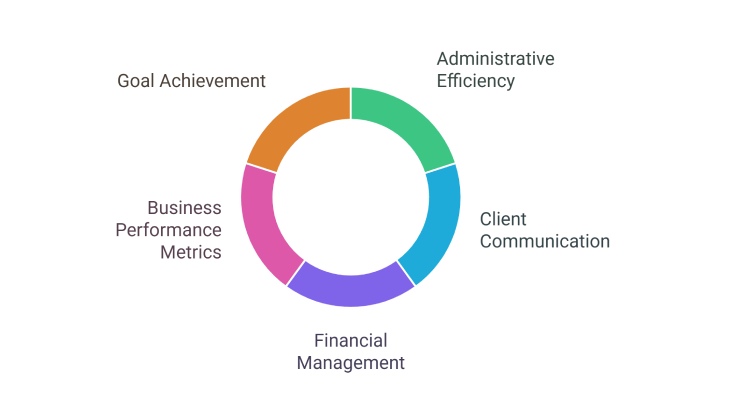
The iPad planner provides financial applications that simplify billing operations as well as invoice generation and expenditure tracking. The key business metrics including revenue and client retention enable coaches to assess business performance through the iPad planner system. Business goals which include both revenue targets and new client acquisition become achievable through iPad planners. That keeps coaches focused on their organization’s needs and growth objectives.
Potential Pitfalls to Avoid When Using an iPad Planner
You can improve your fitness coach productivity through iPad planning tools but it is essential to watch out for specific disadvantages. Your success in digital tool utilization will grow with the avoidance of these standard mistakes to provide your clients and yourself with an optimal coaching experience. The following list presents major issues with iPad planners along with step-by-step prevention strategies. To make the most of your iPad planner, explore the best iPad planner apps that offer enhanced features to avoid these pitfalls.
- Overloading on Features: Using too many features or apps can overwhelm you and your workflow. It’s important to choose only the necessary tools that streamline your process, so you don’t become distracted by unnecessary options.
- Data Privacy & Security: Always protect your client data by using secure apps with strong encryption. Enable two-factor authentication and follow data protection practices to ensure your clients’ information stays safe and private.
- Technical Failures & Backup: Regularly back up your data to avoid losing important client information due to unexpected technical failures. Using cloud storage or external backups will ensure your records are safe and accessible, no matter what.
- Not Personalizing Enough; Relying too much on generic templates can cause clients to feel less engaged. Customizing your plans based on each client’s goals and progress will make them feel more motivated and valued.
- Falling Behind on Updates: Keep your iPad and apps updated to ensure smooth performance. Software updates often include bug fixes, security patches, and new features that enhance your planning and coaching experience.
Conclusion
Embracing an iPad planner can elevate your fitness coaching business to new heights. Optimizing time management, customizing workout plans, and ensuring effective communication, empower coaches to deliver personalized, data-driven services. By avoiding common pitfalls and utilizing best practices, you can maximize your planner’s potential, enhancing client satisfaction and retention, while fostering growth in your business. The future of fitness coaching is digital make the most of it.