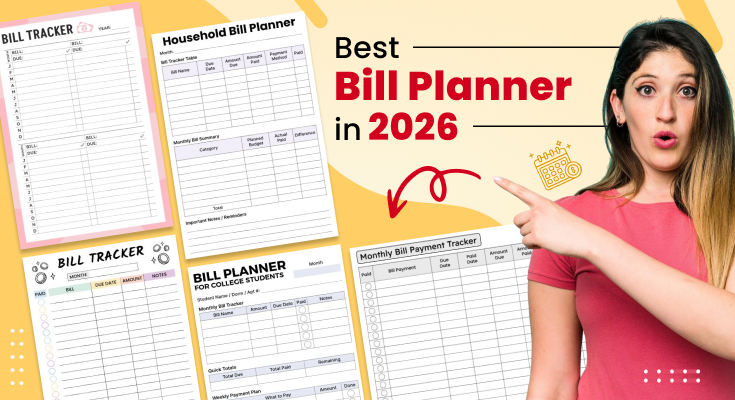
Financial stress impacts 78% of Americans, with one of the main reasons for missed payments being bills. That annoying feeling of pulling out your bank statement in the middle of the month, questioning where all the cash went, happens to many people. The great news? An organized bill planner helps turn your finances from stress to total mastery.
Whether you’re dealing with bills in the home, running a small business, or living the life of a college student, this ultimate guide has everything you need to take control of your bills for 2026. We’ll walk you through step-by-step tips, introduce you to the best templates for the circumstance, and guide you through the ideal bill planning solution for you.
What Is a Bill Planner and Why Does It Matter in 2026?
A bill planner is your financial command center, a systematic tool (physical or digital) that helps you track, organize, and pay bills on time while managing your overall budget. Think of it as the difference between constantly reacting to financial emergencies and actually directing where your money goes.
The core purpose of a bill planner:
| Function | Benefit | Impact |
|---|---|---|
| Tracks due dates | Never miss payments | Protects credit score, avoids late fees |
| Organizes expenses | See spending patterns clearly | Identifies waste, reveals savings opportunities |
| Monitors payment status | Know what’s paid and pending | Eliminates duplicate payments, reduces anxiety |
| Forecasts cash flow | Anticipate money needs | Prevents overdrafts, enables better decisions |
| Centralizes financial info | One place for everything | Saves time, reduces stress |
Fundamentally, the financial context for the year 2026 is unique in that budgeting has been made even more imperative by the circumstances. In a surprise twist, the impact of subscription culture has gone way beyond Netflix and Spotify, where the average American is managing up to 12 different charges that consume many hundreds of dollars a month.
Other variable costs that have become more and more unpredictable involve utilities that vary wildly from month to month due to variations in the weather and energy costs. Budget planner templates assist in organizing these variable costs and seeing where exactly your money is being spent.
Why Do So Many People Struggle With Bill Management?
Most people who struggle with bills aren’t irresponsible; they’re fighting against predictable obstacles that nobody warned them about. Understanding these challenges is the first step toward solving them.
The five critical bill management obstacles:
- Misaligned payment schedules: Bills arrive on schedules that don’t match paychecks, creating constant juggling acts where you mentally track which bills you can pay when
- Variable expense uncertainty: You can estimate your electric bill, but can’t know precisely what it’ll be until it arrives same with groceries, gas, and dozens of other necessary expenses
- Hidden cost multiplication: Annual subscriptions you forgot about, quarterly insurance premiums, and irregular car maintenance hit without warning and blow up carefully planned budgets
- Life’s unpredictability: Real life constantly throws expenses at you that no budget template includes: kids get sick, cars break down, friends get married, pets need emergency vet visits
- Lack of financial visibility: Without a clear system, you don’t actually know where money is going until it’s gone
Studies show that 57% of Americans are uncomfortable with their savings amounts, and 22% of Americans have no emergency savings. Without savings, unexpected costs from an auto repair or financial setback are crises rather than inconveniences.
Payment history constitutes 35% of your scores, which means that, in addition to incurring late payment charges, defaulting on payments will also affect your chances of purchasing a home, being approved for credit cards, or even being hired for a job. There are business planner templates that help entrepreneurs separate business expenses from their personal expenses.
What does one missed bill payment cost you:
- Late fees: $25-$40 per occurrence
- Credit score damage: 60-110 point drop for 30+ days late
- Higher interest rates: Can increase by 5-10% on credit cards
- Service disconnection risk: Utilities, phone, and internet cutoff
- Relationship stress: Money arguments damage partnerships
How Do You Choose the Right Bill Planning System for Your Situation?
The best bill planner is the one you’ll actually use consistently. Let’s break down your options so you can make an informed choice.
Physical Bill Planners
Ideal for individuals who prefer a hands-on approach to managing their finances. Monthly schedule planner templates can serve as an effective physical bill tracker when you mark payment dates on the calendar.
Advantages:
- ✅ Writing things down creates stronger mental engagement
- ✅ Always accessible, no battery or internet required
- ✅ Visual satisfaction of checking off completed tasks
- ✅ Customizable with stickers, colors, and personal touches
- ✅ No learning curve for technology
Disadvantages:
- ❌ Manual calculations required
- ❌ Can’t sync across multiple people or devices
- ❌ Risk of losing the physical planner
- ❌ Takes more time for entries and updates
- ❌ Difficult to search historical information
Best for: People who remember things better when they write them down, those who enjoy physical planning rituals, and anyone who prefers disconnecting from screens for financial tasks.
Digital Spreadsheets
Ideal for people who want customization and control without recurring subscription costs.
Popular options:
- Google Sheets: Free, cloud-based, accessible anywhere, shareable with partners
- Microsoft Excel: Powerful formulas, works offline, compatible with most systems
- Apple Numbers: Mac-friendly, beautiful templates, intuitive interface
Advantages:
- ✅ Complete customization to track exactly what matters to you
- ✅ Automatic calculations and formulas
- ✅ Create graphs and visual representations
- ✅ One-time setup with ongoing use
- ✅ Can share with partners or family members
Disadvantages:
- ❌ Requires manual data entry
- ❌ Learning curve for formulas and functions
- ❌ No automatic transaction imports from banks
- ❌ Needs discipline to update regularly
- ❌ Can become complex if over-customized
Best for: People comfortable with spreadsheets, those who want maximum control, and anyone needing to track specific data points not found in standard apps.
Budgeting Apps
Perfect for people who want automation and real-time financial oversight.
| App | Best For | Cost | Key Feature |
|---|---|---|---|
| PlanWiz | Template-based planning | Free/Lifetime $47.99 | Customizable bill tracker templates with full privacy |
| YNAB | Zero-based budgeters | $14.99/month | Every dollar gets a job |
| Mint | Automatic trackers | Free | Comprehensive overview |
| PocketGuard | Spending limiters | Free/$12.99/month | Shows “safe to spend” amount |
| Goodbudget | Envelope method fans | Free/$10/month | Digital envelope system |
| Simplifi | Real-time tracking | $5.99/month | Customizable dashboard |
Advantages:
- ✅ Automatically imports transactions from bank accounts
- ✅ Real-time updates on spending and balances
- ✅ Send alerts when bills are due, or funds are low
- ✅ Generate reports and spending insights
- ✅ Accessible from phone, tablet, or computer
Best for: Tech-savvy individuals, those with multiple accounts to track, and anyone seeking automated financial insights without manual dataentry.
Hybrid Approaches
Many successful bill planners combine multiple methods for the best of all worlds.
Popular combinations:
- Physical planner for bill due dates + Spreadsheet for detailed tracking
- App for transaction tracking + Physical planner for goal setting
- Spreadsheet for budgeting + App for payment reminders
- Physical calendar for visual overview + Digital tool for calculations
The key is finding what keeps you engaged and aware of your finances without becoming overwhelmed. The calendar maker provides an excellent visual overview of bill due dates that you can pair with detailed digital tracking tools.
What Are the Best Bill Planner Templates for Different Needs?
The right template is what separates a system that is used daily from a system that collects dust. Let’s discuss some of the best bill planner templates available and how they can help solve different financial problems. Whether one is planning bills for a household, a business, or one’s personal financial accounts, organizing one’s financial planning can ensure that one never misses a bill due date. Daily planner templates can be used to cross off the completion of a list of financial activities performed daily.
Template #1: Small Business Bill Management Planner
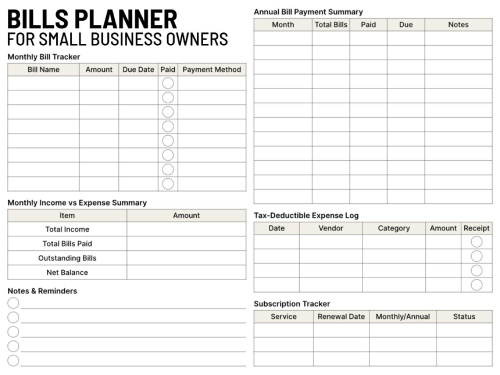
This business bill planner will aid entrepreneurs in managing all the financial commitments in a single, organized place. The monthly bill tracker will facilitate the entry of every bill, amount, due date, payment status, and payment method. At the top, you will find the annual bill payment summary for managing the yearly bills, along with the income and expense comparison on a month-by-month basis, which will state the total income, bills paid, bills outstanding, and the net balance. There will also be a log for tax-deductible expenses, in which you will be able to maintain a record of deductible purchases along with the vendor information and receipts. The subscription tracker will allow you to track all the subscription services along with the renewal details. At the end, there will be pages for taking important financial notes along with a circle to recall important financial information or due payment dates.
Best For: The small business owner, freelancer, and entrepreneur who needs to track business expenses, manage cash flow, and organize tax-deductible expenses throughout the year.
Template #2: College Student Monthly Bill Planner
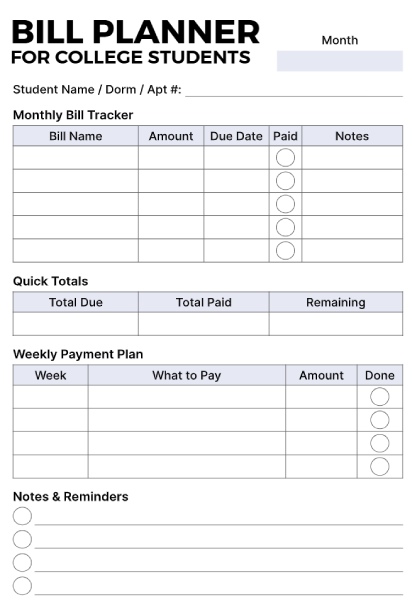
This bill planner for students will make financial organization much easier for people on tight budgets. You are to write your name and dorm/apartment number at the top of the page, along with the name of the month. There is a table to track your monthly bills where you can write down each bill name and amount due, as well as the status of payment, by simply making a circle for each one that has been taken care of. There is an area to track payments on a weekly schedule that will allow you to plan out what you have to pay for the week by making a circle when you are done paying that amount. The planning area at the end allows you to plan any financial goals that you may have on your mind.
Best For: Students living off campus, people who are managing their first bills in their twenties, or anyone who is budgeting to stay within a tight budget.
Template #3: Monthly Household Bill Management Planner
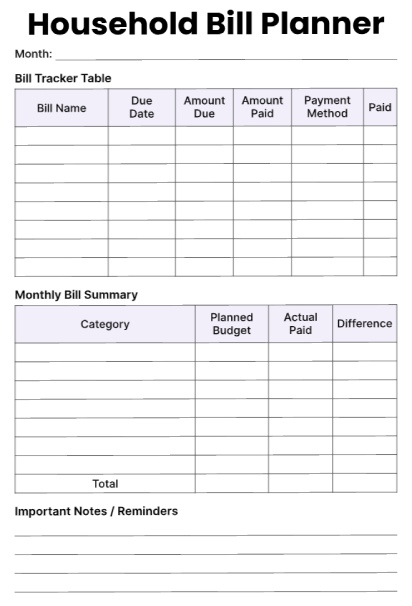
This is a useful home budgeting calendar so you can stay up-to-date with all the expenses you need to pay throughout a month. The bill tracker calendar is dated with space to put down information such as bill name, due date, how much is due, how much is paid, payment type, and a field indicating if paid. The section where you can track all your expenses and judge your budgeted expenses against those you actually incurred is a useful feature of this bill tracker calendar. The section where you put down all your notes is significant and useful, and this is placed at the bottom of the bill tracker calendar.
Best For: Families or households with managers responsible for budgeting by categories, analyzing spending habits, and scheduling all monthly bills to be paid on time.
Template #4: Personal Expense Bill Tracker Planner
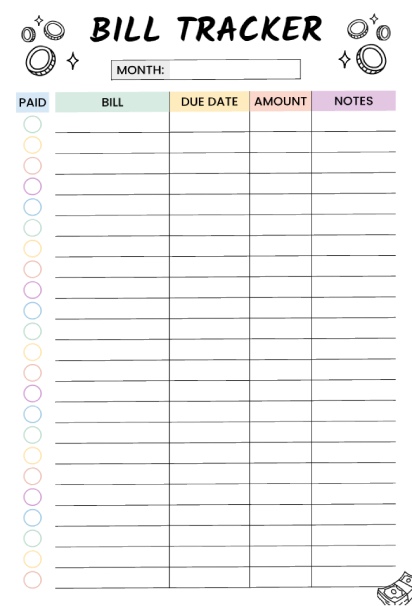
This vibrant and entertaining bill tracker requires a very simple design that helps to make bill management easier. The design requires a circle on each row that you can color or mark as soon as you pay your bill. The columns include bill name, date due, and amount, along with a section where you have to fill in vital details. The pastel color-coding system used in this bill tracker makes it very simple to read. The color-coding system used here involves green for bill payment, yellow for bill name, orange for bill date, purple for bill amount, along with a pink section for vital details. Cartoon images of coins and money used at the top as well as at the end of this bill tracker system make it very attractive.
Best For: Visual learners who prefer a positive and straightforward method of monitoring bills that does not involve complex equations or numerous entries to be made in columns.
Template #5: Organized Monthly Financial Bill Tracker Planner
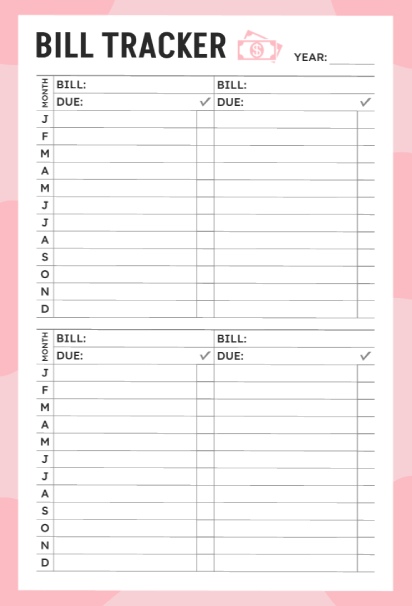
This annual bill tracker allows you to view a full year’s worth of recurring bills on one page. This pink-bordered bill tracker has a space for you to write in the year at the top of the page. First, you enter the name and paying date for each bill on the left, and then you have two identical bill tracking sections, each covering a full year. In each bill tracking section, the months of the year appear vertically (J F M A M J J A S O N D), and boxes appear beside each one for you to mark once each bill is paid. This is ideal for bills that come monthly or at set intervals around the year. It is then very easy to check for any payments that have been missed or spot any patterns in bill payments with this bill tracker.
Best For: Individuals with monthly bills to monitor all their yearly payments within one sheet of paper, by also indicating missed and upcoming payments.
Template #6: Monthly Bill Payment Tracking Planner
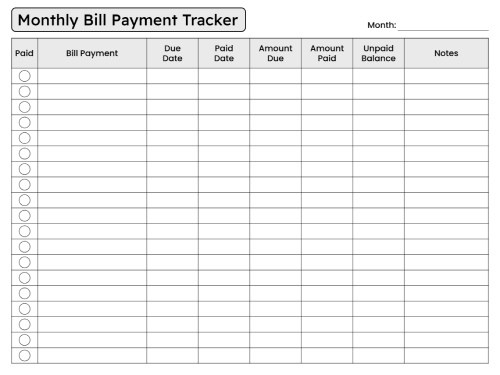
This simple bill tracker has a clean table form where you can easily monitor payments for all of your bills. In the first column, you have a series of circles where you mark payments with a check once they’ve been paid and then proceed to fill in the bill name, date due, paid, amount due, and amount paid, as well as any balance due. There is a column for adding reminders/numbers for confirmation of payments as you check them off, which is situated on the right-hand side. The minimalist, black-and-white table with numerous rows allows you to monitor as many bills as you need, with plenty of room on each page for each bill you are paying. In the corner, you mark the month with which you are working.
Best For: People who would like to have a simple bill manager that solely concentrates on the payments without any frills or graphical elements to distract them.
Template #7: Annual Bill Tracking and Payment Schedule Planner
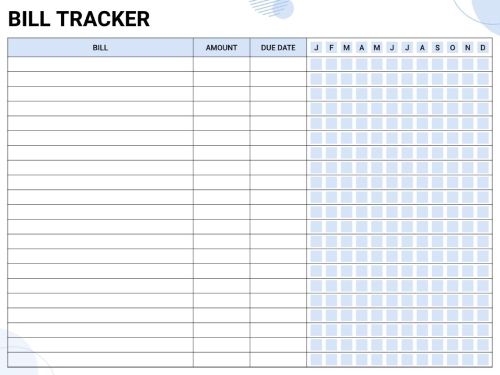
This special bill tracker will display the entire twelve months of the year in a grid form, enabling you to check each bill as you are paying it for the entire year. On the left, you would create a listing of each bill with its amount and the date it is due, and on the right, you would have a massive blue-colored grid with columns for each month of the year (J F M A M J J A S O N D) and rows where you would check each bill’s payments as you send them through. You would have your bills running horizontally, with each bill having its own row. It is just a matter of placing a check or a blue shade in columns for each month you send the bill through.
Best For: Individuals having multiple repeating bills and needing a yearly overview to review the continuity of their payments, as well as to spot seasonal expenses, allowing them to plan accordingly for the year.
How Do You Start Your Bill Planning Journey Today?
Now that you understand bill planning systems and templates, let’s create your personalized implementation plan. Following these steps in order prevents overwhelm and builds sustainable financial habits.
Week 1: Complete Financial Audit
Time required: 3-4 hours total
What to gather:
- Bank statements from the past 3 months
- Credit card statements from the past 3 months
- Recent pay stubs showing take-home pay
- All bills received in the past 90 days
- Subscription and membership confirmation emails
- Insurance policy documents
- Loan statements
Action steps:
- Create a master list of every single bill and expense
- Note the amount, due date, and payment method for each
- Calculate your actual monthly take-home income (not gross pay)
- Identify irregular expenses that hit quarterly or annually
- Highlight any bills currently paid late or missed
Goal: Create a complete, honest picture of your current financial situation. Most people discover they’re spending 15-20% more than they realized once everything is documented. Notes planner templates are perfect for capturing this initial audit information as you gather documents and identify all your financial obligations.
Week 2: Choose Your System and Template
Time required: 2 hours
Decision factors to consider:
- Do you prefer physical or digital tools?
- Will you track bills alone or with a partner?
- How many bills do you need to manage?
- What’s your technical comfort level?
- Do you have specific needs (debt payoff, variable income, student budget)?
Action steps:
- Review the template options detailed in this guide
- Choose one that matches your situation (start simple, you can upgrade later)
- Download or purchase your chosen template
- If digital, set it up on devices you use daily
- If physical, purchase any necessary supplies (planner, pens, highlighters)
Goal: Pick the system that you will follow through on. System choice should be the “good enough” solution that you will follow on a day-to-day basis. The weekly planner templates work well for most people, starting by providing enough detail without overwhelming you with complexity.
Week 3: Set Up Your Bill Planner
Time required: 2-3 hours
Action steps:
- Transfer all bills from your audit into your chosen template
- Set up payment reminders (digital alerts or calendar marks) 3-5 days before each due date
- Configure automatic payments for fixed bills you want on autopilot
- Add income information and calculate your budget
- Create categories that make sense for your spending patterns
- Input historical data if your template includes trend analysis
Pro tips:
- Color-code bills by priority: essential (red), important (orange), flexible (yellow)
- Include confirmation numbers or account details in the notes fields
- Set up mobile access if using digital tools
- Share with your partner if managing finances together
- Create a backup of digital templates
Goal: Have a complete, functional bill planning system ready to use starting next week.
Week 4: Implement and Monitor
Time required: 15-30 minutes daily, 1 hour weekly
Daily habits:
- Check your bill planner each morning to see today’s obligations
- Log any spending or bill payments as they occur
- Review upcoming bills in the next 3-5 days
Weekly habits:
- Update all bill payment statuses
- Review spending against budget categories
- Adjust the upcoming week’s plans based on remaining funds
- Check that all automatic payments were processed correctly
Monthly habits:
- Complete month-end review: actual vs. budgeted spending
- Identify categories where you overspent or underspent
- Adjust next month’s budget based on lessons learned
- Celebrate wins (paid all bills on time, stayed under budget, etc.)
Goal: Build consistent habits that make bill planning automatic rather than something you have to remember to do. The daily task journal helps you track these daily financial check-ins and build the consistency that transforms bill planning from a chore into an automatic habit.
Frequently Asked Questions
The simplest way to organize bills is to use a combination of three factors: an electronic calendar with all due dates, auto-payment for fixed bills, and reminders set 3 to 5 days before due dates for variable bills. Utilize an electronic calendar for reminders, with a specific day for viewing bills to make payments for non-auto bills.
Start simple: list every bill you pay with its due date and amount. Choose a basic template from the options in this guide. Track for one month without changing behavior, just observe and record. Use that data to create a realistic budget for month two. Don’t try to be perfect immediately; focus on awareness first, improvement second.
Recommended tools for planning a bill: categorization of costs by vendors, structuring payments by due dates (Net 30 Days, Net 60 Days), structuring by categories of taxes, and financial flow categorization based on payments. The bill number, vendor information, and expense categorization based on taxes can be taken into account. There needs to be a clean distinction between personal and business expenses.
No, maintaining separate planners for business and personal finances is crucial. Mixing them complicates tax filing, makes accounting difficult, obscures true business profitability, and creates legal liability issues for business owners. Use separate templates and, if possible, separate bank accounts for complete financial clarity.
Conclusion: Your Path to Financial Peace Starts Now
Managing bills doesn’t have to be overwhelming. The difference between financial stress and financial confidence is simply having a system you actually use.
Begin with an accurate assessment of your bills, pick a planning approach that suits your lifestyle, and set aside 15 minutes per day to keep track of your expenses. Whether you value privacy and customization found on PlanWiz, the automation offered on Mint, the discipline of YNAB, the immediate data analysis provided on Simplifi, or the spending controls found on PocketGuard, there is an approach for you.
Omitted payments will actually cost you more than late charges. Missing payments will impair your credit rating, stress you out, and keep your finances in disarray. Taking control, on the other hand, is easier than you think.
This week, take action:
- Gather your bills and create your master list
- Choose one template from this guide
- Set up payment reminders 3-5 days before due dates
- Check your planner for 15 minutes each day
One month from now, you’ll have transformed financial anxiety into financial control. The question isn’t whether you can do this; it’s whether you’re ready to start.
Stop wondering where your money went. Start telling it where to go. Your financial command center awaits.
Learn more:
How to Use a Daily Planner App to Manage Your Budget and Finances
Download Shopping Budget Management Planner and Start Saving Money Today
The Ultimate Organizer Planner Guide for Work, Home & Personal Life
Family Budget Planner Template for Better Financial Planning