
Starting a bullet journal from scratch usually means deciding on a layout before writing a single task, and that first step alone stops a lot of people before they begin. Ready-to-use templates remove that step entirely.
Our app brings together a set of bullet journal templates for daily plans, weekly plans, goals, habits, routines, tasks, notes, and personal priorities. There is no single way to plan, which is why this is not one template trying to cover everything. It is twelve layouts, so you can pick the one that matches what you need to organise right now, and keep everything in one app from the very first page.

Overview of the Bullet Journal with To-Do List
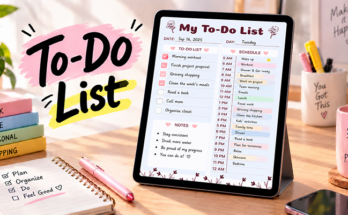
This template puts a full working day on one page. Each section has its own soft-coloured header, so you can find your way around at a glance. The left side holds your tasks, and the right side holds deadlines and communication. It is meant to be filled in a little at a time, as the day moves along.
Here is what you find on the page:
- Date: A date box in the top corner, so the page matches the day you are planning.
- To Do List: Ten checkbox lines for everything you want to get done today.
- Top Priorities: Five checkbox lines for the tasks that matter most.
- Deadlines: A box for anything that has to be finished by a set date.
- Reminders: A box for small things you do not want to forget.
- Get in Touch: Calls and Meetings, each with checkbox lines and a time column, plus an Emails list with a subject line for each.
- Notes: A large open space for anything else you want to write down.
- Follow Up: A box for what still needs a reply, a nudge, or a next step.
Because each section is small and separate, you can fill in only what matters that day and leave the rest blank.t day.
Practical Use Cases for Bullet Journal Templates
Planning looks different for everyone, and the templates in this collection follow that. Here are a few ways you might use them:
They use the Daily To-Do and Notes Planner to write down tasks, add a few goals, and tick things off as the day goes on.
They use the Daily Routine Timeline Planner to give each part of the day a time, from the first thing in the morning to the last thing at night.
They use the Weekly Priorities and Reminders Planner or the Weekly Tasks and Notes Planner to see all seven days together and spot the full days early.
They use the Weekly Habit Tracker Template to follow their habits across a full week instead of a single day.
Using Checkboxes and Sections to Stay Organised
The small parts of these templates do more than fill the page. Each one helps you notice a different part of your day.
☑️ Checkbox: Close Every Task
Use it as: A clear yes-or-no marker for each task.
How to apply: Tick the box as soon as a task is done.
Why it works: A tick gives a quick sense of progress, so the list shrinks in a way you can see.
Example: Seeing six of ten boxes ticked by lunch shows the day is on track.
⭐ Top Priorities: Decide What Matters First
Use it as: A short list of the tasks that cannot wait.
How to apply: Write your most important tasks here before filling in the longer to-do list.
Why it works: A short list keeps the important tasks from getting buried under smaller ones.
Example: Writing “send the proposal” here makes it the first thing to finish.
🕒 Time Column: Give Calls and Meetings a Place in the Day
Use it as: A note of when each call or meeting happens.
How to apply: Write the name or topic on the line and the time beside it.
Why it works: Seeing times next to each other makes it easier to spot gaps and overlaps.
Example: Two meetings close together are a prompt to leave a few minutes in between.
🔁 Follow Up: Keep Loose Ends From Slipping
Use it as: A holding space for anything waiting on a next step.
How to apply: Jot down who or what needs a follow-up as soon as it comes up.
Why it works: Writing it down frees you from remembering it and gives you a list to check the next day.
Example: “Reply to the client about Friday’s date” is easier to act on when it is in one place.
Tips to Get the Most Out of Bullet Journal Templates
A few small habits help you get more from these templates:
- Start with one template. Pick the one that matches what you need most right now, instead of trying every layout at once.
- Fill in a little, often. A few minutes in the morning and a few in the evening work better than one long session.
- Set priorities first. Filling in your priorities before the longer to-do list keeps the important tasks visible.
- Be kind about unfinished tasks. An unticked box is not a failure. Move it to tomorrow and carry on.
- Look back at the week. A quick look at what got done and what kept moving shows what to change.
Benefits of Using Bullet Journal Templates
These templates give planning a ready-made place on the page, in ways that fit different days:
- No blank-page start. The layout is already built, so you can begin with the first task.
- Everything in one place. Tasks, goals, notes, and habits sit together instead of being scattered across different notebooks and apps.
- Daily and weekly plans do not compete. Each has its own layout, so neither has to fight for the same page.
- Layouts match the task. A simple list, a full week, or a habit tracker: the format fits the plan, not the other way around.
- Nothing slips through. Reminders, deadlines, and follow-up sections catch the things that usually fall between days.
Step-by-Step Guide to Using Bullet Journal Templates
Follow these steps to fill in any bullet journal template, from start to finish:
Open Our PlanWiz Planner App
Open our app on your phone so you can fill in your planner anytime, anywhere.
Find the Template
Go to the bullet journal template collection and pick the layout that fits what you need to plan.
Set the Date
Fill in the date or the week, so the page matches the day you are planning for.
Fill In Your Plans
Write your tasks, priorities, goals, or notes, depending on the template you picked.
Track as You Go
Tick off tasks, add reminders, and note calls, meetings, or habits as the day moves along.
Look Back and Adjust
At the end of the day or week, read through your page and choose what to carry forward.
Best Bullet Journal Templates
A bullet journal does not have to start from a blank page, and it does not have to look the same every day either. These templates were built around the different ways planning actually happens: some days call for a simple list, others for a full week laid out at once, and some for tracking habits over time. Each one takes a different shape, so the layout can match the task instead of the task being forced into one fixed format.

Daily Goals and Tasks Planner
A daily layout with a goals section above a two-column things-to-do list, with notes underneath, so the day’s plan and the bigger picture sit on the same page. The two-column format makes it easy to split tasks by type, whether that’s work versus personal, or morning versus afternoon.

Daily To-Do and Ideas Planner
A daily layout split into four panels: a to-do list, notes, a list of important items, and a space for new ideas. Keeping the important items and the new ideas on their own lists stops them from getting lost among everyday tasks.

Needs vs Wants Template
A two-column page with Needs on one side and Wants on the other, set on a dotted background. Writing both lists side by side makes it easier to see what truly comes first before making a plan or a decision.

Daily Priorities and Meals Planner
A daily layout that pairs a priorities list with a mood check-in and a breakfast, lunch, and dinner section, covering both tasks and everyday routines. It’s a template that treats the practical side of a day and the personal side of it as equally worth tracking.

Daily Task Planner
A daily layout with an ideas section at the top, followed by a to-do list, goals, a “What’s Next?” list, and notes. The “What’s Next?” list gives tomorrow’s tasks a place to wait, so they are ready when the day begins.

Daily Routine Timeline Planner
A daily layout built around a vertical timeline, with a column of boxes and times running from morning to night. It suits anyone who plans the day by the clock and wants to see how the hours fit together.

Daily To-Do and Notes Planner
A daily layout with a to-do list, a goals section, and a notes space, so daily tasks and bigger goals both have a place without competing for room. It works well for anyone who wants one page to hold both the small, immediate tasks and the bigger picture they’re working toward.

Weekly Priorities and Reminders Planner
A weekly layout with each day of the week alongside priorities, reminders, and a look ahead to next week, so nothing gets lost between one week and the next. The reminder section in particular helps catch things that would otherwise slip through the gap between Sunday night and Monday morning.

Weekly Log Template
A weekly layout with a colour-coded strip for each day of the week, from Monday to Sunday, and open dotted space beside it. The open space lets you write and sketch the week in your own way.

Weekly Habit Tracker Template
A weekly layout with each weekday and space for notes, plus a priority list, a checklist, and a habit tracker running across the whole week. Habits are easier to notice over seven days than one, and this template is built around that longer view.

Weekly Task Planner
A weekly layout with each day of the week in its own colour-coded band, plus a to-do list, a notes section, and a goal for next week. The colours make each day easy to find, and the next-week goal gives the coming week a starting point.

Weekly Tasks and Notes Planner
A weekly layout with Monday through Sunday in their own blocks, with notes and a to-do list running alongside, so the whole week is visible at once. Seeing every day laid out side by side makes it easier to notice which days are already full before adding anything new to them.
Plan Your Way
These templates come in daily and weekly formats, giving you options based on what you want to plan and organise, rather than forcing every kind of planning into the same box.
- A simple daily list for tasks, goals, and notes
- Weekly layouts with priorities, reminders, and a look ahead
- Every day of the week laid out in its own space
- Goals and daily tasks sharing the same page
- Priorities tracked alongside mood and meals
- A daily routine planned by the clock
- Needs and wants sorted side by side
- A weekly habit tracker for patterns over time
Whether the goal is a clear daily list, a full week laid out at a glance, or a place to track habits over time, there’s a layout built for it. Choose a ready-to-use template based on what needs planning, and keep everything organised in one app instead of switching between notebooks, apps, and loose pages. Build a self-care routine around her own life, instead of someone else’s idea of what it should look like.
Frequently Asked Questions
The collection includes daily and weekly layouts with to-do lists, goals, priorities, reminders, notes, mood and meal tracking, a daily routine timeline, a needs and wants comparison, and a weekly habit tracker.
They are made for anyone who wants a simple, ready-made place to plan their tasks, goals, and habits, whether they are new to bullet journaling or already have a system.
Yes. Many people use a daily template for today and a weekly one to see the pattern across the week.
Start with the Bullet Journal with To-Do List and Reminders. It covers tasks, priorities, deadlines, calls, meetings, and follow-ups, and you can add other templates later.
Yes. The Weekly Habit Tracker Template has a habit tracker that runs across the whole week, so you can see your pattern over seven days.