
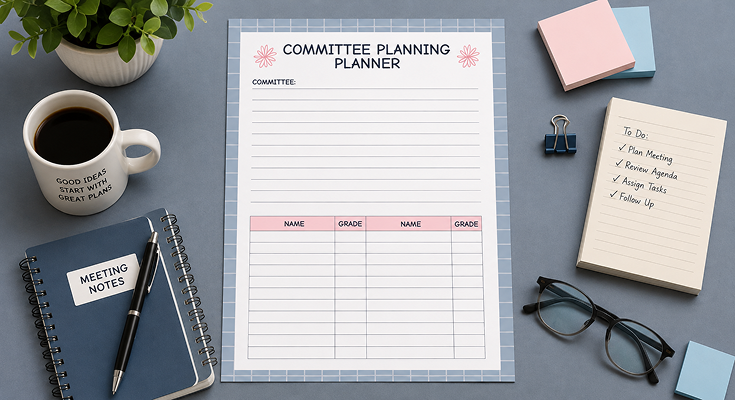
Holding organizing committee meetings without an committee meeting planner means nothing but missed action points, confusion about decisions, and time wastage for all parties involved. There’s going to be a tool that teaches you how to make laser-beam agendas, how to organize member contributions accurately, and how to make sure all your meetings have actual progress made toward your objectives with its help. Whether you are dealing with managing your non-for-profit boards, school boards, steering, or any other organizational structure, the printable template helps you stay organized.
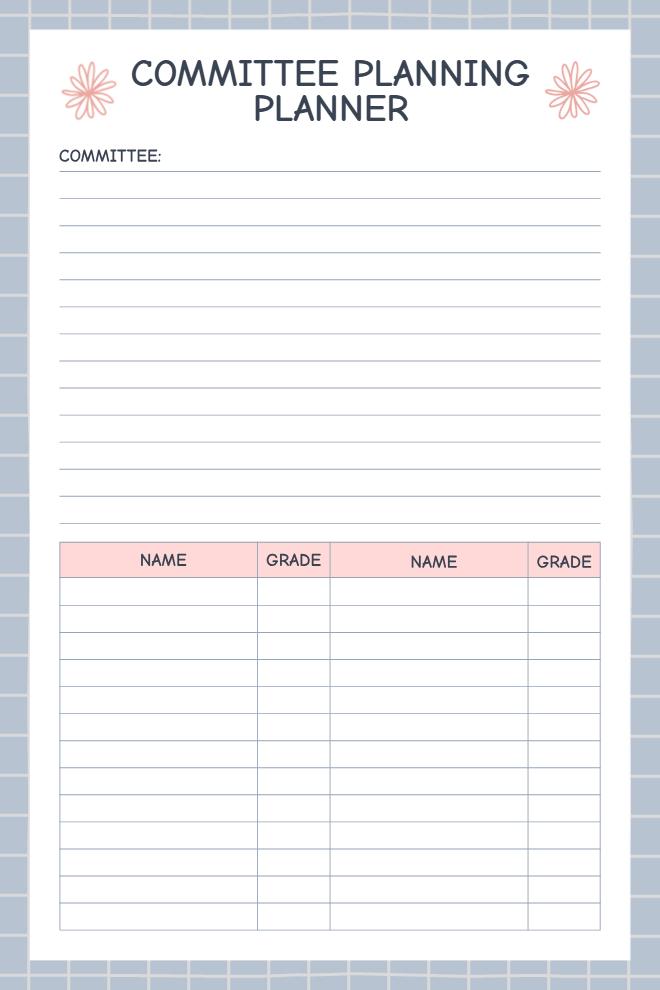
Planners exist on platforms such as Planwiz, which come in digital as well as printable formats according to your needs. The template includes essential sections for committee details, comprehensive agenda items, member names with grading or contribution tracking columns, and dedicated space for notes and follow-ups. What makes this tool particularly valuable is its dual functionality; it works as both a preparation framework before meetings begin and a documentation system during actual sessions
What is a Committee Meeting Planner?
A Committee Meeting Planner is an organized template that has been specifically created for formal group sessions which involve decision-making and accountability tracking. Unlike generic meeting notes or task lists, this template has been designed to combine session planning, participation tracking, and outcome tracking in a single complete structure that encompasses several sections that include committee information, session activities and time allocations, participation tracking, and tracking of votes and assignments.
This management method connects the dots between the preparation of meetings and the implementation phase by functioning as a tool with a dual application throughout the whole process of the meeting. Just as the discussion topic guide helps manage the issues for discussion, the committee planner integrates levels of accountability with the tracking of the committee’s members. When discussing the use of the meeting agenda templates in the context of actual meetings, this method serves as an application for the real-time documentation of decisions and assigning the holder of the responsibility with the deadline.
How to Run Effective Committee Meetings in 7 Steps?
When handling committee meetings using a committee meeting planner without structure, it results in wasted time as well as ambiguous results. Successful committees that work according to proven structures ensure that members remain on track. A committee meetings planner helps to organize chaotic meetings into productive ones.
1. Set Clear Objectives Before Each Meeting
Specify what your results will be that you want to accomplish before committee meetings. You can categorize each item on your committee agendas as requiring a decision, needing input, or informational only. These goals should be explicitly stated in your committee work plan. When all parties are aware of the purpose of the meeting, there will be no tangent discussions.
2. Distribute the Planner 48 Hours in Advance
Send your final committee meeting template form to all committee members at least two days prior to the meeting. This will allow the committee members some time to review items discussed in the planner. Early distribution ensures that members contribute effectively as they have enough time to reflect on intricate matters.
Include any supporting materials like reports or budgets referenced in the agenda. For tracking financial discussions, pair your committee planner with budget planner templates to maintain clear spending oversight
3. Start on Time and Follow Your Agenda
Start promptly to set the expectation for punctuality as a committee norm. Address agenda items in order, spending a designated amount of time on each topic. Use the planner as a visual anchor during discussions. When conversations drift off-topic, refer back to the committee meeting schedule to refocus attention and maintain momentum.
4. Document Decisions and Action Items in Real-Time
Have one individual capture all the decisions made, votes taken, and action items entered directly into the planner during the course of the meeting. This will eliminate the usual difficulty of decision confusion and forgetting who volunteered for what.
Note specific deadlines and owners for each action item. The committee meeting template becomes your official record that members can reference when questions arise about responsibilities. Consider using to-do planner templates alongside your meeting planner to help members track their individual action items between sessions.
5. Use the Member Tracking Section Strategically
Record attendance, voting patterns, or participation levels in the tracking table. This data helps identify engagement trends and ensures fair distribution of responsibilities across all members.
Track contributions consistently across meetings for meaningful insights. The grading section of your committee meeting schedule provides objective records for performance reviews or committee restructuring decisions.
6. Follow Up Within 24 Hours
A copy of the filled-out planner is to be distributed to the whole group of people attending within one business day. This is to ensure that the decisions are still fresh and the execution of the planned activities is immediate.
Store each meeting planner as an archive within your organization’s records. This is helpful during times of audit, transitions, or strategic review. Those that handle multiple committees can organize using business planner templates.
7. Review Previous Planners at Each Meeting
Begin your meeting by reviewing the previous meeting’s action items by the previous meeting’s planner for the previous committee meeting. You are accountable, and the documentation piece can never be overstated.
Finished items should be acknowledged as such. Delayed matters should be dealt with through specific action plans. This helps create a follow-through culture which will make your committee much more effective.
Frequently Asked Questions
A meeting planning organizer for committees is an organized document that puts all the necessary components of the meeting into one document. This will include areas for meeting information, topics, tracking, and decision-making.
This tool is useful in helping convert disorganized conversations into productive meetings that have clear-cut agendas. Be it school board, nonprofit organization, or even business steering meetings, this tool is useful in keeping all the required elements in line.
The planner acts, therefore, as an aid before the interactions happen, in addition to being an aid for future reference. Its benefit, as mentioned, is to provide continuity especially when the sessions are held on different days, hence avoiding typical challenges such as forgetfulness on who decided on this or who was assigned task.
The biggest advantage offered by the committee meeting planner is the considerable amount of time saved on preparation, thanks to the templates provided. This eliminates the task of preparing the document for the meeting every time.
This enhances the efficiency of the meeting where all the discussions are focused on the previously agreed matters that require attention under the agreed items in the agenda.
The organized approach ensures that nothing remains unchecked, with all decisions captured for reference and adherence by the organization.
Start using the meeting planner for the committee meeting when preparing for your next meeting, one week ahead of time if possible. There will be time enough to collect your agenda items, then distribute it to all of the members.
It is especially useful when your committee is dealing with universal issues like unresolved action items and decision results. The organizer establishes a level of accountability by maintaining a consistent level of documentation documentation.
Insert topical discussion items, giving enough detail for members to be able to anticipate the issues to be discussed. Add approximate time allocations and indicate who will lead each discussion.
Mark each item with a decision or information only label. Great agenda items are precise and focus on actions, rather than such general headings as “updates” or “miscellaneous business” that may give rise to unproductive discussions.
Yes, the meeting planning tool for the committee meeting works well with both types of meetings. To use it for physical meetings, you can print the copies for everyone and use it as a guideline for the discussions throughout the meeting.
For virtual meetings, the online version can be filled out, which will be screen shared during the video conference. Many committee groups leave the planner open where all members can see it in a shared document.
Adjust the grading criteria to match your committee’s specific needs and tracking requirements. School committees might track student grades, while nonprofit boards might record voting patterns or donation commitments.
Add organization-specific sections like budget reviews, compliance checkpoints, or strategic goal progress tracking. The digital format allows you to insert your organization’s logo, add color coding, or expand the member tracking table for larger committees.
Consider creating different versions for different meeting types within your organization. Executive sessions may need privacy notice indicators, while public committee meetings may require areas for public comments and other issues related to the recording of the notice as a public record.
In formal corporate or board meetings, you may also consider utilizing conference agenda templates for larger events with multiple conferences.
For basic edits, PDFs work quite well in editors like Adobe Acrobat, Foxit, or free options such as PDF-XChange Editor. These tools will let you fill in text fields, select checkboxes, and then save a completed version.
For heavy editing, download the template in Microsoft Word or Google Docs format. Canva and PowerPoint users will be able to edit using those applications too-for even more robust design controls and a way to make fully customized iterations.
For teachers leading classroom committees, more organizational resources are available in the teacher planner templates collection.
Start with header fields for basic meeting information including committee name, date, time, and location. Add a large section with lines or rows for detailed agenda items and time allocations.
Create a table to track member participation, attendance, or voting records as needed. Leave substantial blank space for notes, action items, and decision documentation that will be filled during the actual meeting session.
Test your custom committee meeting planner with an actual meeting before finalizing the layout. Gather feedback from members about what sections are most useful and which need expansion or simplification for regular use.
The biggest mistake is filling out the meeting planner too vaguely without specific details or clear action items. Many users also forget to distribute it to members before the meeting, which defeats its preparation purpose.
A further common mistake that you can note can be the lack of proper archival of finished planners for future use as a reference.
Treating the process as a mere formality, as opposed to a useful working document, would negate the purpose that a decision book actually serves as a means of accountability for decisions made by the organization as a whole.
Make the committee meeting planner a mandatory part of your meeting process from the start. Request that members submit agenda items in advance using the format, and refuse to add last-minute topics without proper documentation.
Regularly demonstrate the planner’s value by referencing previous versions to track progress on initiatives. When members see decisions and commitments documented clearly, they naturally become more engaged with the planning process and accountable for assigned tasks.






