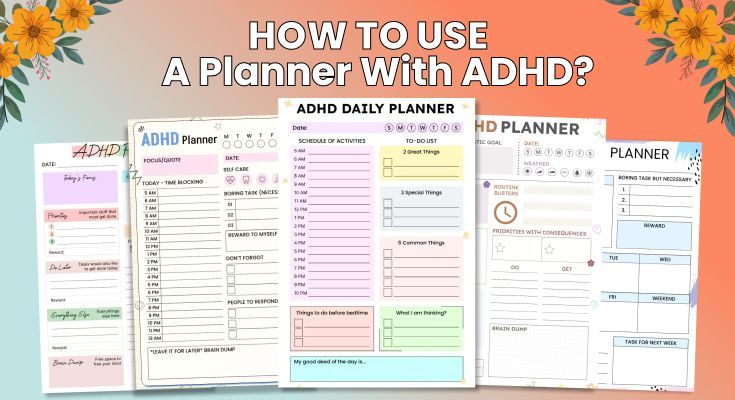
If you’ve bought planners with good intentions only to abandon them by week two, you’re not alone. Learning how to use a planner with ADHD isn’t about willpower; it’s about building a system that works with your brain. Many people with ADHD struggle with time blindness, executive function issues, and mental overload, which makes traditional planners hard to stick to. But when your system is simple, flexible, and reminder-based, planning becomes far more manageable and even transformative.
This guide will walk you through a clear 6-step method for choosing the right planner, setting it up effectively, and building habits that take less than 10 minutes a day. Whether you’ve struggled with planners before or you’re starting fresh, this approach is made for the way ADHD brains work.
How to Use a Planner with ADHD to Simplify Your Life?
To use a planner effectively with ADHD, you need to work with your brain’s wiring, not against it. The essential approach involves five key steps that account for executive function challenges:
1. Pick One Planner System (Digital or Paper)
Select one planner system based on your specific ADHD challenges. Choose digital if you frequently lose physical items or need automatic reminders. Choose paper if screens distract you or if you learn better through writing by hand.
Don’t overthink this decision. The best planner is the one you’ll actually open. Digital planners excel at sending notifications and syncing across devices. Paper planners provide tactile engagement and eliminate screen distractions. Many ADHD adults use both digital tools for appointments and reminders, and paper for daily task focus.
The key rule: Commit to one system for at least 30 days before switching. Constantly changing systems prevent any method from working.
2. Start with Just 3 Daily Tasks
Track only 3 daily priorities initially, not a detailed hourly schedule. ADHD brains get overwhelmed by complexity, so begin with the bare minimum that provides value.
Your planner should have just three sections:
- Today’s top 3 tasks
- Time blocks for appointments
- Brain dump space for random thoughts
That’s it. Resist the urge to track habits, meals, water intake, moods, and 47 other metrics. When you track everything, you track nothing. It becomes overwhelming, and you quit. You can always add more later, but starting simple prevents abandonment.
3. Set Up Automatic Reminders
Set automatic reminders, create visual placement cues, and use alarms. Never rely on memory alone; working memory deficits make internal organization nearly impossible for ADHD brains.
Set up these external supports:
- Phone alarms for morning planning (same time daily)
- Reminders 15 minutes before appointments
- Alarms for task transitions
- Visual cue: leave your planner on your pillow at night so you see it first thing
- Sticky note on your laptop: “Check planner”
Your brain isn’t broken; it just needs external scaffolding. These reminders compensate for working memory challenges. There’s zero shame in needing them.
4. Plan at the Same Time Every Day
Plan at the same time daily, attaching this habit to something you already do consistently (like your morning coffee). Consistency comes from external scaffolding, not willpower.
Create planning anchors:
- Morning: Coffee → Check planner → Pick top 3 tasks → Start timer (5 minutes total)
- Evening: Dinner → Brain dump tomorrow’s thoughts → Set tomorrow’s priorities (3 minutes total)
Habit stacking works because you’re not creating a new routine from scratch. You’re attaching planning to an existing habit your brain already does automatically. This removes decision-making and willpower from the equation.
5. Permit Yourself to Be Imperfect
Missing days are normal. The goal is to use your planner 60-70% of the time, not 100%. Perfectionism is the enemy of progress with ADHD.
You will skip days, forget to plan, abandon your planner for a week during a stressful period. This doesn’t mean failure; it means you’re human with ADHD. The difference between success and failure isn’t perfection; it’s whether you return to the system after gaps.
When you miss days, just open your planner again and start fresh. No guilt spiral. No starting over. Just pick up where you left off.
6. Customize Your System to Fit Your Brain
After 2-3 weeks of using your basic planner setup, start making small customizations based on what’s working and what isn’t. Your planner should adapt to your unique ADHD challenges, not force you into someone else’s system.
Color coding that makes sense to you:
- Use colors that feel intuitive (not what productivity gurus recommend)
- Keep it simple: 3-4 colors maximum
- Consistent meaning: blue = appointments, green = personal, red = urgent
Layout adjustments:
- Need more writing space? Choose wider templates
- Overwhelmed by hourly blocks? Switch to morning/afternoon/evening sections
- Love checklists? Add more checkbox space.
Tracking what matters to YOU:
- Only track habits that directly impact your ADHD management
- Skip tracking systems that create guilt (like water intake if you always forget)
- Add sections for things you actually reference (medication log, energy levels)
Flexibility features:
- Use sticky notes for tasks that move frequently
- Create a “flexible tasks” section for items without fixed deadlines
- Design different page layouts for high-energy vs. low-energy days
The customization rule: Change one thing at a time. Try it for a week. Keep what helps, remove what doesn’t. Your planner should evolve with you, not stay rigid.
Success markers within 2-4 weeks:
- You’re checking your planner 1-2 times daily
- You’re completing 2 of 3 priorities most days
- The system feels sustainable rather than burdensome
- Planning takes under 10 minutes per day
- You feel less overwhelmed about tasks
If you’re hitting even half of these markers, you’re succeeding. Progress, not perfection.
Digital vs. Paper: Which Planner Works Best for Your ADHD Brain?
The digital-versus-paper debate matters more for ADHD brains than neurotypical ones. The wrong choice creates friction that will derail your system.
Many ADHD users rely on digital planners because they provide notifications, automation, and visual reminders. If you’d like to discover apps that offer those features and can truly support your executive function challenges, explore this detailed comparison: best ADHD planner apps blog.
Quick Decision Framework
To make the choice easier, use this simple decision guide designed specifically for ADHD challenges. It helps you quickly identify which planning system matches your habits, energy levels, and daily routines. Review the points below and see which side feels more natural to your brain.
Choose DIGITAL if you:
- Frequently lose physical items (keys, wallet, papers)
- Need constant reminders and notifications to stay on track
- Have a schedule that changes frequently throughout the day
- Already carry your phone everywhere
- Find satisfaction in checking off digital tasks
- Need to share calendars with family or coworkers
Choose PAPER if you:
- Get distracted by phone notifications and fall into social media
- Learn better through the physical act of writing by hand
- Need the tactile satisfaction of physically checking boxes
- Want something visible on your desk or workspace
- Find screens contribute to mental fatigue
- Enjoy the creative aspect of pen and paper
There’s no wrong choice, only what works for YOUR brain. Many people eventually use a hybrid approach, but start with ONE system to build the habit.
What are the Top Recommendations for the ADHD Planner?
After reviewing dozens of planning systems with ADHD adults, only a few consistently improved focus, reduced overwhelm, and increased follow-through. These tools work because they address real ADHD challenges like time blindness, task paralysis, and decision fatigue. Below are the top recommendations based on what actually helps ADHD brains stay organized.
Digital ADHD-Specific Planners
1. Tiimo (Visual Schedule App)
- Price: $9.99/month or $49.99/year
- Best for: Severe time blindness and visual learners
- Key features: Color-coded time blocks, visual timers, focus mode, and can be used offline
- Why it works for ADHD: The visual, color-based interface helps you “see” time passing. Built-in timers and notifications reduce reliance on working memory.
2. Goblin Tools (Task Management Suite)
- Price: Free with optional $5/month premium
- Best for: Task paralysis and breaking down overwhelming projects
- Key features: “Magic ToDo” breaks tasks into subtasks automatically, a tone checker, countdown timer
- Why it works for ADHD: Automates the hardest part, figuring out how to break projects into steps. Removes the executive function barrier of task analysis.
3. Google Calendar + Google Tasks
- Price: Free
- Best for: Simple, reliable system for beginners
- Key features: Syncs across devices, integrates with Gmail, voice input available, shareable
- Why it works for ADHD: Low barrier to entry, already on your phone, simple interface with minimal setup required. Notifications are reliable and customizable.
4. PlanWiz (Template-Based ADHD Planner)
- Price: Free + premium($47.99/lifetime)
- Best for: ADHD users who want visual and structured planner templates
- Key features: Ready-made to-do list templates, ADHD-friendly planner layouts, habit tracking, reflections, weekly & monthly planner, reminders, progress tracking
- Why it works for ADHD: PlanWiz offers ADHD planner templates that reduce decision fatigue and make planning simple. Instead of creating your own layout every day, you just select a template and start writing.
Learn more about how ADHD-friendly planner apps improve mental clarity:
Why an ADHD-Friendly Daily Planner App Is a Game-Changer for Mental Clarity
Paper ADHD-Friendly Planners
5. Planner Pad (Funnel System Planner)
- Price: $39-$52, depending on size
- Best for: Chronic over-schedulers who put too much on their plates
- Key features: Unique funnel system: monthly → weekly → daily priorities
- Why it works for ADHD: Forces prioritization through its visual structure. You can’t overschedule because there’s limited daily space. Reduces decision fatigue.
6. Bullet Journal Method (Any Notebook)
- Price: $5-$20 for a notebook
- Best for: Creative types who need customization and flexibility
- Key features: Completely customizable, rapid logging system, simple symbols
- Why it works for ADHD: Flexibility means you can adapt when rigid systems fail. The act of creating spreads provides dopamine. No guilt about unused pre-printed pages.
7. Academic Planner (Simplified or Blue Sky)
- Price: $25-$58
- Best for: Students with ADHD or structured schedules
- Key features: Vertical hourly layout, assignment tracking, academic year dates
- Why it works for ADHD: Visual hourly blocks help with time blindness. Academic structure matches school semester needs. Specific spaces reduce decision-making about where to write things.
How Can You Set Up a 4-Week ADHD Planner System?
This system has been tested with dozens of ADHD adults. It works because it builds gradually, starting absurdly simple and adding complexity only after habits form.
Week 1: The Bare Minimum Start
Your only goal this week: Open your planner once per day. That’s it.
Initial Setup (Days 1–2)
- Set up ONLY two things: A calendar section and a single master task list
- Don’t add color coding, habit trackers, meal planning, or anything else
- If using digital: Turn on notifications. If using paper: Buy a binder clip to mark the current page
- Write down everything currently floating in your head onto the master task list (don’t prioritize yet)
Choosing Your Planning Time (Days 3–4)
- Pick ONE specific time to check your planner daily
- Morning planning (7-9 AM) works for 70% of ADHD adults because executive function is typically stronger early in the day
- Attach this to an existing habit: “While I’m drinking my first cup of coffee” or “Right after I brush my teeth”
- Set a recurring alarm for this time
Creating Physical Reminders (Days 5–7)
- Set up three types of reminders (redundancy is critical for ADHD):
- Phone alarm at your chosen planning time
- Physical placement: Put your planner on your pillow the night before, next to the coffee maker, or block your laptop keyboard
- Visual cue: Post-it note on your bathroom mirror that says “Check planner”
Week 1 Success = Opening your planner 5 out of 7 days. If you hit this, you’re ready for Week 2.
Week 2: Adding the Rule of 3
The Rule of 3: Each day, identify only 3 “Must-Do” tasks. Not 10. Not 5. Three.
Why this works: ADHD brains overestimate what’s possible in a day. Three tasks are realistic and achievable, building momentum instead of constant failure.
Morning Planning Routine (5 minutes):
- Look at your master task list
- Look at your calendar for today’s appointments
- Choose 3 things that MUST happen today
- Write them in your planner for today
- Close the planner
During the Day:
- Check your planner whenever you finish a task or feel lost about what to do next
- Check off completed tasks (this provides crucial dopamine)
- If new tasks arise, add them to your master list, NOT today’s to-do list
Brain Dump Practice:
- When random thoughts or tasks pop into your head, immediately write them in your master list
- Don’t try to remember them for later, your working memory can’t handle it
- Keep your planner accessible or use your phone’s voice-to-text for quick capture
Week 2 Success = Using the Rule of 3 at least 4 out of 7 days.
Week 3-4: Building Reliability and Adding Time Awareness
Time Estimation Practice: This builds “known time,” a library of how long tasks actually take versus what your brain predicts.
- Before starting each Must-Do task, estimate how long it will take
- Write this estimate in your planner
- When you finish, write how long it actually took
- Over time, you’ll recognize patterns: “I always underestimate email by 2x” or “Grocery shopping reliably takes 45 minutes”
Introducing Time Blocking: Instead of rigid hourly scheduling (which creates anxiety and fails when one thing goes wrong), use 2-3 hour blocks:
- Morning Block (9 AM – 12 PM): Deep work or most important task
- Afternoon Block (1 PM – 4 PM): Meetings, collaborative work, admin tasks
- Evening Block (7 PM – 9 PM): Personal tasks, meal prep, planning tomorrow
Within each block, you have flexibility. The structure prevents time blindness without creating rigidity.
Weekly Review (Sunday Afternoons): Spend 15 minutes:
- Review what got done this week (celebrate wins, even small ones)
- Move uncompleted tasks to next week or delete them
- Look at next week’s calendar and identify potential challenges
- Plan your 3 Must-Dos for Monday
Adding Accountability:
- Find an accountability partner (friend with ADHD, partner, or coach)
- Text them each morning with your 3 Must-Dos
- Check in at the end of the day or the end of the week
- Even a simple “Did you check your planner today?” text creates external structure.
Week 3-4 Success = Planning happens 5+ days per week, and the routine is starting to feel automatic.
Frequently Asked Questions
Choose digital if you: lose physical items frequently, need automatic reminders, have a schedule that changes throughout the day, or are comfortable with technology. Choose paper if you: get distracted by phone notifications, learn better through writing by hand, need tactile satisfaction from checking boxes, or want something visible on your desk. Both can work; the key is matching the format to your specific ADHD challenges.
At minimum, check twice daily: morning (to review today’s priorities) and evening (to plan tomorrow). Set automatic reminders for both times until it becomes a habit, which typically takes 3-4 weeks for ADHD adults, longer than the traditional 21-day myth. Many people find benefit in checking their planner 3-4 times throughout the day, especially when transitioning between tasks or feeling lost about what to do next.
Most ADHD adults find morning planning most effective, ideally within 30 minutes of waking, when executive function is typically stronger. The sweet spot is often while drinking your first cup of coffee or right after a morning shower, attaching planning to an existing pleasurable habit provides structure and dopamine. Avoid planning during your afternoon energy crash when decision-making feels impossible.
Proceed with extreme caution; multiple systems usually create confusion and a maintenance burden rather than improved organization. If necessary, designate crystal-clear purposes: a digital calendar only for time-specific appointments, a paper planner only for daily tasks and projects. Most ADHD adults find that one simple, well-maintained system beats multiple complex ones. Complexity is the enemy of ADHD success.
Conclusion
A planner can become a powerful tool for managing ADHD when it’s built around simplicity, routine, and self-awareness. The goal isn’t to create a perfect system; it’s to create one that actually supports your daily life.
When you remove pressure, rely on external reminders, and give yourself room to adapt, planning becomes easier, more consistent, and far less overwhelming.
Key takeaways to remember:
- Start simple: Focus on one planner and just 3 daily priorities.
- Use external reminders: Alarms, notifications, and visual cues reduce reliance on memory.
- Consistency beats perfection: Using your planner most days is enough to see progress.
- Plan at the same time each day: Habit stacking makes planning automatic and effortless.
- Customize slowly: Change one thing at a time until your system fits your ADHD needs.
- Expect imperfect days: Skipped pages or messy weeks are normal, just pick up where you left off.
- Choose tools that work for your brain: Whether digital or paper, the best planner is the one you’ll actually use.
With the right structure and a compassionate approach, your planner can help you stay organized, reduce stress, and create more stability and focus in your everyday routines.
For a simple and effective start, first try PlanWiz. It’s easy to use and comes with ready-made ADHD planner templates that reduce decision fatigue.