
Take control of your gardening with our easy-to-use garden planner template, crafted to simplify how you organize your plants, tasks, and goals. Whether you’re planning a flower garden or tracking weekly chores, a weekly garden planner template keeps your garden thriving and well-managed.
Using PlanWiz’s powerful weekly schedule maker, you can effortlessly plan watering, pruning, and planting, ensuring nothing slips through the cracks. Let’s discover how our free printable garden planner templates empower gardeners to stay organized, focused, and inspired throughout every season.
What Features Enhance a Weekly Garden Planner Template?
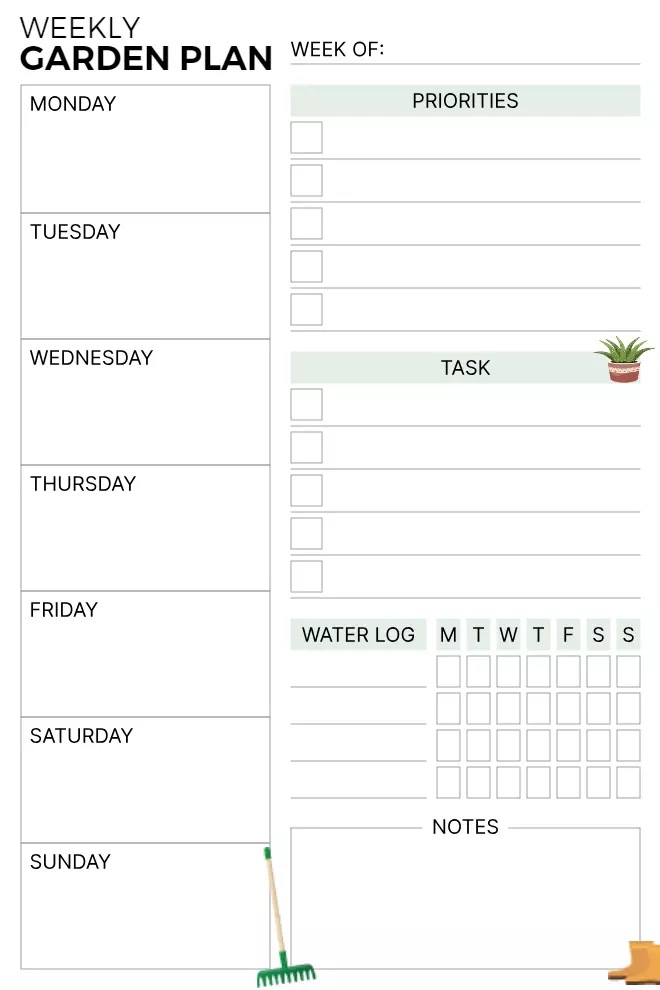
This minimalist weekly garden planner template has essential features catering to gardeners of all levels. It provides a structured layout to plan daily activities while keeping track of plant care needs. Let’s explore the features that make it a must-have:
Weekly Planning Sections
- A well-organized column for each day of the week.
- Allows gardeners to schedule watering, fertilizing, pruning, and harvesting.
- Customizable spaces for additional notes or reminders.
Priorities Checklist
- A dedicated area to list high-priority gardening tasks.
- Helps maintain focus on important seasonal activities.
- Ideal for noting urgent plant care needs like pest control or repotting.
Task Management Section
- A checklist format to track progress efficiently.
- Users can mark completed tasks, ensuring nothing gets overlooked.
- Great for planning weekly sowing, weeding, and mulching schedules.
Watering Log Tracker
- A simple yet effective tool to monitor plant hydration.
- Includes a daily log for tracking watering frequency.
- Prevents over- or underwatering, essential for plant health.
Notes Section for Customization
- A blank space to add gardening insights, observations, and goals.
- Ideal for jotting down new plant varieties, weather changes, and soil conditions.
- Enables gardeners to document seasonal trends for future reference.
Which Gentle Visuals Fit in This Garden Planner Template?
The minimalist weekly garden planner features gentle visuals that enhance both function and style. With soft green tones, plant icons, clean typography, and intuitive checkboxes, it ensures a clutter-free experience. By applying how to plan your week like a pro, users can organize tasks efficiently, making gardening effortless and enjoyable in a well-structured layout.
Soft Green Tones Reflecting Nature
Soft green and pastel hues create a soothing, nature-inspired ambiance that enhances readability. These colors blend seamlessly with the planner’s minimalist aesthetic, offering a calm and inviting feel. By evoking the serenity of gardens, this color scheme ensures focus, making it easier for users to track tasks, plan schedules, and stay motivated.
Plant-Themed Icons for a Personal Touch
Subtle plant icons, watering cans, and gardening tools enhance the planner’s theme. These illustrations guide users, separating sections without cluttering the layout. With smart planner organization ideas for daily garden planning, users can structure tasks efficiently while maintaining a visually appealing design. Potted plants and natural elements add charm, keeping gardening spaces engaging and organized.
Clean and Minimalist Font Style
A modern, simple font maintains readability while preserving the planner’s minimalist design. The typography harmonizes with the soft colors and structured sections, ensuring a clean, clutter-free layout. This approach enhances usability, making it easier to scan, write, and organize tasks, allowing users to focus on their gardening plans without visual distractions.
Checkboxes for Task Completion
Neatly aligned checkboxes provide an intuitive way to track tasks and mark completed goals. These elements boost efficiency and keep users on track with gardening. By integrating checkboxes seamlessly into the planner’s structured layout, it maintains both aesthetic appeal and functionality. With effective task prioritization for gardening routines, users can tackle high-impact tasks first for steady progress.
How Can You Modernize With This Garden Planner Template?
While this planner already embodies simplicity and efficiency, modernizing its usage can elevate its effectiveness. Here are some innovative ways to integrate it into a contemporary gardening routine:
Use Digital Apps for Hybrid Planning
- Scan and upload the planner into the best note-taking apps, like PlanWiz or Notion.
- Combine digital tracking with traditional handwritten notes for efficiency.
- Set reminders for critical tasks like fertilization or pest control.
Laminate for Reusability
- Print and laminate the planner for eco-friendly, long-term use.
- Use dry-erase markers to update tasks weekly.
- Reduces paper waste and maintains a sustainable approach to garden planning.
Integrate with a Smart Gardening System
- Sync watering schedules with smart irrigation apps.
- Record plant growth data alongside weekly tasks.
- Utilize digital plant identification tools for better care management.
Customize for Seasonal Adjustments
- Modify the planner according to seasonal planting cycles.
- Add sections for seed starting schedules in spring or bulb planting in fall.
- Personalize based on climate, plant types, and personal gardening goals.
How to Use Your Weekly Garden Planner in 5 Easy Steps
Excited to dive into your new garden planner? Here’s a simple, step-by-step guide to help you turn it into your ultimate gardening superpower, all in just a few focused minutes each week!
Seasonal Gardening Tips to Supercharge Your Planner
As the seasons shift, so do your garden’s unique needs, and the beauty of this planner is that it’s designed to grow and evolve right along with them. Here are some thoughtful seasonal tips to help you make the most of every page, all year long.
- Spring: Use the Task Management Section to plan seed sowing and soil prep. Note which crops need starting indoors in the Notes Section.
- Summer: Focus the Watering Log on frequent hydration during hot days. Add reminders for pest checks in the Priorities Checklist.
- Fall: Schedule bulb planting and leaf mulching in the daily columns. Jot down harvest dates to track your yields.
- Winter: Plan indoor gardening or seed catalog reviews. Use the Notes Section to sketch next year’s garden layout.
By thoughtfully tailoring your planner to the rhythms of each season, you’ll set your garden up for success and keep it thriving with vibrant health and beauty all year long!
Make It Your Own: Fun Ways to Personalize Your Planner
Think of this planner as a blank canvas just waiting to be filled with the colors, creativity, and care of your gardening dreams. With a few personal touches, you can transform it into a space that reflects your unique style and growing journey. Here are some inspiring ideas to make it truly your own:
- Add Stickers or Doodles: Pop in some plant-themed stickers or sketch your favorite flowers in the Notes Section for a fun, artistic touch.
- Color-Code Tasks: Use colored pens to highlight different tasks—like blue for watering and green for planting—to make your planner pop.
- Create Plant Profiles: Dedicate part of the Notes Section to track each plant’s needs, like sunlight or soil preferences, for quick reference.
- Include Photos: Paste small photos of your garden’s progress in the margins to create a visual diary of your growth.
- Set Long-Term Goals: Add a monthly goal section to dream big, like building a raised bed or starting a compost pile.
When you take the time to personalize your planner, it becomes so much more than just a gardening tool; it turns into a living record of your experiences, growth, and inspiration. It’s a beautiful reflection of your evolving gardening journey, season after season.
Grow Green: Eco-Friendly Tips to Pair with Your Planner
If you care deeply about nurturing your garden while also protecting the planet, your planner can be a powerful ally. By incorporating mindful, sustainable practices into your weekly planning, you’ll cultivate a garden that thrives in harmony with nature. Here are some eco-friendly ideas to get you started:
- Track Water Usage: Use the Watering Log to monitor and reduce water waste by grouping plants with similar needs.
- Plan for Composting: Schedule compost turning or organic fertilizer use in the Task Management Section to enrich your soil naturally.
- Prioritize Native Plants: Note native or drought-resistant plants in the Priorities Checklist to support local ecosystems.
- Reduce Waste: If you laminate your planner, mark it as a reusable tool in the Notes Section to track your eco-friendly efforts.
- Schedule Seed Saving: Use the daily columns to plan seed collection for next season, cutting down on store-bought seeds.
By weaving these simple yet impactful tips into your planner routine, you’re turning it into more than just a place for to-do lists; it becomes a meaningful tool for cultivating a greener, more sustainable garden that gives back to the earth with every seed you sow.
Conclusion
The minimalist weekly garden planner is more than an organizer—it’s a game-changer for gardeners. Structured layouts, stylish design, and smart features make gardening easy and enjoyable. Whether you prefer traditional note-taking or digital integration, the PlanWiz planner app adapts to your gardening needs, making it the perfect companion for achieving your green goals.
FAQs
By tracking watering, pest checks, and seasonal tasks, it helps you avoid common errors like overwatering or missing planting windows.
Definitely! Add monthly or seasonal goals, like building a raised bed, in the Notes Section and break them into weekly tasks in the daily columns.
Yes! Use the Task Management Section to separate tasks for veggies, flowers, or herbs, and color-code or label them for clarity.
Tailor it to each season—plan seed sowing in spring, watering in summer, bulb planting in fall, or indoor gardening in winter using the daily columns and Notes Section.
Schedule seed collection in the daily columns and record storage methods (e.g., in envelopes) in the Notes Section to save seeds sustainably.



