
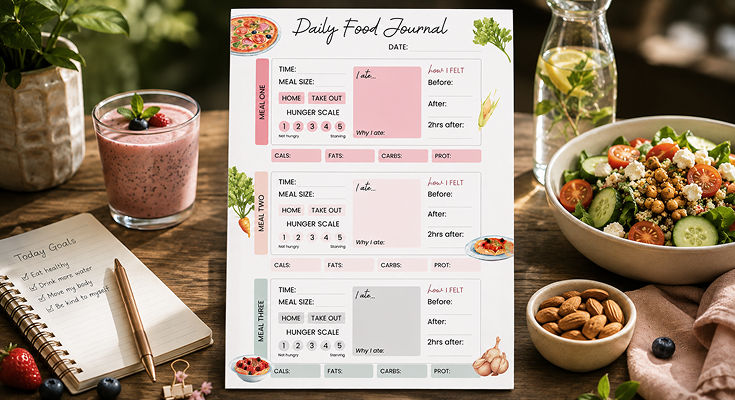
Want a simple way to stay on track with your meals and diet? A clean, easy-to-use food journal template helps you log what you eat, plan, and spot patterns in your nutrition. Whether you’re trying to eat healthier, manage weight, or just stay organized, this is the tool you need.
If you’re more into digital tracking, a daily planner app can make things even easier. You can log meals on the go, set reminders, and stay consistent without the hassle of paper. It’s a smart way to pair your food diary with your daily routine—perfect for anyone who wants to stay organized and stick to healthy habits.

With a sleek and modern design, the modern daily food journal template includes clearly defined sections for breakfast, lunch, dinner, and snacks. Subtle icons and a minimalist color scheme improve readability, making meal tracking more engaging. Its spacious layout allows for easy input, ensuring a smooth and efficient way to monitor daily food intake.
How Do Soft Pastel Colors Enhance a Modern Daily Food Journal Template?
Soft pastel colors enhance a modern daily food journal by creating a visually appealing and user-friendly experience. Unlike bold tones, pastels evoke calmness and relaxation, making meal tracking enjoyable. Their gentle hues improve readability, reduce visual clutter, and promote a positive mindset, encouraging users to consistently engage with their food journal for better dietary habits.
Benefits of soft pastel colors
- Enhanced Readability: Light and soothing tones create a gentle contrast, making text easy to read without causing eye strain, especially during extended use. This ensures that users can quickly scan their entries and track their meals effortlessly.
- Encourage Consistent Use: A visually appealing and aesthetically pleasing journal increases the likelihood of users engaging with it daily. When a food journal looks inviting, it becomes a habit-forming tool that supports long-term dietary tracking.
- Reduce Visual Clutter: Muted hues provide a clean and well-organized layout by preventing overwhelming or distracting color combinations. A structured and balanced color scheme helps users focus on their meal records without feeling overwhelmed.
- Promote a Positive Mindset: Soft pastel shades, such as tranquil blues, calming greens, and warm peach tones, have psychological effects that encourage mindfulness and relaxation. This makes the journaling process feel less like a chore and more like an enjoyable self-care activity.
By incorporating soft pastel colors, the modern daily food journal not only looks stylish and elegant but also offers a welcoming and stress-free experience. Its minimalist and refined aesthetic ensures that users stay motivated while maintaining a well-organized approach to meal planning and dietary awareness.
How Does the Hunger Level Scale Help This Food Journal Template?
The hunger level scale in this food journal template, which goes from 1 (“Not hungry”) to 5 (“Starving”), is a simple way for users to think about their hunger before and after meals. It helps them understand if they’re eating because they’re truly hungry or just because they feel like it, which can stop them from eating too much.
By marking their hunger level for each meal—like Meal One, Meal Two, and Meal Three—users can see patterns over time, such as if they’re always starving before lunch or never hungry at dinner. This makes the food journal template a great tool for eating more thoughtfully.
Why It Helps
- It makes users pause and check how hungry they really are, so they don’t eat out of habit or boredom.
- It shows if they’re waiting too long to eat, which might lead to overeating when they’re too hungry (like at level 5).
- It helps them learn what a comfortable hunger level feels like, such as eating when they’re at level 3 instead of 1 or 5.
To deepen your mindful eating, pair the hunger scale with a mindfulness journal. Reflecting on thoughts and feelings adds clarity to your habits. Try a mindfulness journal template alongside this food journal template for better insight.
What Role Do Subtle Icons Play in This Modern Daily Food Journal Template?
Subtle icons enhance the modern daily food journal by adding both functionality and visual appeal. These small design elements act as quick visual cues for effortless navigation. By enhancing organization and accessibility, icons simplify meal tracking, making it more intuitive, engaging, and user-friendly. Explore effective planner organization ideas for meal tracking to enhance your journaling experience.
Key Roles of Subtle Icons:
- Enhanced Navigation: Icons help categorize meal sections, hydration tracking, and snack logs, reducing the need for excessive text.
- Boost Engagement: Small graphics make the journal more interactive and visually appealing.
- Improve Accessibility: Visual elements help users of all ages and backgrounds understand and use the journal effectively.
- Create a Modern Look: Well-designed icons contribute to a sleek, contemporary design that aligns with current trends.
For example, a small water droplet icon for hydration tracking or a simple fork-and-knife icon for meal sections makes food journaling intuitive and structured.
Why Is the ‘I Ate’ Note Area Great in This Food Journal Template?
The “I ate…” note area in this food journal template gives users a space to write down exactly what they had for each meal, like Meal One, Meal Two, and Meal Three. This is great because it helps them keep track of their food choices in a simple way, so they can look back and see what they’re eating over days or weeks.
It also makes them more aware of whether they’re picking healthy foods or eating too many snacks, which can help them make better choices. The note area’s placement in the template—right in the middle of each meal section—makes it easy to use without feeling like extra work.
Benefits of the Note Area
- It helps users remember what they ate, especially if they’re trying to eat more fruits or vegetables.
- It shows if they’re eating the same things too often, like having pizza every day for Meal Two.
- It can help them spot foods that make them feel good or bad when paired with the “How I Felt” section.
Ideas for Using It
- Write down the main foods, like “chicken salad and bread” for Meal One, to keep it simple.
- Add a note about portion sizes, like “two slices of pizza” for Meal Two, to see if you’re eating too much or too little.
- Use it to track water or snacks between meals if you want to be more detailed.
The “I ate…” note area can also work well with a meal planner to make your eating habits even better. By planning your meals ahead of time, you can make sure you’re choosing healthier options to write down in this food journal template. Take a look at a meal planner template to help you organize your breakfast, lunch, and dinner, so you can eat well and track it easily in the “I ate…” section.
Why Is Grid Layout Ideal for a Modern Daily Food Journal Template?
A structured grid layout is crucial for maintaining clarity, efficiency, and ease of use in a modern daily food journal. Understanding how to plan your day efficiently for better meal organization helps maximize the benefits of this layout, enhancing readability, preventing clutter, and simplifying daily food logging for a seamless journaling experience.
- Improves Readability: Clearly defined sections prevent overcrowding and make it easy to scan information at a glance.
- Encourages Consistent Tracking: A structured format minimizes confusion, making it simpler to maintain daily entries.
- Enhances Workflow: A logical arrangement of breakfast, lunch, dinner, and snacks ensures a smooth journaling process.
- Supports Goal Setting: Users can compare meal patterns over time and make informed dietary adjustments.
The grid layout divides information into manageable sections, preventing the journal from feeling overwhelming and making it an ideal tool for meal planning and dietary tracking.
What Makes the Before and After Feelings Special in This Food Journal Template?
The “Before” and “After” feelings section in the “How I Felt” part of this food journal template is special because it lets users write how they feel before and after each meal, like Meal One, Meal Two, and Meal Three. This helps them notice how food affects their mood and body, which can be a big step toward healthier eating.
For example, they might see that they feel tired after eating certain foods or happy after others. Having this section in the food journal template makes it more than just a food tracker—it becomes a way to understand how meals connect to their overall well-being.
Why It’s Special
- It helps users see if they’re eating because they’re stressed or sad, not just hungry, by checking their “Before” feelings.
- It shows how meals make them feel right after eating, like if they feel full, bloated, or energized in the “After” part.
- It connects their emotions to food choices, helping them pick meals that make them feel better over time.
Tracking your feelings before and after meals can also be part of a bigger self-care routine that helps you feel your best. A self-care journal can give you more space to write about your emotions and daily habits, which can work well with this food journal template. Explore some self-care journal templates to support your journey toward better health and happiness while using the “Before” and “After” feelings section.
Conclusion
A modern daily food journal template that incorporates soft pastel colors, subtle icons, and an organized grid layout offers a seamless and aesthetically pleasing experience. The PlanWiz planner app helps users to track their meals effectively, stay motivated, and maintain a well-balanced diet with ease.
FAQs
The structure separates your day into three main meals, making it easier to track eating patterns and ensure you’re eating regularly without skipping meals.
It lets you rate your hunger from 1 (not hungry) to 5 (starving) before and after meals, helping you eat based on actual hunger rather than habit or emotions.
Writing why you ate—like if you were hungry, bored, or stressed—helps you understand your eating triggers and make better choices.
Yes, you can use the three structured sections to plan what you’ll eat for each meal, helping you prepare healthier options in advance.
You can add or adjust sections, like including more details about snacks or drinks, to fit your personal eating habits and goals.






