
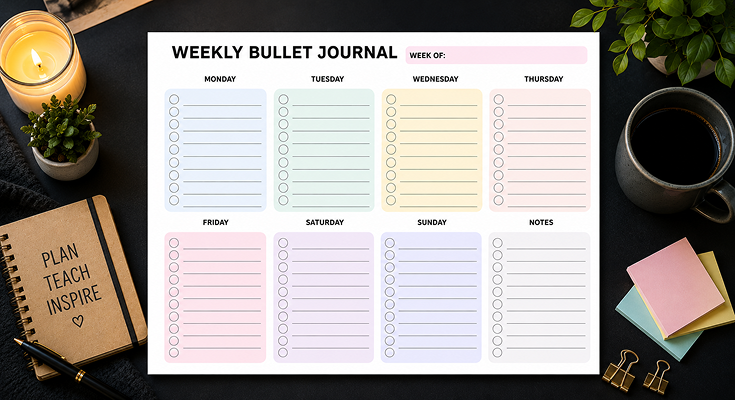
Discover a seamless way to organize your week with our free weekly schedule maker, a printable weekly bullet journal template designed for effortless planning. Featuring clear daily sections and a versatile notes space, this layout helps you stay focused and productive, perfect for anyone looking to master their time management.
Our bullet journal template offers free PDF printables with intuitive, stylish designs that cater to your planning needs. Whether you’re seeking fresh bullet journal layout ideas or reliable printable bullet journal pages, PlanWiz delivers a user-friendly tool to keep your tasks structured and your goals within reach.

The simple weekly bullet journal template features soft pastel tones, rounded sections, and a minimalistic design. Each day has a unique color for easy distinction, creating a visually appealing and clutter-free look. The smooth layout and subtle hues offer a calming feel, making planning both effective and aesthetically pleasing for work, school, or personal use.
Why Pastel Colors Enhance Your Planning Experience
Pastel shades do more than make your planner look pretty; they create a calming, focused environment that elevates your planning. Our printable bullet journal pages use soft hues like blush pink, mint green, and lavender to reduce stress and improve clarity. Here’s why pastels are a game-changer:
- Boost Focus: Gentle colors minimize visual distractions, helping you concentrate on tasks. For example, a soft blue Monday section lets you focus on listing work meetings without overwhelming your senses.
- Reduce Stress: Planning can feel chaotic, but pastels turn it into a soothing ritual. Imagine filling out your weekly bullet journal template with a cup of tea, creating a moment of calm in a busy day.
- Simplify Task Tracking: Each day features a unique pastel shade, making it easy to distinguish between tasks. For instance, Tuesday’s mint green section stands out from Friday’s lavender, helping you quickly spot appointments or errands.
- Improve Readability: Pastels provide just enough contrast for clear note-taking without straining your eyes, ideal for long planning sessions or quick reviews on the go.
This thoughtful use of color makes the bullet journal layout both inviting and practical. By applying well-tested planner organization ideas, such as color-coded sections and minimalistic design, users are more likely to stick with the system and enjoy better daily organization.
Key Features of This Weekly Bullet Journal Template
Our free bullet journal printables are designed to streamline your planning with a modern, user-friendly structure. Available as a bullet journal template free PDF, this template offers features that cater to diverse needs, from work to personal life. Here’s what makes it exceptional:
- Rounded Day Sections:
- Unlike traditional boxy planners, this template uses soft, curved edges for each day, creating a modern, approachable aesthetic.
- Example: When planning a week of school tasks, the rounded design makes scanning deadlines feel intuitive and less rigid.
- Structured Task Checklists:
- Each day includes a bullet-point checklist for tasks, goals, or appointments, helping users maintain focus and structure. A task planner template is especially valuable for anyone seeking a practical system to manage priorities, reduce overwhelm, and stay consistent with daily planning.
- Example: A freelancer can list “send client proposal” and “update portfolio” in Thursday’s section, checking them off to track progress.
- Versatile Notes Area:
- A spacious notes section offers room for brainstorming, reminders, or reflections, adding flexibility to your planning.
- Example: Jot down a recipe idea during a family meeting or note a work brainstorm in the same space as your daily tasks.
- Clutter-Free, Spacious Design:
- Generous white space keeps the layout clean, preventing tasks from blending together and maintaining focus.
- Example: A parent can clearly see “soccer practice at 5 PM” in Wednesday’s section, ensuring no task gets overlooked.
This bullet journal layout is perfect for both paper-based and digital planning, pairing well with apps like PlanWiz for those who prefer a hybrid approach.
How Spacing Elevates Clarity and Usability of Planner Template?
Proper spacing is critical for a planner’s effectiveness, and our weekly bullet journal template excels in creating a clear, navigable layout. Strategic spacing enhances readability and reduces overwhelm, making planning a breeze. Here’s how it works:
- Enhanced Readability:
- Evenly spaced lines and sections allow you to scan tasks, whether checking your schedule during a commute or before a meeting.
- Example: Spot “dentist appointment at 3 PM” in Tuesday’s section without sifting through cluttered text.
- Clutter-Free Organization:
- Gaps between daily sections keep tasks distinct, preventing the chaos of overcrowded planners.
- Example: A student can separate “study for biology” from “group project meeting” on the same day, maintaining clarity.
- Encourages Consistent Planning:
- An inviting, spacious layout motivates regular use, helping you build a habit of planning each Sunday for a productive week.
- Example: Spending 15 minutes filling out the template becomes a rewarding ritual, thanks to its clean design.
This balanced bullet journal layout ensures your printable bullet journal pages are both functional and visually appealing, supporting efficient scheduling for any lifestyle.
Practical Tips to Maximize Your Bullet Journal Template
To make the most of this free bullet journal printable, try these actionable strategies:
- Use Color Coding for Extra Organization:
- Enhance the pastel sections with colored pens or highlighters. For example, use red for urgent tasks and green for personal goals to prioritize at a glance.
- Set Weekly Priorities:
- Use the notes section to outline one or two key goals, like “finish budget report” or “plan weekend getaway,” to stay focused on what matters most.
- Blend with Digital Tools:
- Scan the completed template into apps like Notion or Evernote for digital access, combining the tactile joy of writing with on-the-go convenience.
- Reflect and Adjust:
- At week’s end, review your notes section to assess what worked. For instance, if you missed evening tasks, shift them to mornings for better results.
These tips help you personalize the bullet journal template, making it a powerful tool for your unique planning needs.
Adapting This Bullet Journal Template for Team or Family Planning
The weekly bullet journal template isn’t limited to personal goal setting. Its clean structure and open-ended layout make it ideal for collaborative tasks in both project teams and busy households. Designed as a customizable planner template, it allows users to tailor sections and notes to fit unique planning needs, ensuring everyone stays organized and aligned.
Here’s how you can adapt it effectively for collaborative use:
1. Assign Tasks to Team Members
Using the bullet journal’s daily sections, you can break down group responsibilities and assign tasks clearly.
How to do it: Write down specific action items and assign them by name.
Example:
- Monday: Sarah – prepare slides for presentation
- Wednesday: John – review and approve budget outline
This makes individual accountability visible at a glance.
2. Coordinate Family Activities
Managing a household can feel like juggling a dozen mini-projects. The bullet journal makes it easy to organize responsibilities and appointments for every family member.
Try this: Use daily slots to note events like:
- Kids’ extracurriculars: “Soccer practice – 4:30 PM”
- Household chores: “Take out recycling – Alex”
- Appointments: “Parent-teacher meeting – Mom”
3. Use the Notes Section for Shared Plans
The flexible notes area in your bullet journal acts as a handy notes planner template, perfect for planning or jotting down shared ideas.
You can use it for:
- Meeting agendas
- Weekly family goals
- Important reminders like: “Buy birthday gift for Grandpa” or “Team deadline: Friday”
Why it works
It centralizes group communication. No more scattered texts or missed messages — everything lives in one shared space in your weekly schedule maker.
4. Share Digitally or Physically
Depending on your family or team’s style, you can use this planner in multiple formats:
Choose what works best:
- Print copies for each family member or team member
- Scan or upload to digital tools like:
- PlanWiz
- Evernote
- Google Drive
- Shared email threads
Practical Tips to Maximize Your Bullet Journal Template
A bullet journal is more than a place to jot down to-dos — it’s a flexible, powerful tool for managing your life with clarity and intention. Whether you’re using a weekly bullet journal template or a custom layout, applying a few strategic techniques can significantly improve your focus, productivity, and long-term success. Below are four expert-backed strategies to help you get the most from your journaling system.
🎨 1. Use Color Coding to Simplify and Prioritize
Color coding is one of the simplest yet most effective ways to make your bullet journal more visually organized. By assigning colors to specific task types or categories, your brain can process information more quickly, making your planner easier to scan and navigate.
How to Use It:
- Assign each color a consistent meaning (and document it in a color key on the first page or corner).
- Use colored pens, highlighters, or stickers to tag tasks and events.
Example Color System:
- 🔴 Red = High-priority or time-sensitive tasks (e.g., deadlines, urgent calls)
- 🟢 Green = Wellness and personal life (e.g., exercise, self-care, meditation)
- 🔵 Blue = Work, school, or career goals (e.g., client calls, assignments)
✅ Why it Works:
Color activates visual memory and mental associations, allowing you to instinctively understand your priorities at a glance, especially helpful when you’re managing a packed schedule.
🔖 2. Incorporate Simple Symbols for Quick Navigation
In the fast-paced world of daily planning, sometimes words alone slow you down. That’s where symbols (or bullets) come in — the heart of the bullet journaling method. A good symbol system makes your entries intuitive and trackable without overloading the page.
Suggested Symbol Key:
- ⭐ = Must-do (essential priority for the day or week)
- ⭕ = In progress (something you’ve started but haven’t finished)
- ✅ = Completed (a satisfying check-off moment)
- 💬 = Follow-up needed (like returning a call or checking email updates)
- 📝 = Notes or reflections
Create a key on the first page of your journal, and stick with the same system throughout. Consistency is key to making your journal work for you.
✅ Why it Works:
Symbols create visual structure and allow for fast scanning, especially when you’re flipping back through pages to review past tasks or notes.
📆 3. Review Your Journal Weekly
One of the most powerful habits for maximizing your bullet journal’s potential is a consistent weekly review. It’s your opportunity to pause, assess your progress, and make intentional changes to your approach. Without this step, planning becomes passive — just a list of tasks rather than a strategy for personal growth.
Your Weekly Review Might Include:
- ✅ Reviewing what you completed
- ❌ Noting what didn’t get done — and asking why
- 🔄 Migrating unfinished tasks to next week (or deciding to drop them)
- 🧠 Reflecting on what helped or hindered your productivity
- 📅 Planning the upcoming week based on what you’ve learned
✅ Why it Works:
Regular reviews help you make your bullet journal with templates dynamic instead of static. It evolves with your life, giving you the space to adapt, reset goals, and make better decisions each week.
Conclusion
This simple weekly bullet journal template offers a soft-colored, rounded-day section design that enhances organization, readability, and efficiency. Whether used as a weekly family planner template or a personal productivity tool, it provides a structured yet visually appealing approach to planning. Download the PlanWiz planner app today and take control of your tasks effortlessly!
FAQs
Inspired by PAA queries about practical steps for weekly organization, relevant to the content’s tips.
Yes! PlanWiz’s bullet journal template is perfect for team planning, allowing you to assign tasks, track progress, and coordinate schedules collaboratively in one easy-to-use layout.
Addresses the content’s focus on spacing for clarity and usability, a common concern in planner design.
Using a task checklist in a bullet journal helps you stay organized, prioritize tasks, and track progress easily. It boosts productivity by breaking down goals into manageable steps and provides a clear visual of what’s done and what’s pending, keeping you focused and motivated.
Yes! The bullet journal template works perfectly both digitally and in print. You can customize and use it on tablets, phones, or computers with popular apps like PlanWiz for seamless planning anytime, anywhere.






