
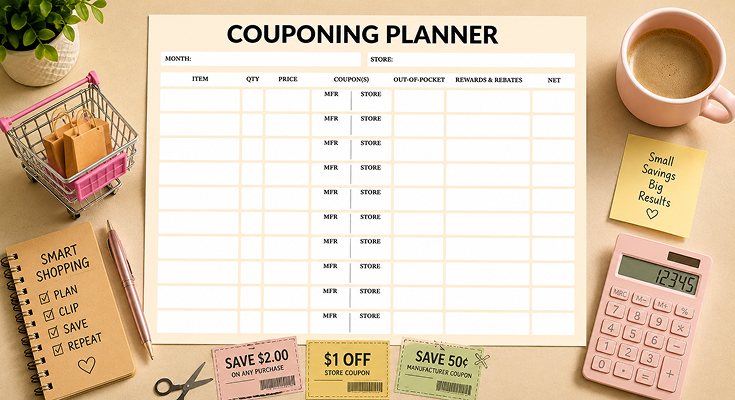
The lack of a organized system for managing grocery bills results in forfeited saving chances, expired discounts, and confusion at the cashier. The use of a store and manufacturer couponing planner template eliminates such problems by allowing for a systematic approach to noting down store discounts as well as manufacturer discounts in a single document. The printable planner enables customers to monitor product prices, discount amounts, cost, and the final amount spent, thus initiating a systematic way of saving money through coupons.
Planwiz has designed this printable PDF file for a downloadable planner that is suitable for beginners and expert couponers who look to save as much as possible while shopping. This process not only helps in saving dollars when buying groceries, but it also helps in removing the hassle of managing the coupons.
What is a Store and Manufacturer Couponing Planner Template?
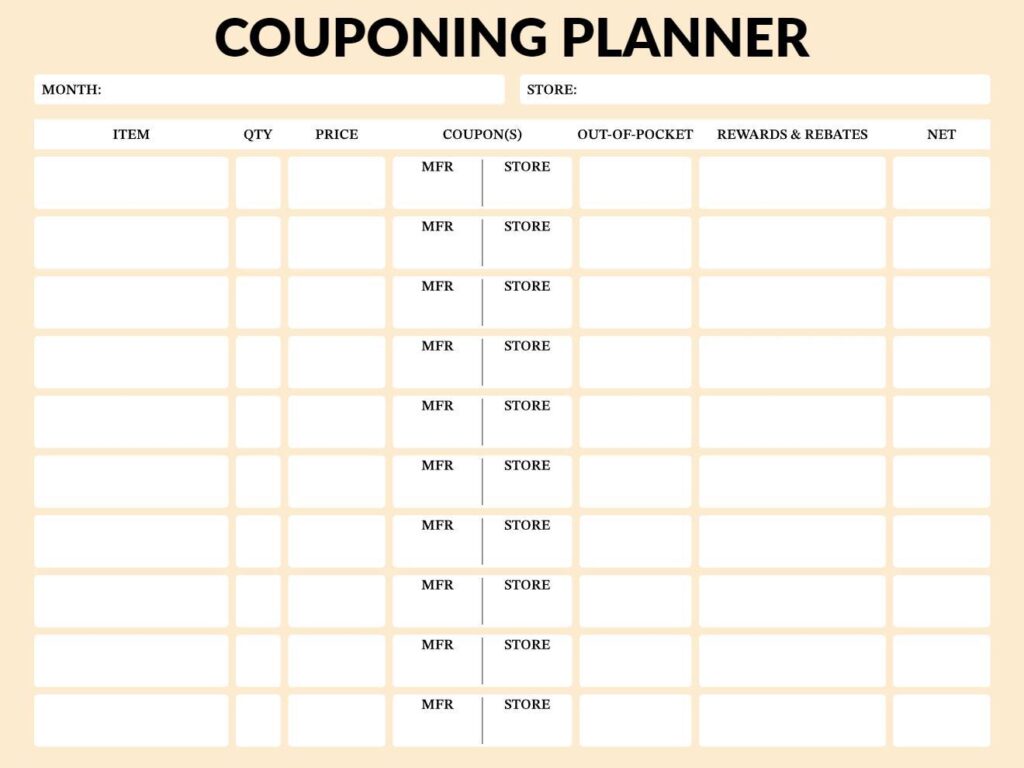
Store and manufacturer couponing planner templates are organized documents with standard formatting, which allow consumers to plan the use of discount offers before making a grocery run. The document has columns organized for recording the name of the item, the number of items, the original price of the item, the value of the manufacturer discount, the value of the store discount, the actual out-of-pocket costs, the reward program, and the final net price after all the discounts have been applied. The document can be used for both planning before shopping and tracking after shopping.
The main purpose of the template is the identification of coupon stacking offers that offer a combination of manufacturer and retailer discounts for the same item. With the side-by-side arrangement of the discounts and manufacturer brands in separate columns, the shopper immediately knows the products that provide the maximum combined discount of up to 75% compared with the 10-20% maximum discount associated with the conventional couponing process. The couponing system makes organized couponing a powerful means of managing the budget for better savings on monthly grocery bills.
How to Use a Store and Manufacturer Couponing Planner Template?
A store and manufacturer couponing planner template will be most effective if coupons are tracked systematically and not randomly after the purchase. The following 10-step process will take you from the initial cutting of the coupons to analyzing the purchase, ensuring that all discounts available are accounted for. This will enable you to alter your grocery budget and construct a couponing system that will provide a savings rate of 40-60% a month.
Step 1: Gather All Available Coupons
Start collecting the coupons available in newspaper insert cards, store websites, mobile applications, and platforms such as Ibotta and Fetch Rewards. Meal planner templates without the coupons enables you to determine the actual groceries you need to purchase to avoid buying things you do not need, despite them being offered attractive discounts. Download a store application to gain access to store-only electronic coupons to be used in addition to manufacturer-made paper coupons.
One handy way of managing paper coupons is to keep them in a binder with dividers identifying each category. So, next time you are checking out deals available in stores, having your coupon organizer close at hand will enable you to easily find the perfect coupons for the products.
Step 2: Review Weekly Store Ads and Match Coupons
Begin by opening your target business’s weekly advertisement, picking out the items that are available for a discounted price, focusing on BOGO deals or manager specials. You can organize shopping trips by utilizing monthly schedule planner templates to help align shopping trips with the weekly sales cycles and the payday cycles. Look for overlapping deals by cross-referencing the items for sale with available coupons.
Point out items in the ad for which you have matching coupons, as these items cost you the most money. Look for any deals the store might have for loyalty members or for buying in bulk, which could further cut costs.
Step 3: Fill in Planner Header and List Items
Complete the “Month” and “Store” fields at the top of your store couponing planner template for organization. Write each planned purchase in the “Item” column, starting with products that have both sale prices and matching coupons for best value.
Enter the quantity needed in the “QTY” column—buy only what you’ll use before expiration. Record the regular or sale price in the “Price” column to establish your savings baseline for each item.
Step 4: Record Manufacturer and Store Coupons
When organizing the “Coupon(s)” section of your organizer template, put the values of the coupons from the manufacturer under the “MFR” column and the coupons from the store under the “Store” column. You will be able to effectively separate the items that offer stacked coupons from the ones that offer a solo price cut using your store and manufacture coupon planner template.
Be sure to write coupon values accurately (such as “1.00 off” or “50¢”) and check coupon expiration dates and size requirements carefully. This step helps you avoid disappointment at checkout if a coupon does not scan because a product does not match a coupon requirement or if a coupon has expired.
Step 5: Calculate Out-of-Pocket Costs
While keeping in mind the price of the product you want to buy, subtract the value of both the manufacturers’ and the store coupons to get the actual price. You can do this by subtracting it in the “Out-of-Pocket” column.
Such a calculation is essential in understanding immediate savings that help in ranking high-quality deals that are worth stockpiling. It also includes products whose out-of-pocket costs are less than 50% of the original price, which are the best deals in accumulating your pantry inventory.
Step 6: Track Rewards, Rebates, and Points
Record loyalty points, cash rewards, and rebate app rewards in the “Rewards & Rebates” column of the spreadsheet. Look up rebate rewards using a rebate app before shopping, then record the rewards in the coupon planner spreadsheet template for the items that give rewards in cash back.
In many stores, there are bonus points for particular items on a weekly basis, thereby cutting down your eventual cost even after the discount through coupons. While calculating the discount, take into consideration the discount points as well.
Step 7: Compute Final Net Cost
Subtract rewards and rebates from your out-of-pocket cost to calculate the true net amount per item. Write this final number in the “Net” column—this represents your actual cost after all discounts and future rebates are applied.
Add up all net costs to see your total projected spending for the entire shopping trip. Compare this total to what you would have paid at regular prices without using your manufacturer couponing planner to quantify your percentage savings. For comprehensive household expense tracking beyond groceries, consider using budget planner templates to monitor all monthly spending categories.
Step 8: Organize and Shop with Your Planner
Take physical store coupons from your organizer and clip them all together in order for easy checkout. Load all store coupons electronically to your rewards account and turn on app-driven discounts in the store.
Take the completed template for the store and manufacturer couponing system with you when you go shopping and mark the completed tasks as you go along. Also, ensure that the sizes and types offered for a product include the one you need for the cut-out deal you seek.
Step 9: Verify Receipt and Update Planner
Before walking out with your purchase from the register, check your receipt against your planner to verify that the cashier applied all coupons correctly. Also, if a product didn’t scan correctly, ask the cashier to correct it manually when you’re still at checkout.
Once you’re home, you can update your store and manufacture couponing planner template with real costs in the event that costs are not as projected. Record any products that are out of stock, prices that are inaccurate, or issues with the scanner to help with accuracy during future sessions.
Step 10: Submit Rebates and Analyze Results
Immediately photograph your receipt and submit to all applicable rebate apps listed in your planner—most require submission within 7-14 days. Update the “Rewards & Rebates” column with pending amounts and expected credit dates for tracking purposes.
Then, at the end of the month, analyze all finished planners for total savings amounts, as well as which stores, product categories, and coupon sources offered the greatest savings opportunities. By establishing savings goals using goal planner templates, savings progress toward financial goals such as emergency fund establishment or debt payoff can be ascertained. With the insights provided by store and coupon savings planners, optimize the strategy by maintaining savings levels between 20-30% currently to 50-70% at a later period.
Frequently Asked Questions
A store and manufacturer couponing planner template is an organizational document that assists shoppers in tracking each retailer’s promotion along with the brand-issued discount in one place. The columns will be set up for MFR coupons, store coupons, prices, and net costs after all the discounts.
This template puts haphazard coupon use into a systematic savings plan. The idea is that, with purchases anticipated in advance, you find the most valuable deals and do not make purchases of items you don’t need just because coupons are available.
With an organized planner, you eliminate missed sales and combined offers on individual items, while, without organization, customers lose discount offers, miss expiration dates, or fail to combine manufacturer and in-store offers.
A couponing planner that you can use for both store and manufacture coupons gives an accurate view of where you are overspending versus where you can make adjustments regarding regular pricing.
Both kinds of discount tracking provide overlap points where you can combine various discounts on a single product. Many stores enable you to combine a coupon from a manufacturer with a coupon from their own store, allowing you to double your benefits.
The template enables the visualization of opportunities to stack during planning. Such early visualization allows you to choose to stack purchases, potentially decreasing expenses by 50-75% rather than 10-20% with a single coupon.
You will enter the shopping month and store name, followed by a list of each item to purchase along with its cost. You will record the coupons in the MFR column and store coupons in the store column.
To determine out-of-pocket expense, subtract both coupon prices from the regular price. Add the reward points or the rebate in the indicated column, followed by calculating the final net expense by subtracting the rewards from the out-of-pocket expense.
Finish this task before going shopping to judge which offers are best. After going shopping, finish this task by putting actual prices to keep records accurate.
You must update your couponing planner and weekly planner templates for your store and manufacturer coupons every week with the release of new weekly sales circulars and digital coupons.
Working with weekly planners along with your couponing planner enables you to schedule time for the review of the weekly sales circular and your trip for couponing. This planning is done a day before your trip.
Every time you go shopping, be sure to record your actual expenses to keep the record precise. It is a good follow-through activity that allows you to evaluate your strategy based on actual savings.
Must have columns would include item name, number of items, regular price, manufacturer savings, and store savings. Additional columns would include out-of-pocket cost, rewards/rebates, and net cost.
Power users can benefit from the inclusion of unit price comparisons, expiration dates, and notes pertaining to price cycles. It can be a good practice to use to do planner templates for storing tasks associated with coupons such as expiration dates and rebates.
A column for the store can be useful in case you have to compare deals for multiple stores.
Organize the information into separate sections for each retailer, or include a “store name” column that allows the shopper to compare the prices among the various stores.
This concept makes it possible for the shopper to see which of the stores he or she visits offers the best deal with regards to sales, manufacturer coupons, and rewards points.
Using the store and manufacturer couponing planner template across several stores can help identify patterns in the pricing and promotion cycles of the stores.
It can also help identify which stores in general tend to offer more competitive base prices compared to others, as well as which stores tend to have favorable couponing policies for certain product groups.
You can also create a column to indicate whether the discount is digital, paper, or app-related to include all the possible sources. To redeem discounts from the paper system, you have to check the planner for the coupons to tear out before heading to the shops.
For digital discounts, be sure to mark the boxes as you load the coupons. This way, you assure yourself of turning on all the discounts available to you without leaving money behind.
Common errors include buying unnecessary items just because coupons exist and failing to verify expiration dates before planning. Shoppers also forget to read size or variety restrictions, load digital coupons before checkout, or compare unit prices even with discounts.
Another mistake is not updating the couponing planner after shopping trips. Without post-shopping reviews, you miss opportunities to learn which strategies work best and can’t track actual savings versus projections.
Review your planner weekly when new deals release to identify fresh opportunities and check coupon expirations. Conduct a comprehensive monthly analysis of total savings, spending patterns, and which stores or coupon sources provide best value.
Monthly reviews help refine which product categories, retailers, and coupon stacking methods maximize your budget. This ongoing optimization transforms the store and manufacturer couponing planner template from a simple tracker into a strategic financial tool.






