Valentine’s Day carries its own small pressure: the plans, the little details, the wanting it to feel right without turning into a whole production. Our app offers templates built around that one day, so planning doesn’t take away from the day itself.
Her Valentine’s Day: Plan Something Special covers the dinner, the activities, the schedule, and the small errands leading up to it. Each template holds one piece of the day, so she can put it together at whatever pace suits her.

Overview of the Valentine’s Day Celebration Planner
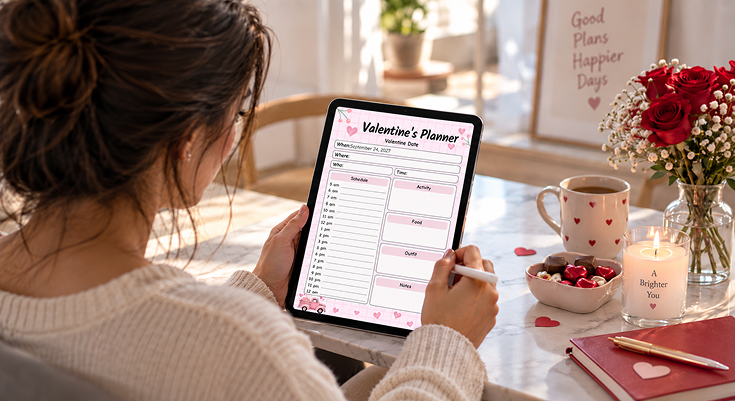
The Romantic Valentine’s Day Celebration Planner puts the shape of the day down before anything else. A soft pink page, watercolor hearts, and a small truck full of flowers give it a warm, romantic feel, while the layout stays simple enough to fill in quickly.
Here is what she finds on the page:
- When, Where, Who, and Time: Four fields at the top to set the basics of the day.
- Schedule: An hour-by-hour list, from 5 am to 12 am, for the day’s plan.
- Activity: An open box for what she and her Valentine will do together.
- Food: An open box for what they will eat, whether that means a reservation or a home-cooked meal.
- Outfit: An open box for what she plans to wear.
- Notes: An open box for anything else worth remembering.
Because the schedule runs the full day, this template works whether the plans start in the morning or only pick up in the evening.
Practical Use Cases for Valentine’s Day Planner Templates
Together, the Valentine’s Day templates in our app help with every part of the day, whether it is spent out or at home:
She uses the Romantic Valentine’s Day Celebration Planner to set the schedule, then turns to the Valentine Dinner Party Menu Planner to work out the appetizers, entrees, and desserts.
She uses the Valentine’s Gift Idea Planner to write down a few ideas, where to find them, and what they cost, so the gift does not become a last-minute scramble.
She uses the Valentine’s Day Activity Planner to plan what to make, what games to play, and what to eat at home, with a shopping list running alongside it.
She uses the Valentine’s Day Prep Checklist to sort shopping, decorating, and events into separate lists, so nothing gets missed in the lead-up.
Using Icons to Prioritize Your Valentine’s Day Tasks
The art across these templates does more than set the mood. Each recurring picture can help her notice what matters most as she plans the day.
🎁 Gift Box: Mark the Plan She Is Most Excited About
Use it as: A flag for the one part of the day she is looking forward to most.
How to apply: Write that plan in the space closest to a gift box on the page.
Why it works: A wrapped gift naturally draws the eye, so her favorite part of the day does not get lost among the rest.
Example: “Surprise dinner reservation” written near the gift box is easy to spot again later.
🧸 Teddy Bear: Keep the Sentimental Details Close
Use it as: A reminder to hold on to the small, personal touches.
How to apply: Jot sentimental notes, like a favorite song or a shared memory, near a teddy bear or heart illustration.
Why it works: A soft, familiar image fits the kind of detail that makes the day feel personal rather than routine.
Example: “Play the song from our first date” fits well in this spot.
💌 Envelope: Track What Needs to Go Out
Use it as: A cue for anything that needs to be sent or given ahead of time.
How to apply: On templates with a card or envelope icon, list cards, invitations, or gifts that need to go out before the day itself.
Why it works: An envelope naturally suggests something on its way to someone else, so it is a clear place for outgoing items.
Example: “Mail the card to Mom” belongs on this part of the list.
💘 Cupid: Celebrate the Plan Once It Is Set
Use it as: A small marker for a plan that is fully settled.
How to apply: Once a section is filled in and confirmed, glance at a cupid or heart illustration nearby as a sign it is ready to go.
Why it works: Cupid is tied to Valentine’s Day itself, so it works well as a light way to mark “this part is done.”
Example: A finished menu next to a cupid illustration means dinner is one less thing to think about.
Tips to Get the Most Out of Valentine’s Day Planner Templates
A few small habits help her get more from these templates as the day gets closer:
- Start with the schedule. Fill in the Romantic Valentine’s Day Celebration Planner first, so the rest of the day’s details have a timeline to sit inside.
- Plan the gift early. Use the Valentine’s Gift Idea Planner a week or two ahead, so there is time to shop without rushing.
- Decide in or out first. Choosing between a dinner out and a night in early makes it easier to pick between the dinner planner and the activity planner.
- Work through the prep checklist in pieces. Tackle shopping, decorating, or events on separate days instead of all at once.
Benefits of Using Valentine’s Day Planner Templates
These templates bring the different parts of the day together without turning it into extra work:
- The whole day has a timeline. The hourly schedule keeps the day from running into itself, from the morning through the evening.
- Nothing gets left for the last minute. The gift planner and prep checklist give the small tasks a place to live well before the day arrives.
- A night in feels just as planned as a night out. The activity planner gives an evening at home the same amount of thought as a dinner reservation.
- Sentimental details do not get lost. Notes sections and small prompts leave room for the personal touches that make the day feel like more than a checklist.
- Planning feels light, not like a project. Soft, romantic art keeps the process feeling closer to the holiday itself than to a task list.
Step-by-Step Guide to Using Valentine’s Day Planner Templates
Follow these steps to fill in any Valentine’s Day template, from start to finish:
Open Our PlanWiz Planner App
Open our app on your phone so you can fill in your planner anytime, anywhere.
Find the Template
Go to the Valentine’s Day template collection and pick the template that fits the part of the day you are planning.
Set the Basics
Fill in the when, where, who, and time, so the rest of the plan has something to build on.
Fill In the Details
Add the schedule, the menu, the activities, or the gift ideas, depending on the template you picked.
Check Things Off as You Go
Tick items off the prep checklist or shopping list as they get done.
Add Another Template if You Need It
Use another template for the next part of the day, like the gift planner or the dinner menu.
Explore Valentine’s Planning Event

Our app provides a seasonal Valentine’s planning experience with themed planner templates for different planning needs. Users can explore themed planner templates to organise the Valentine’s dinner, activities, schedules, and preparations. They can choose a template that fits their plans, personalise it, and keep everything organised in one app throughout the Valentine’s season.
Your Valentine’s Day Planner Templates
A day like this comes together from a few smaller pieces, not one big plan. These templates split it into the parts she actually needs to sort out.

Valentine’s Schedule Planner
Sometimes it helps to see the whole week, not just the day itself. This template lays out Monday through Sunday, with a box for each day, so she can pencil in plans across the week Valentine’s Day falls in. A gift box and a small teddy bear give the page a gentle, festive feel.

Valentine’s Gift Idea Planner
A good gift usually takes a little thought ahead of time. This template lines up ideas, where to get each one, when to get it, and the cost, all in one table. It keeps gift planning from turning into a last-minute trip to the store.

Valentine’s To-Do List
Some days just need one long list. This template gives her a simple, checkable list with plenty of room, so every small task, from picking up flowers to writing a card, has a line of its own.

Full Day Hourly Routine Planner
Valentine’s Day rarely stands alone; there is usually a week of little tasks around it. This template splits the week into Monday through Sunday boxes, with a notes section at the bottom, so the days leading up to Valentine’s Day stay just as organized as the day itself.

Valentine Planner
This template gathers several smaller lists in one place: cards to send, decor, things to make, gifts to buy, and Valentine’s Day plans, along with an “On the Menu” section for the food. It works well for a woman who wants most of her Valentine’s Day planning on a single page.

Valentine Dinner Party Menu Planner
A Valentine’s dinner still needs real thought behind it: what to serve, for how many, and in what order. This template lays out appetizers, entrees, sides, desserts, and drinks on one page, with a notes section for anything else worth remembering, like a favorite dish or a dietary note.

Valentine’s Day Activity Planner
Not every Valentine’s Day centers on dinner out. This template gives her room for things to make, games to play, food and drinks to try at home, and books or movies to line up, with a shopping list running alongside it all.

Valentine’s Day Prep Checklist
The lead-up to Valentine’s Day has its own small tasks: shopping, errands, decorating, and events to keep track of. This checklist splits them into shopping and errands, decorating and crafts, and events and activities, so nothing gets missed in the days before.
Why You’ll Love It
A day meant to feel easy shouldn’t come with hours of planning behind it. These templates handle the pieces ahead of time, so the day itself has room to just be enjoyed.
- A template for the dinner, the activities, the schedule, and the prep
- Room for both a night out and a night in
- Fits right in with the app’s calendar and reminders
- Built around the small details that actually go into the day
Our app works with bigger text, different colors, and a screen reader, in every language and country it already supports. However she wants to spend the day, there’s a page ready for it.
Frequently Asked Questions
The collection includes a main schedule planner, a dinner menu planner, an activity planner, a prep checklist, a gift idea planner, a to-do list, and a few weekly planning templates, all built around the day.
They are made for a woman planning Valentine’s Day, whether she is hosting a dinner, planning a night in, choosing a gift, or just trying to keep the week organized.
Yes. Many people use the Romantic Valentine’s Day Celebration Planner as the main schedule, then add the dinner menu, gift planner, or prep checklist as needed.
Start with the Romantic Valentine’s Day Celebration Planner. It sets the schedule for the day, and you can add the other templates once you know what the day will include.
Yes. The Valentine’s Gift Idea Planner has space for gift ideas, where to find them, when to get them, and the cost, so gift planning does not turn into a last-minute task.