
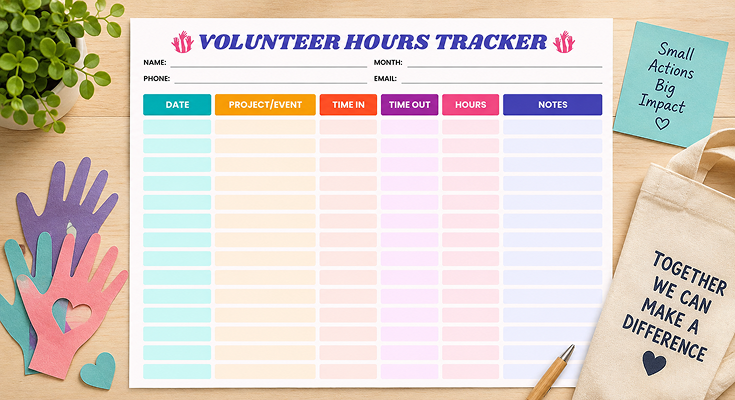
Tracking community service hours across multiple projects can be challenging for students, scholarship applicants, and volunteers. Without a proper volunteer activity hours tracker, you risk losing records of hours worked, missing supervisor signatures, and facing last-minute stress when applications require official confirmation.
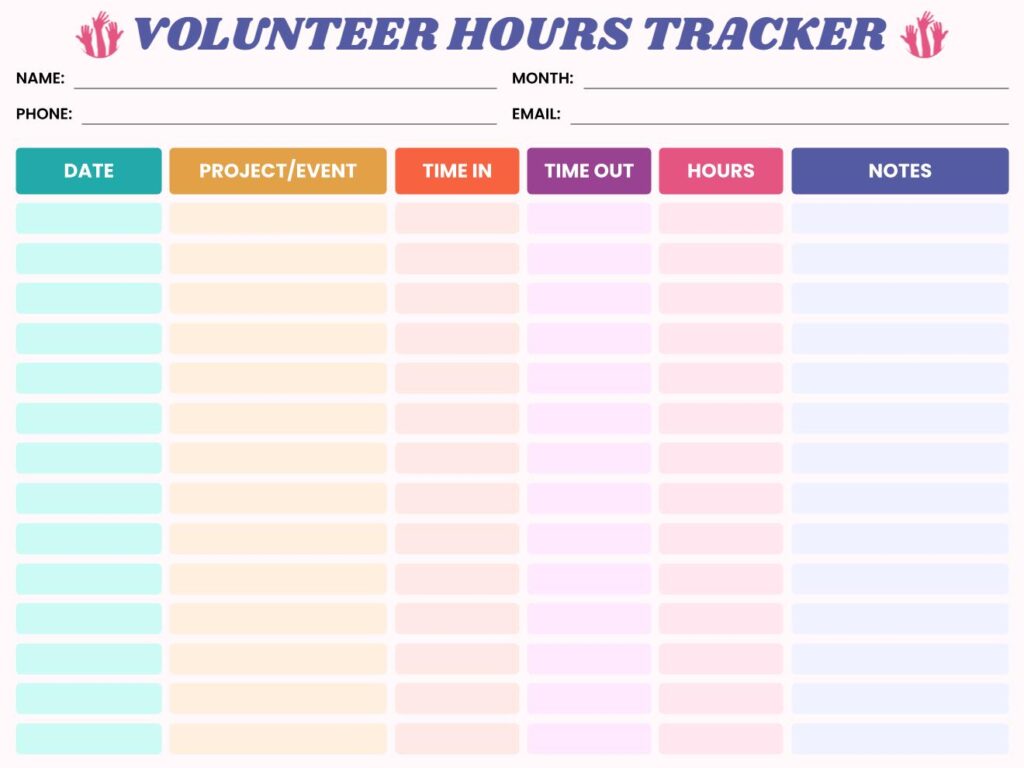
Planwiz‘s printable template simplifies volunteer hour tracking with a streamlined format. It includes columns for dates, project titles, time stamps, calculated hours, and supervisor comments-ensuring no detail is missed. The intuitive layout makes it easy to maintain accurate records and quickly compile reports when needed. Whether you prefer paper tracking with print-friendly PDFs or digital files across devices, this template adapts to your workflow.
What is a Volunteer Activity Hours Tracker?
A volunteer activity hours tracker is a documentation tool that records specific details about your community service sessions in an organized format. Unlike informal notes or mental tracking, this structured log captures dates, project names, time stamps, calculated hours, and supervisor information all in one standardized document. It serves as official proof of your volunteer contributions that schools, scholarship committees, courts, and organizations can verify and accept for their requirements.
The tracker transforms scattered volunteer experiences into a professional record that tells the complete story of your community involvement. Each entry creates a permanent timestamp of when you served, where you contributed, and how long you dedicated to helping others. This systematic documentation protects you from losing credit for hours already worked and provides concrete evidence when applications, verifications, or legal requirements demand detailed proof of your volunteer service history.
How to Calculate Volunteer Activity Hours? Step-by-Step Guide
Calculating volunteer activity hours tracker correctly ensures you receive full credit for your community service time. Subtract your start time from end time, then convert any remaining minutes into decimal format for accurate documentation.
How Do I Convert Minutes to Volunteer Activity Hours?
Use this simple conversion chart to transform minutes into decimal volunteer activity hours for accurate tracking:
| Minutes Worked | Decimal Hours | Example |
|---|---|---|
| 15 minutes | 0.25 hours | 2:00 PM – 2:15 PM = 0.25 hrs |
| 30 minutes | 0.50 hours | 9:00 AM – 9:30 AM = 0.5 hrs |
| 45 minutes | 0.75 hours | 1:00 PM – 1:45 PM = 0.75 hrs |
| 1 hour 15 min | 1.25 hours | 10:00 AM – 11:15 AM = 1.25 hrs |
| 2 hours 30 min | 2.50s hours | 3:00 PM – 5:30 PM = 2.5 hrs |
| 3 hours 45 min | 3.75 hours | 8:00 AM – 11:45 AM = 3.75 hrs |
What’s the Easiest Way to Calculate Volunteer Activity Hours?
Follow these three simple examples to calculate volunteer activity hours for any time range:
1: Basic Afternoon Shift
- Time In: 2:00 PM
- Time Out: 5:30 PM
- Calculation: 5:30 PM – 2:00 PM = 3 hours 30 minutes = 3.5 hours
2: Morning to Afternoon Session
- Time In: 9:15 AM
- Time Out: 1:45 PM
- Calculation: 1:45 PM – 9:15 AM = 4 hours 30 minutes = 4.5 hours
3: Full Day With Break
- Time In: 10:00 AM
- Time Out: 3:00 PM
- Lunch Break: 30 minutes
- Calculation: 5 hours total – 0.5 hours break = 4.5 hours
Common Calculation Mistakes to Avoid
❌ Rounding up excessively: 2 hours 10 minutes ≠ 2.5 hours (correct: 2.17 hours)
❌ Forgetting AM/PM: Can result in negative hours or 12-hour errors
❌ Including break time: Most programs don’t count lunch or rest breaks
❌ Using wrong decimal: 45 minutes ≠ 0.45 hours (correct: 0.75 hours)
✅ Always convert minutes to quarters: Use 0.25, 0.5, or 0.75 increments
✅ Double-check across midnight: Evening to morning shifts need special attention
✅ Ask about rounding policies: Some organizations round to nearest quarter hour
Organize your volunteer sessions more effectively by planning them in advance with weekly planner templates that shows your available time blocks for community service alongside work and school obligations.
How Many Volunteer Activity Hours Tracker Do Need? Requirements by Purpose
Different organizations and institutions require varying amounts of volunteer service hours. Understanding these requirements helps you plan your community service schedule and meet deadlines without last-minute stress.
High School Volunteer Hours by State
State-by-State Overview:
| Requirement Level | Hours Required | States/Districts |
|---|---|---|
| No Requirement | 0 hours | Most U.S. states |
| Low Requirement | 10-40 hours | Select districts in CA, TX, FL |
| Moderate Requirement | 40-75 hours | Maryland (75), District of Columbia (100) |
| High Requirement | 100-20s0 hours | Some private/charter schools |
Note: Requirements vary by school district, not just state. Always verify with your specific high school counselor.
Honor Society Service Requirements
National Honor Society (NHS)
- Initial eligibility: 20-30 hours (varies by chapter)
- Annual maintenance: 10-20 hours per year
- Must be completed before induction ceremony
National Junior Honor Society (NJHS)
- Required hours: 10-20 hours annually
- Ages: Middle school students (grades 6-9)
Beta Club
- Service requirement: 10+ hours per semester
- Focus on service leadership projects
When organizing service projects for honor societies, use agenda templates to structure volunteer planning meetings and keep team members aligned on project goals and timelines.
Volunteer Hours for Scholarships
President’s Volunteer Service Award
- Teens (11-15 years): 50 hours (Bronze), 100 hours (Silver), 200 hours (Gold)
- Young Adults (16-25 years): 100 hours (Bronze), 175 hours (Silver), 250 hours (Gold)
- Timeframe: Within 12-month period
Bright Futures Scholarship (Florida)
- Requirement: 100 community service hours
- Deadline: Before high school graduation
- Verification: Must be school or organization approved
Common Scholarship Minimums
- Local scholarships: 25-50 hours
- Regional scholarships: 50-100 hours
- National scholarships: 100-200+ hours
Many scholarship applications also require financial planning documentation, so consider pairing your volunteer hours tracker with budget planner templates to demonstrate responsible financial management alongside community service commitment.
College Application Service Hours
Competitive Universities (Ivy League, Top 20)
- Expected: 100-200+ hours over 4 years
- Preferred: Leadership roles and sustained commitment
- Quality over quantity: Long-term projects matter more
State Universities
- Typical: 50-100 hours beneficial but not required
- Advantage: Demonstrates community engagement
- Documentation: May ask for verification
Community Colleges
- Requirement: Typically none
- Benefit: Can strengthen transfer applications
- Recognition: Some offer volunteer-based scholarships
Community Service Hour Mandates
Juvenile Offenses
- Range: 20-200 hours depending on offense severity
- Timeframe: 3-12 months to complete
- Verification: Must use approved organizations with official tracking
Adult Offenses
- Minor infractions: 20-100 hours
- Serious offenses: 100-500+ hours
- Requirements: Pre-approved locations, supervisor signatures mandatory
Pro Tips for Meeting Requirements
✅ Start early: Begin tracking hours freshman year to avoid senior year stress
✅ Quality matters: 50 hours at one organization beats 50 hours at 10 different places
✅ Get signatures immediately: Don’t wait until deadline to chase down supervisors
✅ Keep digital backups: Scan or photograph completed tracking sheets monthly
✅ Exceed minimums: Aim for 10-20% above required hours as a safety buffer
To effectively manage your volunteer commitments alongside school and other activities, use monthly schedule planner templates to block out regular volunteer sessions and avoid scheduling conflicts with academic deadlines.
Frequently Asked Questions
A Volunteer Hours Record Book is a well-structured document that assists a person in recording their volunteer service hours effectively. This record book records all necessary information such as dates, names of projects, hours spent, and total hours in a single document.
An official record of the volunteer service with specified dates and hours documented by educational institutions, scholarship committees, and non-profits is required.
The template for the tracking of hours spent for voluntary service helps in generating genuine documents that can be approved by the supervisors and proves one’s commitment to the scholarship or educational programs.
The main users of this system will be students meeting graduation requirements, as most high schools require 40-100+ community service hours to receive a diploma. Another main group will be students applying for scholarships in order to accurately document community service requirements.
These trackers are used by the youth group leaders, the coordinators of the volunteers, and the managers of the community service programs. Students can incorporate the tracking of both their study planner templates and their volunteer activities.
If it’s personal growth activities that one is tracking or the activities that are needed for educational purposes, one can never underreport their contributions by systematically tracking.
Memory fails when tracking dozens of volunteer sessions across months or years, leading to significant hour loss and inaccurate reporting. Mental estimates often undercount actual time spent, potentially costing you scholarship opportunities or graduation requirements.
Volunteer hours trackers ensure there is documentation evidence available for checking and signing by supervisors, thus giving the required documentation that can work in favor of the organization or the supervisor.
Digital reminders lack the needed information required in documentation, such as project names, times, supervisor contact information, and tasks.
Complete the header section of your time log with your full legal name, current phone number, and your regularly checked email address.
At the very top, write the exact month you are recording to keep charted records organized by date. As soon as a volunteering session is over, log there and then the exact date, full project or organization name, and the very time you got there and left.
Calculate total hours by subtracting start time from end time and then get your calculator to check your arithmetic.
Write down the full name of your supervisor, the particular activities you carried out, and any other accomplishments or skills you might have demonstrated during that session in the notes column.
To do planner templates that will assist you in making up your task list before every volunteer session to guarantee that you will accomplish all the assignments given to you.
The date column should be in the complete date, which involves having the month, day of the month, and year in a standardized form such as “01/15/2026” or “January 15, 2026.” In the project/event column, you should enter the activity as in “Food Bank Sorting” or “Hospital Patient Support.”
Time in and time out columns need exact times with AM/PM designations to avoid confusion during hour calculations. The hours column shows your calculated total for each session, while the notes section captures supervisor names, special tasks, or memorable experiences.
Modify the project/event column terminology to match your specific volunteer setting-schools might use “activity type” while nonprofits prefer “department.”
Add organization-specific fields like volunteer ID numbers, supervisor contact information, or project codes if your program requires them.
Color-code different organizations or project types using highlighters on printed versions or cell shading in digital formats. Create separate monthly sheets for each organization if you volunteer extensively with multiple groups to simplify individual reporting requirements.
Convert the template to Excel, Google Sheets, or fillable PDF format for electronic tracking with automatic hour calculations using formulas. Digital versions allow continuous saving, easy corrections, and instant sharing with supervisors or school counselors via email.
Set up cloud storage syncing so your volunteer hours tracker automatically backs up after each entry you make. Maintain both digital and periodic printed copies since some organizations specifically require physical signatures on paper documentation.
Start off with a simple volunteer hours log by using a table that clearly shows key columns like date, project/event, time in, time out, total hours worked and notes.
Don’t forget the header columns for your name and contact information and also the time span of record.
Keep the format easily readable by having ample spacing between rows. You may even try differentiating the headings of the columns by use of color. This will not only add to the aesthetics but also help your organization.
If your program requires verification stamps/sign, offs, give signature spaces at the bottom of the document so your supervisors can stamp their signatures.
This is because most of these mistakes occur because of waiting several days or weeks to enter hours instead of putting them down as soon as possible. Others include mistakes made in calculating minutes to decimal hours or forgetting to put AM/PM notation.
Waiting until the last day to obtain signatures from the supervisors is stressful when coordinators become unavailable or hard to contact. Losing finalized monthly sheets without, in turn, keeping copies means losing record of dozens of volunteer hours you have already earned.
It is essential to update your tracker of volunteer hours immediately following the completion of a volunteering activity. It should always be done on the same day the activity took place when the information is still vivid in your memory.
that appropriate to evaluate your progress on a monthly basis to assess how much progress you are making towards your requirements for the next level of education.
An audit of all entries should be done quarterly for the purpose of detecting any errors in calculations, the lack of a supervisor’s signature, and the omission of details before the deadline.
This will prevent last-minute rushes in the application process when required to provide the entire history of your voluntary service.
Store the completed monthly trackers in a three-ring notebook using page protectors in chronological order and scan each sheet as soon as they are finished. Digital copies can be stored in a variety of locations online through the use of programs such as Google Drive or One Drive.
Keep all records of volunteer hours tracked for at least 3-5 years in case colleges, renewal applications for scholarships, and employers ask for past records to be provided.
Make an annual summary sheet to list the total number of hours worked in all projects to refer to in later applications without digging through monthly records.






