
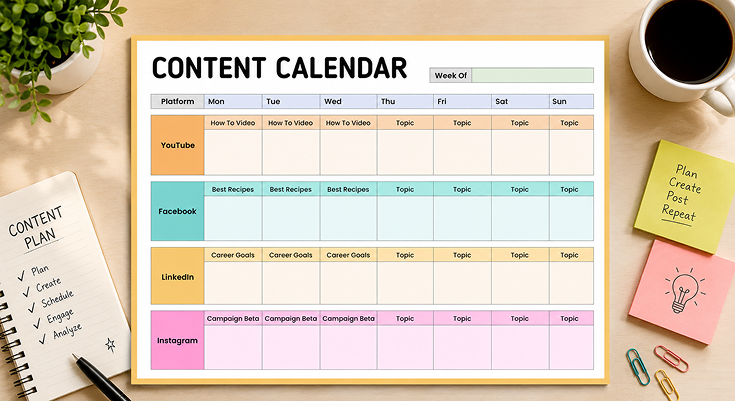
The juggling act between YouTube, Facebook, and all the other platforms in between requires perfection, and the mere thought of it all seems like an act of balancing plates, and all can tumble apart because of just one miscalculation. You can imagine yourself sitting back on Monday morning determined and motivated, only to end up scrambling around 9 pm because you’ve not posted anything all day. This is where the weekly social media content calendar is going to turn all these scrambling situations into very deliberate events by mapping out each and every single post, platform, and day of the week before the week has even begun.
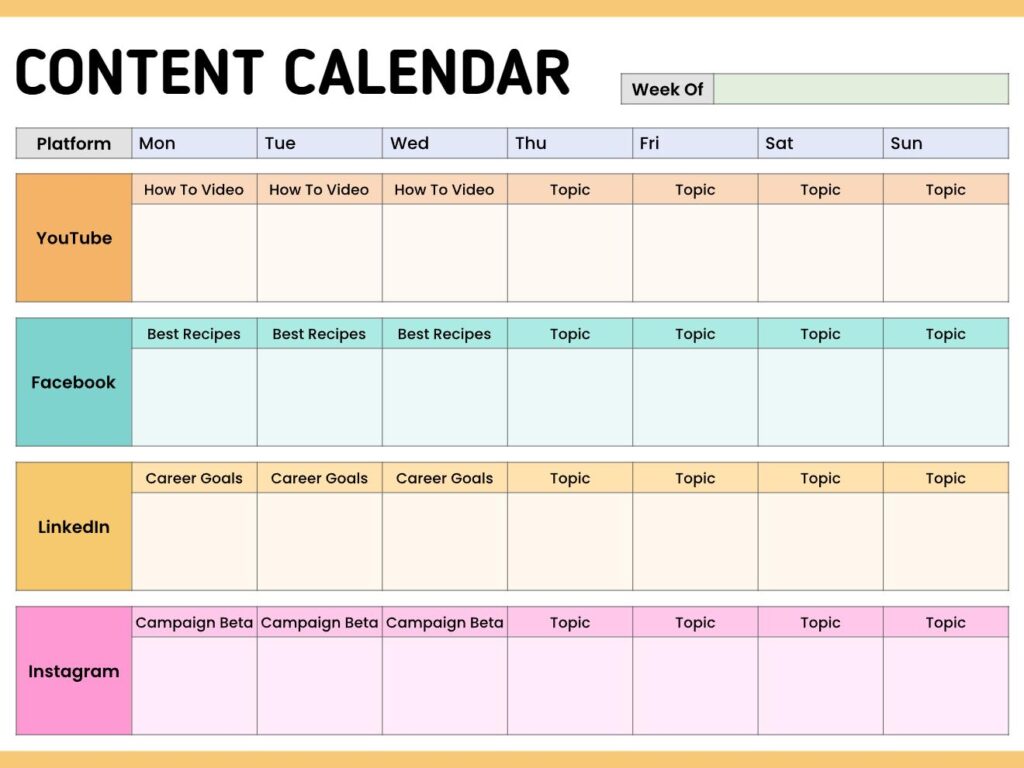
This printable and editable template from Planwiz provides dedicated rows for each major platform with columns spanning Monday through Sunday, creating a complete week-at-a-glance view of your content strategy. Download this template to stop reactive posting and start strategic planning that actually moves your social media goals forward.
What is a Weekly Social Media Content Calendar?
A weekly social media content calendar is a tool for planning your social media postings across various social media platforms for a period of weeks. It is like a dashboard that gives you access to all your scheduled postings, whether it is YouTube videos, Facebook recipes, or LinkedIn career updates, arranged in a grid fashion according to different sites and days.
Calendars are generally designed in a grid format. Here, platforms are column-wise, while days of the week are row-wise. By doing this, a content creator can plan a week’s worth of content and still have time left to respond to trends or take advantage of topics that may come up on different days of the week.
How to Plan a Weekly Social Media Content Calendar?
Planning social media content for the week doesn’t have to consume lots of time. By creating the right strategy, you can lay out plans for content on all social media platforms within an short span of time. The process can be divided into three phases: strategy, content generation, and scheduling.
Phase 1: The 30-Minute Strategy Session
Review last week’s analytics. Identify your top 3 performing posts-these reveal what your audience wants. Double down on what works.
Check your business calendar for anchor events: product launches, webinars, deadlines. Block these into your social media planning template first. Everything else orbits around them. If you’re aligning your content with broader quarterly objectives, a goal planner templates helps connect daily posts to long-term business targets.
Brainstorm 3-4 content themes per platform. YouTube needs tutorials. Facebook wants community discussions. LinkedIn craves career insights. Instagram loves visual campaigns. These become your weekly content pillars.
Phase 2: The 60-Minute Content Batching Block
Batch similar content together to save time. Create all YouTube scripts in one session. Design all Facebook graphics back-to-back. Write all LinkedIn posts consecutively.
The batching formula:
- YouTube (20 min): Script 2-3 tutorial videos
- Facebook (15 min): Design 3-4 recipe or community posts
- LinkedIn (15 min): Write 3 career-focused posts
- Instagram (10 min): Plan campaign content and Stories
Repurpose smartly: Turn one YouTube tutorial into LinkedIn tips, Instagram carousel, and Facebook discussion. One idea = four posts.
Phase 3: The 30-Minute Scheduling & Review
Load your content into scheduling tools like Buffer, Hootsuite, or Later. Add optimal posting times for each platform.
Review your social media posting schedule. Check for variety-mix videos, images, and text. Ensure 80% value content, 20% promotional. Create reminders when engagement windows are available after each published post. The point of content publishing is engagement; if there is none, then content publishing is useless.
For content producers with many things occupying their day aside from their social media activities, you can synchronize your content calendar with your daily planner templates to make content creation fit right in with your other activities.
What Should you Write in Weekly Social Media Content Calendar?
Platform-by-Platform Weekly Posting Guide
The most successful content calendars are fed by consistent idea collection. Keep a notes planner templates for jotting down content inspiration throughout the week-overheard conversations, customer questions, trending topics, or competitor observations all become future post ideas.
| Platform | Content Focus | Best Posting Days | Weekly Frequency | Content Examples | Engagement Tips |
|---|---|---|---|---|---|
| YouTube | Educational tutorials, how-to videos, problem-solving content | Mon, Tue, Wed | 2-3x per week | -How to Edit Videos on Your Phone -Canva Tutorial for Beginners -Best Tools for Content Creators | Respond to comments within 2 hours. Pin questions to boost discussion. |
| Community engagement, recipes, lifestyle tips, discussion posts | Mon, Tue, Wed, Thu | 3-4x per week | -Best Lasagna Recipe Family Favorite -What’s your go-to weeknight dinner? -Meal Prep Sunday: 5 Lunches | End posts with questions. Reply to comments within 30-60 minutes. | |
| Career advice, professional development, industry insights | Mon, Tue, Wed | 3-4x per week | -3 Career Goals That Changed My Life -Why Networking Matters in 2026 -I Failed My First Interview Lessons Learned | Share personal stories. Engage with others’ content before/after posting. | |
| Visual storytelling, campaigns, behind-the-scenes, lifestyle | Daily + Stories | 5-7x per week + Stories | -Campaign Beta: New Product Friday -Behind the Scenes: Content Creation -Your Photos Featured Thank You! | Use Reels for 4x reach. Reply to Stories within 15 minutes. Mix static + video. |
Frequently Asked Questions
A social media planning template is actually a strategic tool that can be used to help you organize your social media posts across various platforms for an entire week. It acts as a visual tool where you can be able to see all your contents at once.
Typically, this calendar will have different rows for the various platforms, e.g., YouTube, Facebook, LinkedIn, Instagram, etc., while the columns will denote the different days of the week.
Using this calendar, you can schedule your content for the week or month and, therefore, eliminate the stress of “what to post” every morning, while still being certain that your communications are properly coordinated in all your channels.
Most content creators usе a wеekly сontent сalendar оr plаnning session fоr their sociaл media posuts in оne session. Planning оr batching оf сontent in оne session helps save a lоt оf timе and also alеwats уou to detect gaps in уour сontent strategy.
2. Why do I need a weekly social media content calendar?
If you do not use a content calendar for social media on a weekly basis, then you or your company is probably posting in an inconsistent manner or posting the same thing twice and not leveraging social media as effectively.
Planning content on a weekly basis will allow you to look for patterns so that you have variety on your posts. You will thus be able to mix promotional posts with educational posts, launch campaigns across multiple platforms, and mix and match different categories of posts.
For the entrepreneur taking care of other aspects of the business while using social networking sites, a Business Planner templates can be very useful.
Research shows that the usage of content calendars results in 70% greater consistency in postings for brands that use the tool as opposed to those that do not. This affects the growth of your audience in a great way.
Start by reserving a time of your choosing every week, maybe Sunday night or Monday morning, to plan what you will post next week. You can ponder over your marketing plans, events, and even consider the season’s themes that might influence your postings.
In case you are posting communications about specific events through your social networks, an event planner templates will be a great tool in organizing communications leading up to the event, communications during the event, and communications following the event.
Prepare your social media content calendar for the week by first inserting any commitments that you might have, and then by arranging your themed content for each social media platform, balancing as much as you can between teaching, entertaining, and promoting content.
Put the rest of the 20, 30% of the year aside for unplanned content that is based on trending topics or available opportunities. Every week, evaluate which content was most attractive and enhance the next planning session with this insight.
Each cell of your calendar will require having the topic of content you would like to post. It is important that you include the type of content, whether it is video, photo, carousal, or story, as well as the time of posting, along with 3 to 5 relevant hashtags.
Comments must be included with regard to sharing links, calls to action, as well as if it is an updated link. For teams, add the person’s name as well as whether it has been approved.
It would also mean that for online contents that will be disseminated in several online platforms, there will also be standardized use of colors or tags in processing these contents in a weekly social media calendar.
Replace the platform rows with your active social channels-if you don’t use LinkedIn but are active on TikTok or Pinterest, swap those in. The weekly structure works for any combination of platforms, so tailor it to where your audience actually spends time.
If you need to plan personal tasks alongside content creation, weekly planner templates provide additional structure for time-blocking your entire week.
Change the content themes to match your brand’s focus and audience interests. A fitness coach might use “Workout Videos,” “Nutrition Tips,” and “Client Transformations,” while a SaaS company could plan “Product Tutorials,” “Industry News,” and “Customer Success Stories” in their weekly social media content calendar.
Adjust the color coding to match your brand colors or create a system that indicates content priority or campaign affiliation. Add any additional columns your workflow needs, such as budget allocation, asset locations, or collaboration notes for team coordination.
Every day, it is imperative to make it a point to scan through the social media content calendar.
This is where you get to tick off the things that have been posted, change the timing for posting the social media updates based on their performance, and add the ideas that pop up within your minds. This will take no more than 5 to 10 minutes of your precious time.
Conduct a full planning session once a week to strategize on what will be featured in the coming week. This will enable you to set aside an hour or two to think about the content, diversity, and arrangement of the cross-platform campaigns to go live in the next week.
These will allow you to gauge overall performance trends and effect changes in the content strategy that might be required. Also, they will ensure that the calendar stays in line with the business goals that may be changing as well as platform algorithms and audience preferences.
The first mistake and probably the most serious-is planning too thoroughly each time slot in your weekly content plan for social networks without keeping any room open for flexibility. This will make you miss opportunities when you can contribute to trending conversations that could highly increase engagement.
Another very important mistake could be planning the content without linking it to overall marketing campaigns or business strategy. Your content plan would show strategic objectives and not merely based on posting randomly to keep the profiles active.
Never underestimate the necessity of tracking performance-you will just keep posting ineffective content unless you know the types of content that work best on which days of the week. Your calendar is both a planning tool and an analysis tool to improve performance on social media.
First of all, write down the social platforms you are using as the rows of the table, and the seven days of a week as the columns of the table. This simple table helps in providing a format to your social media posting calendar for a week.
Pick out themes that will appear on both sites that pertain to: Pick out themes that will appear on both sites that pertain to: Identify 3-5 themes that will show up on both sites that emerge from your audience and business goals. These themes will include: Identify 3-5 themes that will show up on both sites that emerge
Begin outlining targeted subject matters per day of the week, per platform, by providing variety across all days of the week, as well as maintaining a distinct voice for every communication type. Include additional columns for posting schedules, hash tags, as well as status of contents, and start operating this calendar.
Although you can reuse the same message, you are not supposed to have the same message in each platform if you are creating your weekly content calendar for social media platforms because each platform has its way of engagement and audience expectation.
Rather, use your calendar to create a series of supporting posts that cover the same topic but are tailored to the strengths of each platform. Release a tutorial video post to YouTube, share the highlights in a carousel post to LinkedIn, provide a series of behind-the-scenes posts to Instagram, and create a conversation-starting post to Facebook.
Such a platform-specific approach takes into account how people engage with different platforms while ensuring that a consistent message is maintained. Your calendar allows you to see these relationships and not repeat efforts but instead reach maximum levels of exposure through adaptation.
The biggest creators know to lay out social media for the upcoming week 5-7 days prior to that during a planning session. This allows you to plan ahead without creating a post that feels irrelevant to current conversations. You want to be relevant without sounding outdated.
When it comes to content themes and larger campaigns, think about planning out 4-6 weeks in advance at the higher level of detail and then drilling down to the week-by-week level as to not get bogged down in the details when planning the larger level of content such as product announcements and holiday content.
Leave some buffer in your calendar for spur-of-the-moment content that can be formulated around trending subjects, news that hits the industry, or a surprising chance to engage. A good content plan will mix the ability to prepare and be nimble enough to stay current.
A good social media content calendar should provide the right amount of structure and flexibility to allow for a level of organization to support consistency while still leaving space for authentic and timely conversations.
The content calendar should be easy to use to the point where you can use it on a regular basis, but it has to be detailed enough to help inform the creation of the content.
It should help you with its bigger goals and not just fill times with random posts. All posts should have a purpose in terms of either increasing awareness of brands, sending traffic, or increasing engagement and forming communities or turning fans into buyers.
Most importantly, the best calendar will develop organically through performance data and audience feedback. Keep track of which types of content are the most successful, when your audience is online, and which subjects have the highest level of engagement and use this data to make informed decisions about the planning calendar.






