
Unleash your productivity with our vibrant, FREE Daily Task Reminder Planner Template, crafted to dominate your daily organization! Its sleek, intuitive layout makes it a breeze to prioritize tasks, set reminders, and stay razor-focused, turning chaotic days into structured triumphs.
Download this customizable daily reminder template from PlanWiz as a printable or digital tool to keep your goals front and center. Perfect for busy professionals, students, or anyone seeking clarity, it pairs seamlessly with a daily planner app to amplify your task management, ensuring every ambition is within reach.
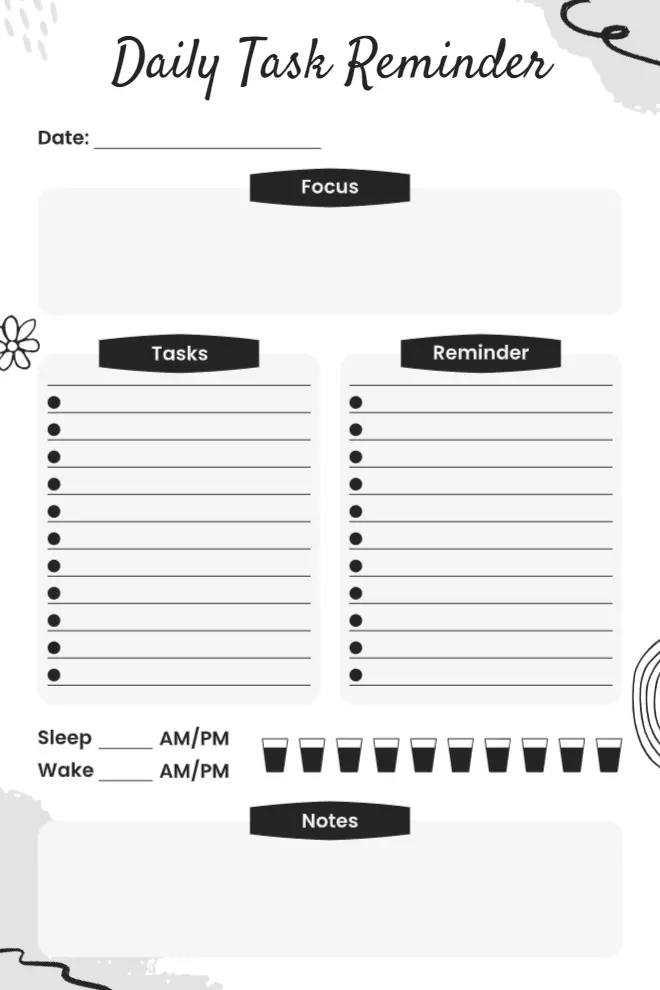
Designing a daily task planner should include simplicity in navigation and user intuition. A balanced format, along with clear sections and abundant writing space, prevents diversion. User effectiveness in managing day-to-day workload meets priority tracking needs through sections that keep tasks distinct from reminders and notes.
Task planner templates that function in different ways are crucial to support numerous planning requirements. The planner features an adaptable format that remains flexible when used in a printable PDF format or digitally. Useful design features in templates improve system usability, which lets users create effective daily plans and maintain an organized approach to tracking their activities.
What Are the Key Sections of a Daily Task Reminder Planner Template?
A well-designed daily task reminder planner template by PlanWiz enhances productivity by helping users manage important tasks while staying organized. With a simple layout, appealing design, and high functionality, it ensures easy navigation and efficiency. The following key components make it an effective planning tool.
Clear Sections for Tasks & Reminders
The ideal planner maintains distinct organizational sections that provide both task areas and reminder systems to avoid user confusion in task management. The segregation of tasks into distinct areas allows people to handle their workloads properly, thus avoiding deadline misses.
- Through the Tasks section, users can organize particular tasks that they must complete during their day. Storing all responsibilities at a single location helps people maintain organizational structure, whether the responsibilities stem from work, household tasks, or personal obligations.
- Users can track their essential dates and meetings through the Reminders section, which prevents them from missing them. The tool helps users maintain constant awareness of all their major obligations.
- Bullet points and checklists used in both areas of the planner help create better visibility and simplify item tracking, which brings satisfaction when checking off completed tasks.
Prioritization Features
Users need more than a basic task list from their Daily Task Reminder Planner because they must identify which tasks take priority. A task-planning system should include features that prioritize essential tasks because these assignments require the most attention.
- The “Focus” Section, as well as the “Top Priorities,” displays the tasks that must be finished immediately as your top priorities. The division in this section helps people avoid feeling overwhelmed while keeping critical assignments at the forefront to prevent their disappearance in lengthy task lists.
- The workflow structure that maximizes productivity becomes possible when tasks get numbered according to priority using time-sensitive approaches with labels like “First Priority” and “Second Priority.”
- Color coding or using symbols (stars, exclamation marks, or bold text) can visually differentiate urgent tasks from less critical ones, ensuring a quick and effective way to allocate time efficiently.
Sleep & Wake Tracking
The quality of a person’s sleep routine consistently affects their productivity levels and concentration abilities, along with their health status. The sleep and wake tracker forms a crucial part of daily task reminder planner templates because it allows users to track their sleep patterns while making needed adjustments to their schedules.
- The system permits users to keep track of their sleeping and waking activities to create awareness about their sleep patterns and establish better health routines.
- The feature strengthens people to establish regular sleep patterns, which guards against fatigue and enhances brain performance throughout daily activities.
- Long-term review of sleep data enables users to discover energy-affecting patterns that allow them to adapt their lifestyle for better productivity.
Hydration Tracker
A person’s energy levels and concentration ability, along with general health, depend on hydration. The planner incorporates a hydration tracker system that supports users in monitoring their daily water consumption.
- Users can mark off eight water intake points by using water icon checkboxes or checkmarks in the water tracker software.
- Monitoring water consumption regularly promotes better hydration behavior, which helps prevent exhaustion as well as reduce headaches and impairments in attention.
- Set timer prompts that remind individuals to maintain hydration at scheduled points to help people stay hydrated during their active days.
Notes Section
I believe that a planner ought to focus on task management with sufficient room to accommodate free-form thinking, idea generation, and reflective activities. Users can add free-text information into the notes section when their content exceeds predefined categories.
- Individuals can add last-minute reminders and ideas with motivational quotes, together with daily thoughts, inside this section. Explore our notes planner templates to enhance your reflective planning and keep your ideas organized.
- People remain disorganized because it functions as a brain-organizing tool that prevents mental organization. The system functions for maintaining an orderly arrangement of diverse data.
- Users may conduct day-end reviews in this part of the template. Users access this portion to review their daily achievement,s coupled with self-improvement assessments, which lead to creating intentions for the subsequent day.
How Does an Editable Daily Task Reminder Planner Template Boost Efficiency?
An intuitive Daily Task Reminder Planner Template is a game-changer for productivity, reducing stress, and improving focus. The design of a planner significantly impacts how effectively users organize tasks, prioritize responsibilities, and maintain mental clarity. By leveraging cognitive psychology, usability principles, and behavioral science, an intuitive planner boosts efficiency in multiple ways.
- Reducing Cognitive Load: Cognitive Load Theory suggests that our brains can only process a limited amount of information at once. A structured planner offloads mental strain, allowing users to visually map out their day instead of mentally juggling tasks. This results in clearer thinking and improved decision-making.
- Prioritization and Task Management: An intuitive planner organizes tasks based on urgency and importance, helping users focus on what truly matters. The right task prioritization tips for better planning ensure that the most important tasks are tackled first, leading to improved productivity and efficiency.
- Priority labels (urgent, important, low priority)
- Time blocking for focused work
- Deadline tracking to prevent last-minute stress
- Visual Hierarchy for Faster Navigation: A clean, well-structured planner enhances usability by presenting tasks in an organized and easy-to-read format. Effective planners use
- Color coding for task differentiation
- Minimalist layouts for better focus
- Progress tracking to boost motivation
- Habit Formation and Routine Building: Consistency is key to long-term productivity. An intuitive planner blends into daily routines, reinforcing habits and ensuring tasks follow a structured workflow. By simplifying planning and eliminating decision fatigue, our productivity planner templates transform chaotic schedules into streamlined efficiency, enhancing focus, motivation, and success.
How Can I Customize a Daily Task Reminder Planner Template for Different Needs?
A task reminder planner needs to adapt to different life responsibilities and personal situations. Discover our customizable planner templates to organize your daily tasks for professionals, students, or stay-at-home parents, with smart ideas to tailor your planner for optimal efficiency and enhanced organizational capacity. The following approaches will help you refine your planning system.
Tailored for Professionals
- Add sections for meeting schedules, project deadlines, and work priorities to maintain productivity.
- Use a digital version to access and update tasks from any device, ensuring a smooth workflow.
- Incorporate a notes section to jot down important ideas, quick reminders, or follow-ups.
- Implement a goal-tracking area to set long-term objectives and measure progress effectively.
For Students
- Create a study planner with sections for subjects, assignments, and due dates to manage workload efficiently. Our study planner template is designed to keep students organized and on track.
- Utilize color-coded categories to differentiate subjects, making the organization visually appealing and structured.
- Add a habit tracker to monitor daily study routines, revisions, and productivity goals.
- Include a motivation section with affirmations or progress reflections to stay encouraged throughout the academic journey.
For Stay-at-Home Parents
- Dedicate sections for household chores, meal planning, grocery lists, and family schedules for better home management. Explore our mom planner templates for family-focused planning solutions.
- Use checkboxes, stickers, or icons to make tracking tasks engaging and visually appealing.
- Add a self-care section to plan relaxation, hobbies, or fitness routines, ensuring a healthy balance.
- Include a kids’ activities tracker to schedule playtime, school events, or learning sessions efficiently.
The daily reminder planner works best when customized to fit your lifestyle. Whether for work, school, or home, you can optimize your daily routine with organizational strategies like priority lists and habit trackers to stay on top of tasks, reduce stress, and enhance efficiency.
Conclusion
A well-structured Daily Task Reminder Planner Template enhances productivity, organization, and balance. Avoiding common pitfalls like overloading tasks, neglecting priorities, and skipping self-care ensures long-term efficiency. Exploring the best daily planner apps, tracking progress, and reflecting on achievements make planning effective, reduce stress, and help them achieve daily goals with clarity and ease.
FAQs
A daily task reminder planner template is a tool designed to help you organize your daily tasks. It provides a simple structure to track, prioritize, and complete your tasks effectively.
You can personalize the template by adding categories like work, personal, or urgent tasks. Customize colors and sections to make it more suited to your daily routine and preferences.
To use it effectively, list your tasks in order of importance, set time slots for each, and review your progress throughout the day. Adjust as needed to stay on track.
Yes, there are plenty of digital templates available through apps like PlanWiz that allow for easy updates, reminders, and syncing across multiple devices to keep you organized on the go.
A planner template helps improve productivity by breaking your day into manageable tasks, helping you focus on priorities, and keeping you on schedule without feeling overwhelmed.



