
Managing a successful law firm involves juggling court deadlines, client meetings, researching cases, tracking billable hours, and at the same time abiding by professional standards and keeping work, life boundaries. A daily tasks for lawyers planner is an excellent tool to help you arrange your whole workday harmoniously, thus, focusing on providing first, rate legal services and not worrying about missing out on anything.
This printable planner template from Planwiz comes with specialized pages for hourly planning, prioritized task organization, communication with clients, document organization, and end-of-day analysis. Download and begin using it today to enjoy more productive days with reduced stress and improved case management results.
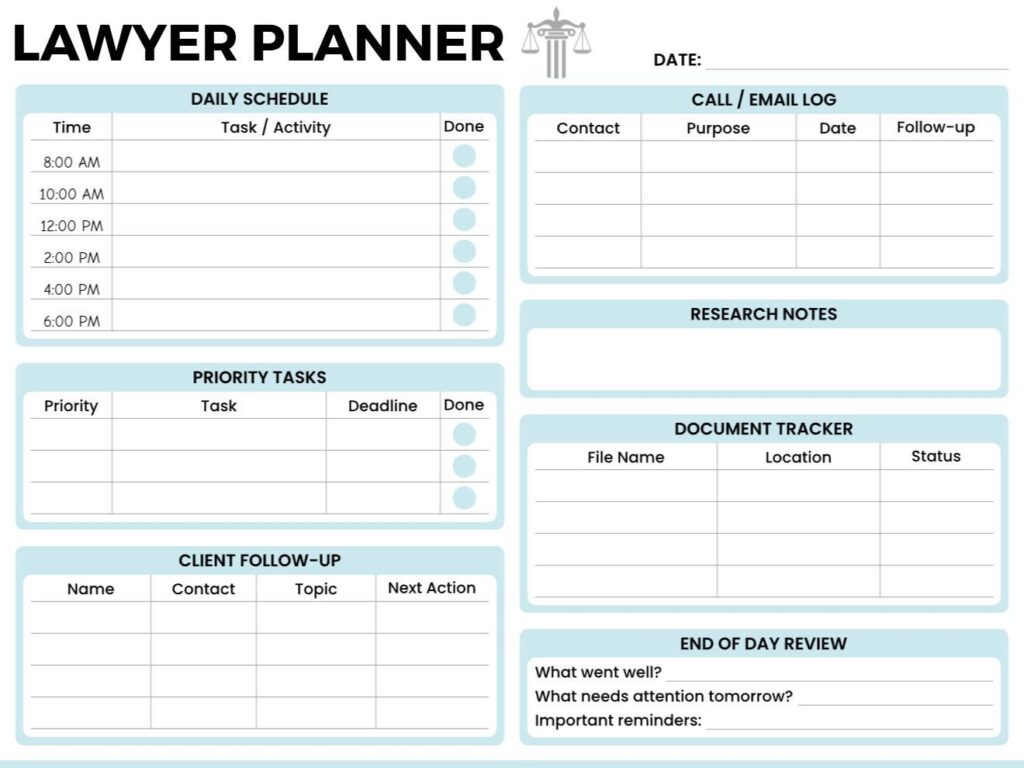
What is a Daily Tasks for Lawyers Planner?
A daily tasks for lawyers planner is essentially a daily organizer that helps lawyers structure their day, handle their case duties, and keep up with client communications all in one place. Compared to standard daily planners, this planner has sections for law practice such as document management, tracking time for bills, marking court deadlines, and client follow, ups which are specifically oriented to the attorney’s work.
The planner combines time-blocking functionality for scheduled commitments like court appearances with flexible task management sections for ongoing case work such as legal research and document drafting. Just like daily planner templates, it aids in organizing your whole workday but with legal, specific features. By integrating schedules, priorities, communications, and documentation into one tool that can be referred to daily, not only is mental stress reduced, but a documented workflow is also created that ensures instant productivity and professional accountability.
How Does a Daily Tasks for Lawyers Planner Help Organize Your Day?
Manageable, productive workdays are created by daily organization in a chaotic legal practice. Use these tried-and-true methods to efficiently manage your time while preserving professional satisfaction and high-quality client service.
1. Begin with Morning Planning (5-10 Minutes)
Before even looking at your emails and voicemails, review your daily tasks for lawyers template. Determine your top 3 priority tasks that you need to accomplish today despite any interruptions. Transfer your scheduled appointments from your electronic calendar into the Daily Schedule portion with preparation time accounted for. To look ahead into the long term, you may want to use this planner in combination with weekly planner templates to review future case deadlines.
2. Time-Block Deep Work Sessions
Reserve 2, 3 hours at a time for uninterrupted work such as legal research, drafting documents, or case strategy. You can put these blocks in your calendar just as you would client meetings, to indicate that they are very important and cannot be changed. Doing so helps you avoid situations where other activities that require a quick response take up the time that you have set aside for in, depth case work.
3. Batch Similar Tasks Together
Group similar tasks to minimize context switching, which is energy-draining. All return calls from clients should be scheduled between 2-3 PM, handling emails within time slots, and admin tasks like logging time should be batched at the end of the day. The to do planner templates, when combined with your daily planner, helps you manage the batched tasks effectively, thus increasing productivity by 40% compared to task switching.
4. Apply the Two-Minute Rule
If a task takes under two minutes-responding to simple emails, signing documents, making quick calls-do it immediately. This prevents small tasks from accumulating into overwhelming lists while keeping your priority section focused on truly important work.
5. Document Communications in Real-Time
Log every client phone call, email, and meeting in your Call/Email Log section immediately. Include the purpose, date, and required follow-ups. Real-time documentation ensures accurate billing and prevents forgotten follow-ups.
6. Protect Your Lunch Break
Block 45-60 minutes mid-day for an actual break away from your desk. Use this time to recharge mentally so afternoon work maintains morning-level quality. Do a quick 3-minute planner review to adjust afternoon priorities based on developments.
7. Set Communication Boundaries
Set specific times for checking emails and making non-urgent calls instead of allowing frequent interruptions. Make boundaries with clients: “I return all non-urgent calls between 2-4 PM daily” provides predictability while ensuring your concentration.
8. Complete End-of-Day Review (5 Minutes)
Make use of your lawyers planner template to fill out the End of Day Review section before closing the day. Take note of what went well, what needs to be addressed tomorrow, and what are the necessary reminders. This practice will help you close out the day mentally while not forgetting anything important.
What Are the Best Time Management Tips for Lawyers Using a Daily Planner?
Some of the special challenges that lawyers have in time management include unpredictable court schedules, difficult clients, and the need to maximize billable hours. These are some of the strategies that will help you manage your time and boost your productivity.
1. Plan Tomorrow Today
- Spend the last 10 minutes identifying tomorrow’s top priorities in your daily tasks for lawyers planner
- Schedule important case work before urgent matters dominate your morning
- Pre-populate your Daily Schedule with known appointments and deadlines
2. Protect Peak Energy Hours
- Block 8-11 AM for cognitively demanding work like legal research and complex drafting
- Reserve afternoons for meetings, calls, and administrative tasks requiring less focus
- Match task difficulty to your natural energy patterns for maximum efficiency. Track your energy levels over time with monthly schedule planner templates to identify your most productive patterns.
3. Use 90-Minute Time Blocks
- Block calendar in minimum 90-minute chunks instead of scattered 30-minute meetings
- Fragmented schedules destroy sustained focus and reduce work quality
- Batch related meetings together to minimize context-switching costs
4. Track Time in Real-Time
- Update time entries as you complete each task using your planner’s time notations
- Real-time tracking captures 15-20% more billable hours than delayed Friday reconstruction
- Fresh memory ensures more accurate descriptions and proper task categorization
5. Touch It Once Rule
- Take immediate action when reviewing content-respond, delegate, file, or schedule proper time
- Reading the same document repeatedly wastes 30-45 minutes daily
- Make decisions quickly to prevent backlog accumulation
6. Create Communication Templates
- Develop email templates for status updates, discovery requests, and scheduling confirmations
- Build document templates for frequently filed motions and standard agreements
- Templates save 45-60 minutes daily while ensuring consistent professional quality. Consider creating meeting templates using meeting agenda templates format for recurring client conferences.
7. Limit Meetings to 45 Minutes
- Schedule meetings for 45 minutes instead of full hours to build in transition time
- Shorter blocks force more focused discussions without reducing effectiveness
- Most meetings expand to fill available time regardless of actual content needs
8. Set Client Office Hours
- Designate specific times like Tuesday/Thursday 3-4 PM for client questions
- Batch client communications to protect focus for deep case work
- Clients appreciate predictability about when they can reliably reach you
9. Review Weekly on Fridays
- Preview upcoming week’s commitments and pre-populate your lawyers planner with priorities
- Identify potential scheduling conflicts before they become urgent problems
- Distribute heavy workload more evenly across the week instead of crisis management
10. Delegate Strategically
- Identify tasks that don’t require attorney expertise-basic research, formatting, scheduling
- Train paralegals and support staff to handle routine matters consistently
- Focus your time on work only you can do: legal analysis, strategy, and client counsel
Frequently Asked Questions
A lawyer daily planner template is a tool that helps lawyers keep track of cases, client communication and court deadlines, all in one document. The planner is unique as it has extra pages designed specifically for case, research and client follow, up organization.
Lawyers need a planner as they have to juggle a number of cases simultaneously, meet tight deadlines and also arrange the documentation. The planner aids lawyers in arranging their thoughts as it gives them different areas to write down their priorities, appointments, and case notes.
Every morning, first look at your calendar and jot down all the appointments, court sessions, and meetings with clients into the Daily Schedule section with exact times. Next, pick out your 3, 5 top essential tasks and write them down in the Priority Tasks section with their respective deadlines.
During the day, update the Call/Email Log right after each client communication to keep a record of the contact, the purpose, and what follows need to be done.
Before leaving the office, work on the End of Day Review section to consider what you have done and see what will be the focus of your attention tomorrow.
Use this in conjunction with goal planner templates to help you align your daily tasks with your long-term career aspirations and give your professional development a deeper touch while keeping track of your objectives.
Fully personalizing your lawyer’s daily planner will provide various and more effective ways of carrying out fundamental tasks that are most applicable to your law practice.
A criminal lawyer, for example, may label “Document Tracker” as “Evidence Log” and include witness tracking fields, while a corporate lawyer may label “Client Follow, Up” as “Transaction Status.”
You can also modify the time slots of the Daily Schedule to fit your regular working hours; for example, if you work earlier than 8 AM or later than 6 PM. You may include task priority ranking systems (High/Medium/Low) or employ the use of colors to distinguish case types.
The lawyer’s daily planner helps to enhance the accuracy of billable time by giving a comprehensive record of all the case, related activities done during the day.
The Call/Email Log records client communication along with timestamps, and the Daily Schedule reflects the exact way time was divided among different cases.
Most lawyers put small time figures next to each task or appointment done, either in minutes or 6, minute billing units. Going through your finished planner while entering time at the end of the day allows you to note down billable activities that might have been forgotten.
Just start with the two essential areas: the Daily Schedule for under, time activities such as court appearances and client meetings, and the Priority Tasks section for critical work that needs to be done. Concentrating on these basic features will allow you to develop regular planning habits while not feeling overwhelmed.
After one or two weeks of using these core sections persistently, slowly bring in the Call/Email Log to better keep track of client communication. When that is a natural thing for you, put the End of Day Review section for reflection and self, improvement.
Whenever possible, make it a point to update your daily tasks for lawyers template in real, time, especially when it comes to client communications and completed tasks.
It is recommended to write down each telephone call or email right after it has happened in the Call/Email Log to have an accurate record while the details are still fresh in your mind.
After lunch, reserve 2, 3 minutes to look back at what you’ve done and change your afternoon priorities according to what had happened in the morning.
This check, in at mid, day allows you to be more focused on what matters most instead of letting supposedly urgent tasks take over your whole day.
The worst offender is having too many priority tasks to complete, which is the equivalent of trying to check off 10-15 things on a to-do list in one day, leaving you with a sense of inadequacy.
Keep your Priority Tasks list on the lawyer schedule planner to 3-5 items that are absolutely essential and must be accomplished despite interruptions.
The final mistake is not blocking off time for concentrated work activities such as legal research, document preparation, or case analysis. These activities should be marked on your Daily Schedule just as you would schedule client meetings.
Use the Document Tracker section in your attorney task planner
to monitor files you’re actively working with that specific day rather than trying to track every document across all cases. List file names, current locations (cloud storage, physical filing cabinet, sent to opposing counsel), and status (draft, under review, filed).
For comprehensive document management across all cases, maintain a separate master tracking system in your case management software. You can also create case-specific tracking using business planner templates if you run a solo practice managing operational aspects.
Use the daily planner’s tracker as a quick-reference tool for today’s active files so you’re not constantly searching for documents.
Solo practitioners can increase the size of the Client Follow-Up component of their law office planner template because they handle all client relationships on their own without the help of support staff.
They may also include a business development component to monitor referral sources, follow-ups on networking, and marketing efforts.
Firm attorneys can decrease the size of the document tracking component of their daily tasks for lawyers template if they have paralegals handling their files, but should increase the size of the Research Notes component for intricate legal analysis.
Keep completed daily tasks for lawyer planner pages as part of your case documentation, particularly sections covering client communications, research notes, and case strategy decisions. Scan finished planners to PDF format and store them in relevant digital case files, creating a detailed timeline of activities.
Retain these records according to your jurisdiction’s attorney file retention requirements-typically 5-7 years after case closure for most practice areas.
The detailed daily record often captures information not documented elsewhere in formal case files, making it valuable for professional liability protection.



