
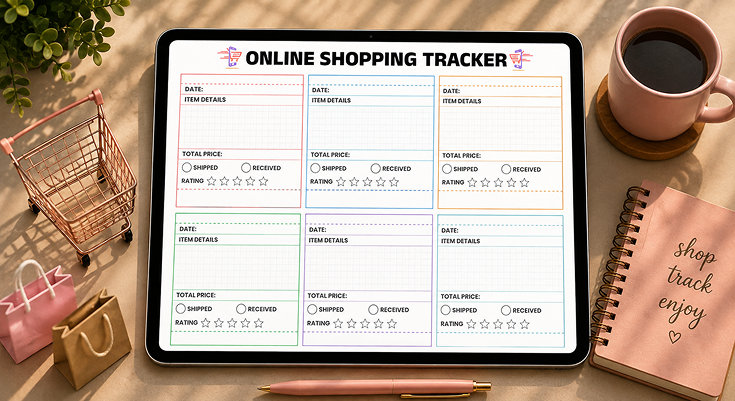
Organizing multiple orders from online shopping sites can be a daunting task if the packages are delivered from different sites at different times. An online shopping order tracker is a tool that allows you to track the dates of your purchases, the status of your deliveries, your total spending, as well as the ratings of the products, in one place.
Leave behind the hassle of managing confirmation emails, retailer apps of retailers, and shipping updates on different platforms that do not allow you to have a complete view of your purchase history. This tracker is provided by Planwiz in PDF or digital form, depending on your organizational needs, to give you an instant view of what is being shipped, what has been delivered, and how much you have spent.

What is an Online Shopping Order Tracker?
An online shopping order tracker is a centralized system that keeps a record of all your orders from various online retailers. It tracks the date of ordering, the description of the ordered item, the price of the item, the tracking number, and the status of the delivery. The online shopping order planner is a simple way of organizing your orders and tracking the status of the ordered items without having to check various confirmation emails or log into various online retailer accounts.
Unlike retailer-specific apps that only show one store’s orders, this tracker provides complete visibility of all your purchases at a glance. The template includes sections for dates, item details, costs, shipping checkboxes (shipped/received), and rating systems to evaluate products after delivery. It is also a permanent record of returns, warranties, and budgeting, even after the confirmation emails are deleted or the online order history expires. For other types of purchases, you may want to use budget planner templates to track your spending habits.
How to Track Orders Using an Online Shopping Order Tracker?
Managing purchases from Amazon, Target, Walmart, and other sites simultaneously requires a centralized system to prevent missed deliveries and duplicate orders.
5-Step Tracking System
Step 1: Create a confirmation email folder Set up an “Online Orders” folder in your email and automatically filter all purchase confirmations there. This gives you one location to reference instead of searching your entire inbox.
Step 2: Extract essential order details immediately Right after purchasing, copy four critical pieces of information: order date, item description, total price, and tracking number. Waiting even a few hours increases the chance you’ll forget or the confirmation email gets buried.
Step 3: Use your online shopping order tracking form. Enter all information in your tracking form within 5 minutes of completing your purchase while the confirmation page is still open. Use detailed descriptions of the items, such as “Navy running shoes size 9,” instead of general terms such as “shoes,” in case multiple packages are received. If tracking business purchases, use business planner templates to distinguish between personal and business spending.
Step 4: Set up shipping notifications Enable text or email alerts for shipping updates from major carriers (USPS, UPS, FedEx). Most retailers provide tracking links in confirmation emails-bookmark these or add them to your tracker notes section.
Step 5: Update status twice daily during delivery windows Check your tracker morning and evening when expecting packages. Mark “Shipped” when you receive tracking confirmation, and “Received” immediately upon delivery to maintain accuracy.
Tracking Methods Comparison
| Method | Pros | Cons | Best For |
|---|---|---|---|
| Email confirmations | Automatic, detailed receipts | Scattered across inbox, hard to see totals | Single orders |
| Retailer apps | Real-time updates, easy reordering | Requires multiple apps, no spending overview | Brand loyalists |
| Package tracking apps | Consolidates carriers, push notifications | Privacy concerns, ads, requires internet | Tech-savvy users |
| Printable tracker | Privacy, offline access, budget visibility, no ads | Manual entry required | Multiple retailers, budget tracking |
Multi-Retailer Management Tips
Color-code by retailer: Use different colored pens or highlight each retailer’s orders differently in your tracker. This helps you quickly identify which companies consistently deliver on time versus which ones are always late.
Track by expected delivery week: Group orders by their estimated arrival week rather than purchase date. This shows you when to expect heavy package volume and helps you plan to be home for deliveries. Use weekly planner templates alongside your tracker to schedule delivery windows around your availability.
Note gift vs. personal purchases: Add a small “G” next to gift items so you don’t accidentally open packages meant for others. This is critical during holidays when you might order for yourself and multiple family members simultaneously. Christmas planner templates can help you coordinate gift purchases with your order tracking during the holiday season.
Frequently Asked Questions
It’s an organizational system that tracks all of your purchases in one place to monitor shipments and keep track of your spending.
An order tracker for online shopping helps you keep track of order dates, descriptions, costs, and statuses without having to search through various email accounts. This helps avoid lost shipments, keeps track of your spending habits, and is a great way to refer back to for returns or customer service inquiries.
When there are holidays for sales or gift-giving, you could find yourself placing 10-20 orders in a short span of time at different stores. Without a means to track it all, it is easy to forget what you ordered, when it will arrive, and how much you have spent.
Online shoppers, holiday gift buyers, small business owners, and budget-conscious families will benefit the most from the organizational aspect.
If you are placing more than 5 orders per month, a tracking system will help you avoid missed deliveries and budget overruns. This is a must-have for anyone who is organizing gift purchases for multiple individuals or purchasing materials for a home-based business.
Families sharing one household address especially benefit because everyone knows which packages are expected and who they’re for.
Consider using family planner templates to coordinate household purchases and package deliveries among all members. This prevents confusion when multiple boxes arrive on the same day from different retailers.
Fill in each order immediately after purchasing, then update the status as packages ship and arrive at your door.
Record the order date first, then write detailed item descriptions including size, color, quantity, and thretailer’s name. Enter the total price paid, including all taxes and shipping fees,s for accurate budget tracking.
Check “Shipped” when you receive confirmation of tracking, and then check “Received” when you have the package in hand. Rate your satisfaction with the star system within 24 hours of receiving the product.
Update it three times for each order: immediately after purchase, when the shipping confirmation email is received, and on the day the package is delivered.
Use your first update immediately after clicking “Place Order” while the information is still fresh in your head and the confirmation email is open in front of you.
If you have multiple daily tasks to track, in addition to shopping, daily planner templates assist you in allocating time for tracking packages and accepting delivery. Update to “Shipped” status within 24-48 hours of receiving tracking notification.
Update to “Received” status on the actual day of delivery, not the estimated delivery day, since this shows which retailers are always late with deliveries. If an order has not moved from one status to the next in the expected time frame, you will be able to notice any issues early enough to contact the retailer.
Add a “Recipient” column and separate the different parts by individuals in order to arrange gifts purchases without duplications or exceeding the budget.
Write down the name of the gift recipient for each item, or simply allocate the whole color, coded sections to the members of the family. Pink section is for Mom’s gifts, blue Dad’s, green kids’, etc.
It’s also possible to add checkboxes for “wrapped” and “hidden” if you’re planning the entire gift, giving process. Some people place the budget limits for each recipient at the beginning of each section to keep the holiday expenses under control.
Yes, use one section per subscription service to monitor recurring charges, delivery patterns, and value assessment over time.
Instead of individual order dates, write the subscription name like “Beauty Box Monthly” and note which month’s shipment you’re tracking.
The price field shows recurring costs, helping you evaluate if subscriptions are worth continuing. Track these recurring expenses in monthly schedule planner templates to see how subscription charges impact your monthly budget.
Use the rating stars to rate the contents of each month’s box, building a record of quality. After 6-12 months, you’ll have a good idea of which subscriptions offer quality and which are disappointments.
Use Excel or Google Sheets to create column headers for your own personal online shopping order tracking tool at the top of the page. In the Status column (Ordered, Shipped, Delivered, Returned), use data validation to create drop-down menus so you can click instead of type.
At the bottom of the Price column, add a SUM formula to automatically calculate your total spending as you enter orders. Rows can be colored by retailer or delivery week for easy scanning.
Don’t put off entering information, skip tracking numbers, forget to update delivery status, or misplace your tracker before the returns window expires.
The worst offender is when someone says, “I’ll get around to entering this information later” and then forgets altogether about the purchase. Get the information down right away while the confirmation email is still open-waiting even a short while is likely to cause you to forget.
A lot of people will enter information as received but forget to actually leave feedback, which can be very helpful for future purchases. Others will get rid of their finished trackers too quickly and then be unable to prove purchase dates when warranty disputes come up months down the line.
Calculate your running total after each entry and establish a visible budget limit for each month to establish spending awareness and accountability.
Before beginning each month, list your shopping budget at the top of a new page in bold. After each new entry, manually calculate the sum of all the “Total Price” entries to determine the running total.
Establish shopping budget reduction goals in goal planner templates to monitor progress towards establishing healthier spending habits.
Use red ink or highlighting to indicate when you go over budget. The act of writing and calculating makes spending more tangible, as opposed to online shopping.
Keep them for at least a year to account for return deadlines, warranties, and year-end budget analyses or tax filings.
Most stores have return deadlines of 30-90 days, and many products come with a one-year warranty, so your online purchase tracking order is a safety net. In case you misplace your original receipt or email copy, the tracker is proof of purchase date.
Store your finished trackers in a three-ring binder sorted by month and year for quick access if you need to check something. Digital copies of each finished page are cloud storage in case the physical copy is damaged or lost.






