Do you remember how we used to plan things without the ipad planner app? Writing down lists on paper, sticking notes everywhere, or just trying to remember everything? It worked… kind of. But it was also easy to forget things or feel stressed.
Now there’s a better way to plan.
With an iPad planner app and an Apple Pencil, planning feels easier and more fun. It’s like having your own notebook on the screen, where you can write, draw, and organize your day the way you like it.
You don’t need to be a tech expert to use it. You can tap, write, erase, and move things around with your fingers or the Apple Pencil. It feels nice and smooth, like writing on real paper.
And it’s not just about making to-do lists. It helps you feel calm, stay focused, and enjoy getting things done. Whether you’re a student, a parent, or someone with a lot to do, this kind of planning can really help.
In this guide, I’ll show you how using an iPad planner app with Apple Pencil can make your life feel more organized and less stressful. It’s simple, useful, and even fun.
Let’s get started! 😊
Table of Contents
1. What Is the Digital Planner Revolution and Why Should You Care?
2. Why iPad with Apple Pencil Is the Best Tool for Digital Planning
3. How Digital Handwriting Helps You Focus, Remember More, and Get Creative
4. The Creative Side of Planning with the iPad Planner App
5. The Future of Digital Planning with iPad and Apple Pencil
6. iPad Planning: Where Wellness and Productivity Come Together
7. How the iPad + Apple Pencil Combo Supports Non-Linear Thinking
8. Common Mistakes Beginners Make with iPad Planning
9. Conclusion
What Is the Digital Planner Revolution and Why Should You Care?
Let’s be real, keeping life organized isn’t always easy. Between work, school, appointments, and everything else, it’s a lot to handle. That’s why so many people are turning to something that just makes sense: a digital planner for iPad.
This isn’t just about going paperless. It’s about making your planning easier, more flexible, and a lot more fun. With the right iPad planner app and your Apple Pencil, you can do way more than just write to-do lists. You can move things around, color-code your tasks, and even make your planner look like you, personal and creative.
How Digital Planning Is Different from Traditional Planning
Traditional planners can be helpful, sure. But once you write something down, you can’t change it. Cross-outs, messy pages, and trying to squeeze in extra notes? Not great.
Now imagine this: You open your digital iPad planner, tap a date, and plan your whole week in minutes. Do you make mistakes? Erase them. Need more space? Add a new page. Want to color-code your calendar or add cute digital stickers? Go for it.
That’s the beauty of using a digital planner for iPad: it gives you the freedom to plan your way. It’s light to carry, super neat, and way more fun to use. It’s also a great choice if you want to cut down on paper clutter and help the environment.
For example, a student can create different pages for each subject in their iPad planner, add notes, set reminders, and even draw out ideas with their Apple Pencil. Everything stays in one place, and it’s easy to use every day.
What Makes It a True Revolution in Productivity
This isn’t just a tech upgrade, it’s a mindset shift. With the best digital planner app for iPad, you’re not just making lists; you’re actually designing a system that fits your life.
You can make your planner match your style, mood, or goals. Add inspiring quotes, bright colors, fun fonts, whatever keeps you motivated. And the best part? You’ll actually want to open your planner every day.
No wonder so many people on YouTube and TikTok are sharing their setups using the best planner app for iPad. Whether it’s a simple daily checklist or a full-on life planner, you’ll find a setup that works for you. If you’re tired of losing sticky notes or flipping through messy notebooks, now’s the perfect time to try a digital planner that iPad users love. Whether you’re looking for the best ipad planner apps or just a simple way to stay on track, digital planning can truly change the way you plan.
Why iPad with Apple Pencil Is the Best Tool for Digital Planning
If you’re thinking about switching to a digital planner for iPad, you’re in for a treat. Using an iPad planner with the Apple Pencil feels like writing on paper—but better. It’s smooth, quick, and gives you a ton of ways to plan your life in your own style.
Whether you’re planning your week, jotting down ideas, or just keeping track of life, this combo gives you the freedom to do it all your way.
Apple Pencil Features That Boost Productivity
One of the best things about using a digital iPad planner is how good the Apple Pencil feels. It’s super easy to write with. You can draw thick or thin lines just by pressing a little harder or tilting the pencil slightly. It’s like magic—but simple.
There’s also a feature where you just double-tap the pencil to switch tools. So if you’re writing something and make a mistake, just tap twice and switch to the eraser—no extra buttons or menus.
Let’s say you’re writing your daily goals in the best planner app for iPad. You can switch between different pens, colors, or highlighters in seconds. It’s quick, clean, and feels kind of fun too. That’s why people love using the Apple Pencil with their iPad planner—it just works smoothly.
Want something crafted specifically for Apple Pencil use? Try the Pencil Planner designed for smooth digital handwriting and flexibility.
Why iPad Is the Ideal Canvas
When it comes to choosing where to use your planner, the iPad is hands down the best option. The screen looks bright and clear, and writing with the Apple Pencil feels natural and easy. Plus, you can use Split View to open your planner on one side and a website or notes on the other. Super handy when you’re planning a project or researching something.
Need to save files or templates? The Files app makes it simple to stay organized. And with iCloud, Dropbox, or even Google Drive, your planner stays with you on all your devices—anytime, anywhere.
Compared to other tablets, the iPad gives a smoother, more reliable planning experience. Apps like PlanWiz, Zinnia, and GoodNotes are designed especially for the iPad, so everything runs fast and looks great. That’s why so many people say it’s the best digital planner for iPad hands down.
Real-Life Use Cases
The cool thing about digital planning is how many different ways you can use it. People from all walks of life are finding it super helpful:
- Students use it to take class notes, track assignments, and plan for exams.
- Entrepreneurs plan out projects, business goals, and daily tasks.
- Parents organize family activities, meals, and budgets all in one place.
- Creative folks use it to sketch ideas, make content calendars, and collect inspiration.
For example, a freelance designer might use PlanWiz to plan Instagram posts, GoodNotes to sketch designs, and Notability to record ideas during client calls. All are using just their iPad planner app with Apple Pencil.
How Digital Handwriting Helps You Focus, Remember More, and Get Creative
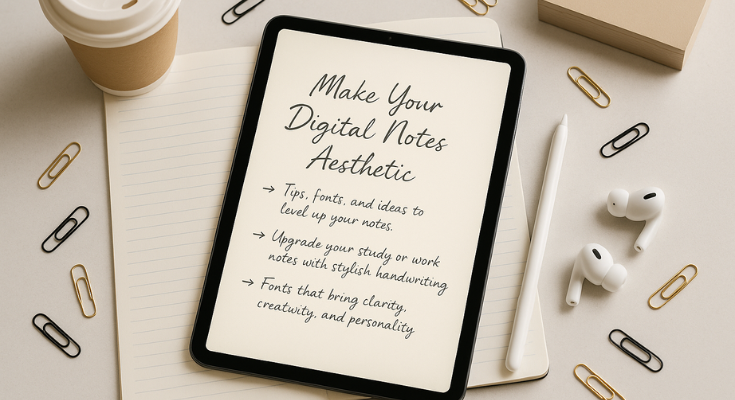
Did you know that writing things by hand can actually help your brain? It’s true! When you write something down, you tend to remember it better. That’s one big reason why so many people love using a digital planner for iPad, especially with an Apple Pencil. It gives you that handwriting feel, but with all the ease of digital tools.
Writing by Hand vs. Typing: What’s Better for Your Brain?
Typing might be quicker, sure. But when it comes to truly remembering what you write, handwriting wins. A study from Japan showed that people who used a stylus (like the Apple Pencil) on a tablet remembered more than those who typed the same info. Why? Because writing things out makes your brain pay more attention.
When you handwrite your plans or ideas in an iPad planner, you’re not just copying words. You’re thinking about them, shaping them, and making sense of them as you go. It slows things down in a good way, helping your brain really take in what you’re writing.
Why Apple Pencil Handwriting Just Feels Right
Using the Apple Pencil with your digital iPad planner feels a lot like using a real pen, but with way more fun options. You can draw arrows between tasks, doodle in the margins, or add little symbols to break things up. It’s not just writing—it’s a whole creative process.
Imagine planning your week: You circle your top 3 goals, draw lines to connect them to smaller tasks, maybe even sketch out your mood for the day. When you’re doing this in your best digital planner for iPad, your brain is way more involved compared to simply typing out a plain to-do list.
This kind of planning brings out your creative side and helps you focus better. Plus, it just makes planning feel more personal and fun.
Looking for more ways to stay productive? Here are some great tips to increase productivity with a digital iPad planner.
Boosting Memory and Creativity with Your iPad Planner
Here’s the cool part: writing by hand doesn’t just help you remember things. It can spark new ideas, too. When you take your time and actually write out your thoughts in the planner app for iPad, your brain has space to make connections. That’s where creativity happens.
Whether you’re a student taking notes or a small business owner mapping out ideas. Using a digital journal alongside your planner can also be a great way to capture thoughts and track your growth over time, or just someone who wants to stay on top of life, using a digital planner iPad setup can help you think better, not just stay organized.
Planning shouldn’t feel like a task. With the best digital planner app for iPad and the Apple Pencil, it becomes something you enjoy, something that helps your mind slow down, focus, and even have fun along the way. If you’re looking to stay organized and think more clearly, try adding handwriting to your digital routine. It might be just the boost your brain needs.
The Creative Side of Planning with the iPad Planner App
Planning isn’t just about writing down what you have to do. It can also be fun, colorful, and a great way to show off your style, especially when you’re using an iPad planner app with Apple Pencil.
Your planner doesn’t have to look plain and boring. You can decorate it just the way you like! Think of it like a digital scrapbook or a colorful notebook where you plan your day and add a little bit of your personality, too.
Make It Yours with Colors, Stickers, and Fun Fonts
One of the best things about using a digital planner for iPad is that you can make it look exactly how you want. Here’s how:
- Pick colors that match your mood
Blue feels calm, red grabs attention, and green makes you think of growth or new goals. - Add cute digital stickers.
You can download stickers online or even make your own if you want to get creative! - Use fun titles and fonts.s
You can write your headers in cool fonts or colors to make your planner feel special. - Add quotes or pictures you love
Save your favorite sayings or photos from Pinterest and pop them into your planner for a little boost of inspiration.
Using colors and stickers isn’t just pretty; it makes planning something you want to do, not something you have to do.
Make a Planner You’ll Actually Enjoy Using
Here’s a little secret: if your planner looks nice and feels fun, you’ll want to use it every day. So don’t worry about making it perfect, just make it you.
Want a tip? Try this:
- Make a mood board
Collect your favorite colors, sticker ideas, fonts, and page styles. You can look at Pinterest or Instagram for inspiration. - Pick a theme you like
Maybe you like soft colors, bright and bold styles, or clean and simple layouts—whatever makes you happy. - Use your theme in your monthly or weekly pages.
This way, your planner feels like it all belongs together. You can even try a daily task journal setup that blends creativity with structure, great for busy days.
With the best digital planner app for iPad, you can turn everyday planning into something creative and fun. And the best part? It helps you stay organized and happy at the same time!
The Future of Digital Planning with iPad and Apple Pencil
Let’s take a quick peek into the future, because digital planning is getting even cooler! If you already enjoy using a digital planner for iPad, just wait… things are about to get even more helpful, fun, and smart.
Smart Features Are on the Way
Soon, your iPad planner might start helping you plan without you even asking! With new tools like AI (smart computer helpers), your planner could suggest tasks, remind you of your goals, and even create to-do lists for you.
Here’s what’s coming:
- Talk to type – Want to write in your planner just by speaking? You’ll be able to do that easily.
- Better handwriting recognition – Your iPad will get better at reading your writing, no matter your style.
- Quick shortcuts – Tap a button and your planner opens to a custom page with your morning routine, daily goals, and more.
Your Planner Could Be Your Life Dashboard
Now imagine this: Your digital iPad planner isn’t just where you write your plans—it becomes your one-stop place for everything important in your life.
Shortly, your planner might show:
- Your daily steps and sleep from Apple Health
- All your meetings from your calendar
- Notes and thoughts from your journal
- Fitness goals as fun little charts
All of this can be in one spot, inside the best digital planner for iPad—neatly organized, easy to check, and even fun to look at. You can design it to match your style and needs, just like a custom dashboard made just for you.
Why This Matters
We’re moving toward a time where your digital planner iPad setup won’t just help you stay organized, it’ll help you live better. Whether you’re using it to stay healthy, remember birthdays, plan work, or track habits, the best digital planner app for iPad will keep everything in one place.
And the best part? It’s still creative and fun. You’re not giving up color, stickers, or drawings. You’re just making your planner smarter, like a helper you carry around in your bag.
iPad Planning: Where Wellness and Productivity Come Together
Planning your day isn’t just about ticking off tasks anymore. With the help of a digital planner for iPad, it’s also a way to take care of your mind and body. Your planner becomes more than a calendar. It becomes a peaceful space where you can feel calm, clear, and in control.
How Digital Planning Helps Clear Mental Clutter
Let’s be honest. Our brains are carrying way too much. Thoughts, reminders, worries, goals… it all piles up. That’s where your iPad planner app with Apple Pencil can really help.
Think of your digital iPad planner as your brain’s helper. It keeps everything in one place, so you don’t have to remember it all.
Here’s how it can help:
- Do a “brain dump.”
Open a page and write down everything on your mind—big or small. Worries, random ideas, tasks. Just let it all out. - Make vision boards
Add pictures, words, or quotes that show your big dreams or life goals. Seeing them every day keeps you focused. - Use calendars and simple to-do lists.
This helps you stop overthinking and decide what matters most today. - Keep everything together
You can store work notes, grocery lists, family plans, and appointments all in your best planner app for iPad. No more flipping through notebooks or forgetting what’s where.
This kind of planning gives your brain a break. And that’s good for your mental health.
Build Healthy Routines Inside Your Planner
One of the best things about using a digital planner, which iPad users love, is how easy it is to track your habits and reflect on your growth.
Here are some simple ways to include wellness in your digital planner for iPad:
- Habit Trackers
Track daily habits like:
- Sleep hours
- Water intake
- Exercise or steps
- Daily gratitude
- Screen time
- Mood Trackers
Each day, mark how you feel using a color scale or happy/sad faces. Over time, you’ll see what affects your mood most. - Monthly Reflection Pages
Take a few minutes at the end of each month to think about:
- What went well?
- What challenges did I face?
- What made me feel proud?
- Which habits made me feel good?
- What should I do differently next month?
These little check-ins help you stay connected to yourself, not just your schedule. Use productivity planner templates to guide your monthly reflections and stay goal-focused.
A Planner That Supports You Every Day
When you combine wellness and planning, it’s easier to stay focused and feel good. Whether you’re using the best digital planner app for iPad for school, work, or home, it can become your safe space for thinking, growing, and staying on track.
And because everything is digital, you can carry your planner with you wherever you go. No paper. No mess. Just a clean, creative space to help you live better.
How the iPad + Apple Pencil Combo Supports Non-Linear Thinking
Not everyone thinks in neat little boxes or straight lines. Some of us like to brainstorm, draw, or just let our ideas flow. That’s where the iPad planner app with Apple Pencil really shines. It lets you plan the way you think—visually, freely, and without limits.
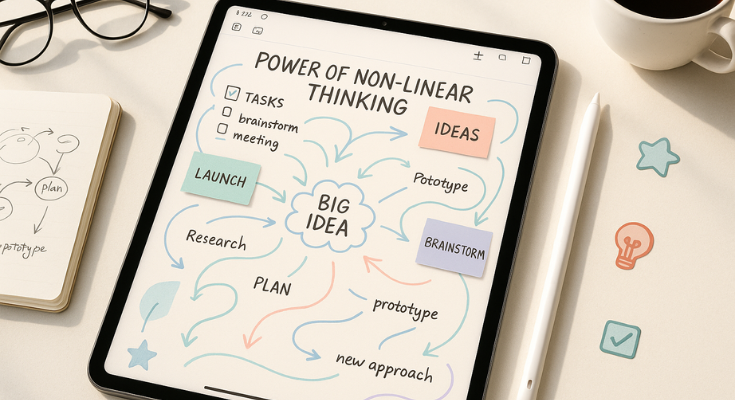
Most old-school planners are pretty strict. They have lines, grids, and checkboxes that tell you how to use them. But with a digital planner for iPad, you get a blank space that works how your brain works.
Using a digital iPad planner is like having a whiteboard you can take anywhere. You can move things around, zoom in on details, or zoom out to see the big picture.
Here’s what makes it so helpful:
- Zoom in when you want to add details to your daily plans
- Zoom out to see your full week, month, or goals.
- Duplicate pages for routines like your weekly check-in. Try using routine planner templates to make this even easier and more structured.
- Drag and drop tasks, ideas, or digital stickers anywhere you like
This kind of flexible setup makes planning feel more like play—and that’s a good thing. It helps you stay creative, focused, and in flow. If you’re someone who thinks visually or just wants more freedom in how you plan, the best digital planner for iPad gives you the space to explore ideas in your own way. And because the best planner app for iPad is all digital, everything stays neat, organized, and easy to update.
Common Mistakes Beginners Make with iPad Planning (And How to Avoid Them)
Starting your journey with a digital planner for iPad can feel exciting, but also a little confusing at first. With so many apps, templates, and ideas out there, it’s easy to make a few common mistakes that slow you down or make you feel overwhelmed.
The good news? These are easy to fix. Let’s walk through the top beginner mistakes and how to avoid them so your iPad planner works for you, not against you.
1. Trying Too Many Apps and Templates at Once
It’s tempting to download every cute planner you see online or try out five different apps in one day. But doing too much too fast can make planning feel stressful instead of helpful.
What usually happens:
You download 10 different planners, open each one, try to customize everything, and suddenly you don’t even know where to start.
What to do instead:
- Start with one app you enjoy using. GoodNotes, Notability, or ZoomNotes are great options and are often rated among the best planner apps for iPad.
- Set up just 3 to 4 key pages to begin with. For example:
- A daily planner page
- A weekly overview
- A goals page
- A simple journal
- As you get comfortable, slowly add more layouts or templates if needed.
Less is more when you’re getting started with a digital iPad planner. Keep it simple, and you’ll use it.
2. Comparing Your Planner to Social Media Perfection
If you’ve ever scrolled through Pinterest or TikTok and seen gorgeous planner pages filled with colors, calligraphy, stickers, and perfect handwriting… It’s easy to feel like your own setup isn’t “good enough.”
But here’s the truth:
Those planners are often made just for photos or videos. They don’t always show what works for daily life.
What to do instead:
- Focus on what makes you feel calm, focused, and in control.
- Stick with simple layouts that are easy to use and update.
- Use your digital planner iPad setup to plan, not to impress.
Remember: A messy planner that works is better than a pretty one you never use.
3. Forgetting to Back Up Your Planner
This one’s a biggie. Imagine spending weeks building your perfect planner, only to lose it all because of a software glitch, app crash, or device reset.
What to do instead:
- Turn on iCloud sync or Dropbox in your app settings so your data stays safe.
- Export a PDF backup of your full planner once a week or at least once a month.
- If you’re also using a Mac, Time Machine can create automatic backups for extra peace of mind.
A little setup now can save you a lot of stress later. The best digital planner for iPad isn’t just well-designed—it’s also well-protected.
Bonus Tips for a Smooth Start
Want to make your digital planning journey even smoother? Try these quick tips:
- Choose one of the best organization apps for iPad based on your lifestyle. If you like visuals, try Zinnia. If you love structure, try GoodNotes or Notability.
- Set a regular “planner check-in” time each day—just 5 minutes in the morning or evening works wonders.
- Personalize your best planner for iPad with your own style: colors, stickers, or even little drawings. This makes planning feel like your space.
Starting small, staying consistent, and not stressing about perfection is the key. With the right digital planner app for iPad, you’ll soon have a setup that helps you stay organized, relaxed, and even a little inspired. If you’re new to digital planning, check out these time management tricks for iPad planner beginners to build momentum.
How to Choose the Perfect iPad Planner App: A Step-by-Step Guide
Free iPad Planner Apps: 7 Amazing Tools That Cost Nothing
iPad Organization App: The Complete Guide to Digital Order
The Digital Handwriting: Master Your iPad Planner with These Pro Tips
Conclusion
So here’s the thing. Planning doesn’t have to be boring or stressful anymore. When you use a digital planner for iPad along with your Apple Pencil, you’re not just writing to-do lists. You’re building a space that helps you stay calm, clear, and excited to plan your day.
Whether you’re a student keeping track of school, a busy parent managing family life, or someone who just wants to feel a little more on top of things, an iPad planner app can help. It’s flexible, fun, and super easy to make your own.
You don’t need to have it all figured out on day one. Start small. Pick one app you like. Set up a few pages that matter to you. Use your Apple Pencil to write, draw, and make your planner feel like it belongs to you.
And most importantly, enjoy the process. You’re not just getting organized. You’re creating something that works with your brain, your style, and your life. Once you find your rhythm, you’ll wonder how you ever planned without it.
Ready to get started? Your planner’s waiting for you.
FAQs
It’s like your regular paper planner, but on your iPad! You can write, organize, and plan using apps like PlanWiz or Notability. And if you’ve got an Apple Pencil, it feels just like writing in a notebook.
Because it makes life so much easier. No more carrying bulky notebooks or crossing out messy mistakes. A digital planner is neat, reusable, eco-friendly, and can be customized just the way you like.
Not at all! It’s super easy, even if you’re new to digital stuff. It feels like using a real pen and paper, but with way more cool features.
Pretty much, yes! But if your iPad works with the Apple Pencil, the whole experience becomes way smoother and more fun.
Because it’s like magic! You can write, erase, draw, and switch tools quickly. It feels natural, but you get all the benefits of a digital setup, no paper, no mess.
Oh yes! You can play with colors, fonts, stickers, and layouts. Make it cute, clean, colorful, or totally your vibe, whatever makes you want to open it every day.
Totally! Studies show that writing by hand helps your brain stay focused and actually remember what you’re writing. It’s like a little workout for your mind!