
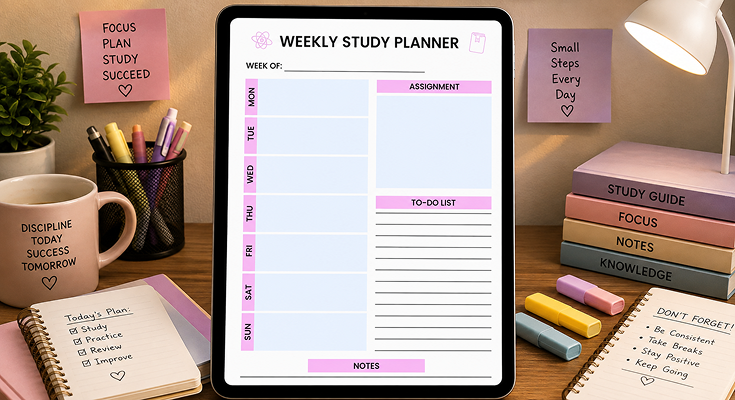
Looking for a smarter way to stay organized throughout the semester? A well-designed study planner template can help you structure your weekly goals, track assignments, and stay on top of exams, without feeling overwhelmed. Whether you’re preparing for finals or planning your daily study routine, having a clear academic roadmap makes all the difference.
Use a weekly schedule maker to break down tasks into manageable chunks and stay consistent with your study habits. Our planner templates are available as printable PDFs and editable formats, so you can customize your study timetable, calendar, or semester plan to match your learning style.

The minimalist weekly study planner template embraces a modern, clutter-free aesthetic, using soft neutral tones and a balanced grid system to enhance readability. The typography is sleek and understated, with bold headers for days of the week and subtle section dividers for assignments and notes. With ample white space, it creates a calm, organized study experience.
How to Use the Minimalist Weekly Study Planner Template
Stay focused and organized with the Minimalist Weekly Study Planner Template from PlanWiz. This practical tool helps students plan study sessions, track assignments, and manage time effectively throughout the week. Ideal for boosting productivity, it provides space for notes, deadlines, and daily check-ins, making academic planning simple and stress-free.
- Download and Print or Import
- Download the template from PlanWiz.
- Choose to print a physical copy or import into a digital tool.
- Set Up Your Weekly Schedule
- At the start of each week, fill in fixed commitments (classes, work, etc.) in the weekly overview section.
- Block out dedicated study times, aiming for 1–2 hour sessions to maintain focus.
- List Assignments and Deadlines
- In the assignment section, write down all upcoming tasks and their due dates.
- Break large projects into smaller tasks (e.g., “Research topic” or “Write introduction”).
- Prioritize tasks by urgency and importance, marking high-priority items with a star or color.
- Use the Notes Section Strategically
- Jot down key concepts, questions, or ideas during study sessions.
- Track study goals (e.g., “Complete 3 chapters of Biology”) or write motivational quotes.
- Review and Adjust Daily
- Each evening, review progress and update the planner.
- Move incomplete tasks to the next day’s schedule and adjust study times as needed.
Tips for Success
- Time Block Your Study Sessions: Assign specific time slots for each subject or task to stay focused.
- Use the Pomodoro Technique: Work for 25 minutes, then take a 5-minute break to boost productivity.
- Customize the Template: Add color-coding for subjects or a habit tracker for consistency.
- Stay Flexible: Adjust your plan without guilt if unexpected events arise.
For students with heavy homework loads, pairing the weekly planner with our homework planner template can enhance their organization. This template is designed to categorize tasks, set priorities, and track completion, ensuring you stay on top of assignments.
📋 Tips for Using Your Planner Effectively
-
Include a Screenshot or Mockup
Provide a visual example of a filled-out planner.
This helps users understand how to organize and fill in their own. -
Emphasize Habit-Building
Highlight the importance of using the planner consistently.
Reinforce that daily use creates positive habits for long-term success. -
Add a Downloadable Checklist
Offer a simple, downloadable checklist.
Summarize the key steps to follow for quick and easy reference.
Time Management Strategies for Students with a Study Planner Template
Time management is a core challenge for students, and your planner is designed to address it. By integrating proven strategies, you can position the planner as a tool aligned with best practices, adding authority and value. This topic connects the template to broader productivity principles, making the post more comprehensive.
Effective time management is key to academic success. Here’s how to use the minimalist weekly study planner with proven strategies:
1. Time Blocking
- What It Is: Assigning specific time slots to tasks for a structured schedule.
- How to Use It in the Planner:
- In the weekly overview, block out study sessions for each subject (e.g., “Math: 10–11 AM”).
- Include breaks (e.g., 5–10 minutes hourly) to avoid burnout.
- Stick to your schedule to build discipline.
To master this technique, check out our time-blocking planner templates, which provide pre-designed layouts to allocate time efficiently and pair perfectly with the minimalist planner.
2. Pomodoro Technique
- What It Is: Working in 25-minute intervals (Pomodoros) with 5-minute breaks.
- How to Use It in the Planner:
- List tasks for each Pomodoro in the assignment section (e.g., “Read Chapter 1”).
- Mark completed Pomodoros with a checkmark to track progress.
- After 4 Pomodoros, take a 15–30 minute break.
3. Eisenhower Matrix
- What It Is: Prioritizing tasks based on urgency and importance.
- How to Use It in the Planner:
- In the assignment section, categorize tasks:
- Urgent and Important: Do immediately (e.g., “Finish essay due tomorrow”).
- Important but Not Urgent: Schedule later (e.g., “Start research for next week’s project”).
- Urgent but Not Important: Delegate or minimize (e.g., “Reply to group chat”).
- Neither Urgent nor Important: Eliminate (e.g., “Scroll social media”).
- Use symbols (e.g., ! for urgent, * for important) to prioritize visually.
- In the assignment section, categorize tasks:
These strategies help you focus on priorities, reduce procrastination, and maximize study time. The planner’s structure supports them by providing a clear space to plan and track tasks.
For broader academic planning, explore our academic planner templates, which include semester and monthly planners to help you track courses, assignments, and exams over longer periods, perfectly complementing the weekly study planner.
🛠️ Implementation Tips
-
Use Student-Specific Examples
For instance, prioritize a math assignment due tomorrow over a project that’s due next month.
This makes the process relatable and practical. -
Include a Visual of the Eisenhower Matrix
Provide a graphic to explain task prioritization using the Eisenhower Matrix.
This helps clarify what’s urgent vs. important.
Common Study Challenges and How the Planner Helps Overcome Them
Addressing common pain points like procrastination or overwhelm makes the post relatable and demonstrates the planner’s practical value. This topic adds empathy and problem-solving focus, encouraging students to try the template by showing how it solves their specific issues.
Studying can be tough, but the minimalist weekly study planner can help you tackle these common hurdles:
1. Procrastination
- The Challenge: Putting off tasks until the last minute, leading to stress and lower-quality work.
- How the Planner Helps:
- Break large tasks into smaller steps in the assignment section (e.g., instead of “Write essay,” list “Outline essay,” “Write intro”).
- Schedule these steps across the week in the weekly overview to avoid cramming.
- Set mini-deadlines for each step to create urgency.
2. Feeling Overwhelmed
- The Challenge: Feeling paralyzed by too many tasks or unclear priorities.
- How the Planner Helps:
- The weekly overview provides a bird’s-eye view of your week for realistic planning.
- List all tasks in the assignment section, then prioritize using symbols (e.g., ! for urgent).
- Focus on one task at a time to reduce mental clutter.
3. Lack of Motivation
- The Challenge: Struggling to stay engaged, especially with tough subjects.
- How the Planner Helps:
- Write motivational quotes (e.g., “Progress, not perfection”) or rewards (e.g., “Watch an episode after Chapter 2”) in the notes section.
- Track progress in the planner to visualize achievements.
- Schedule favorite subjects or easier tasks first to build momentum.
Additional Tips
- Start Small: If new to planning, use the planner for 1–2 days, then build up.
- Reflect Weekly: Review what worked and adjust your approach.
- Seek Support: Share planner goals with a friend or study group for accountability.
To boost overall productivity, try our productivity planner templates, which help you prioritize tasks, set goals, and balance school with personal life, enhancing the minimalist planner’s effectiveness.
🛠️ Implementation Tips
-
Use a Conversational Tone
For example: “We’ve all procrastinated—here’s how to stop.”
A friendly tone helps readers feel more connected and motivated. -
Include a Call to Action
Encourage readers to download the planner and try using it for just one week.
Challenge them to see the difference it can make. -
Add a Relatable Anecdote
Share a story—like a student who overcame procrastination and improved their grades by using the planner daily.
Why Grid Layout is Ideal for This Minimalist Weekly Study Planner Template?
A grid layout creates a structured, organized, and readable study planner. Clean lines and balanced spacing ensure a clutter-free and visually appealing format. It enhances navigation, allowing students to locate tasks, assignments, and notes efficiently. A minimalist design with proper alignment prevents confusion and keeps study materials systematically arranged for an effective academic routine.
The planner’s consistent alignment ensures a professional, polished, and distraction-free appearance. The uniform placement of elements makes navigation seamless and effortless for students. A minimalist daily study planner template with study logs helps track progress efficiently. The adaptable design ensures clarity and a structured layout, enhancing organization and usability, whether digital or printed.
Readability is key to a successful planner, making schedules easy to scan. Important deadlines and assignments stand out clearly, minimizing stress and confusion. The professional aesthetic, featuring structured columns and subtle dividers, enhances focus. Eliminating unnecessary elements, the planner offers a sleek, modern, and distraction-free design for efficient academic planning.
Do Shadow-Free Elements Make This Minimalist Weekly Study Planner Template Sleek?
Minimalist design thrives on simplicity and clarity. Removing shadows refines the planner’s aesthetics, creating a clean, distraction-free study experience. Shadow-free elements enhance readability, ensuring content stands out without unnecessary embellishments. This sleek design helps students stay focused, promoting an organized and visually appealing study routine without distractions.
- Clean Visuals: Shadow-free elements create a crisp, clean look by removing visual noise, helping students focus on their study plans. This enhances the planner’s aesthetic and clarity, with a simple layout that keeps information clear, structured, and easily accessible for a distraction-free, efficient study process.
- Modern Design: A shadow-free minimalist design embraces contemporary trends with clean, simple layouts. The lack of shadows creates a sleek, flat design that emphasizes clarity and enhances usability, helping students focus on their tasks. This modern aesthetic keeps the planner stylish, functional, and aligned with current academic preferences.
- Improved Print Quality: Shadow-free designs improve clarity for printed planners, preventing distortion that makes content harder to read. A well-structured, shadowless planner ensures sharp, professional prints, enhancing usability in both digital and printed formats without compromising readability or visual appeal.
- Consistency Across Platforms: Shadow-free elements create a consistent, sleek design across all devices—computers, tablets, and smartphones. This uniformity enhances the user experience, ensuring study plans stay clear and organized, making academic planning efficient and distraction-free.
- Focus on Content: A study planner should prioritize usability and clarity, ensuring academic tasks remain the primary focus. An iPad planner app for students to organize life offers seamless digital planning. By eliminating unnecessary embellishments, the design enhances productivity, keeping study planning streamlined, distraction-free, and highly effective.
Which Design Tricks Elevate This Minimalist Weekly Study Planner Template?
Even with a minimalist approach, strategic design elements can enhance functionality. Subtle design tricks ensure the planner remains visually appealing without compromising simplicity. The right mix of color, typography, and spacing refines the planner’s aesthetics. These enhancements boost usability, helping students maximize productivity with a clean, distraction-free study experience.
Subtle Color Accents
Minimalist planners benefit from soft color accents. Subtle highlights for important sections improve navigation without overwhelming the design. Neutral tones provide a calm, distraction-free study space, making it easier to focus. Light color coding enhances readability while maintaining a sleek and structured look, ensuring students can efficiently organize assignments, deadlines, and study schedules effortlessly.
Typography Hierarchy
Typography plays a crucial role in enhancing clarity. Bold headers for weekdays and subtle dividers for assignments and notes improve readability. A structured font hierarchy guides the user’s eye, ensuring essential information stands out. Clean, modern typography maintains the planner’s minimalist aesthetic while reinforcing organization, helping students efficiently manage study tasks and deadlines with ease.
Ample White Space
Strategic white space enhances readability by reducing clutter. By incorporating breathing room between sections, the planner remains visually appealing and easy to navigate. White space improves focus, ensuring students process information efficiently. A well-balanced layout with ample spacing creates a seamless study experience, allowing for a structured and distraction-free academic planning routine.
Interactive Elements
For digital planners, interactive elements like checkboxes or hyperlinks enhance usability. A clickable checklist helps students track completed assignments easily. Hyperlinks to additional study resources streamline research and organization. Discover the best planner organization ideas for efficient study planning to optimize your study routine and improve productivity.
Customizable Templates
Customization enhances the user experience. Providing customizable planner templates allows students to tailor their planners based on study preferences. Options like adjustable sections, priority labels, and flexible layouts improve usability. Personalization ensures students maximize productivity while maintaining a structured and efficient study planner.
Conclusion
A minimalist weekly study planner template ensures students organize study schedules effectively. The grid layout, shadow-free design, and enhancements create a sleek, structured planner. Subtle design tricks and customization make the planner both functional and appealing. The PlanWiz planner app enhances productivity, sharpens focus, and optimizes academic planning, ensuring a seamless study experience.
FAQs
It’s a simple, clutter-free planner designed to help students organize their weekly study schedule, track assignments, and jot down notes. It includes a weekly overview, an assignment section, and a notes area to boost productivity.
The planner helps you manage your time, prioritize tasks, and reduce stress by providing a clear structure for your study routine, as outlined in the blog post’s “Key Features” section.
Yes! Its minimalist design is flexible, making it ideal for any student managing classes, homework, or projects, as discussed in “What Is a Minimalist Weekly Study Planner?”
List all tasks and deadlines in the assignment section, break large projects into smaller steps, and prioritize using symbols (e.g., ! for urgent).
Block time for both in the weekly overview, prioritizing key tasks. The planner’s structure helps you see where activities fit, as noted in “How to Use the Template Effectively.”






