The modern weekly project planner template is a well-structured tool that enhances productivity by organizing tasks efficiently. It helps in tracking deadlines and setting reminders. This weekly project schedule maker ensures a smooth workflow, making planning easier. Designed by PlanWiz, it offers an intuitive layout that simplifies task management for professionals and individuals alike.
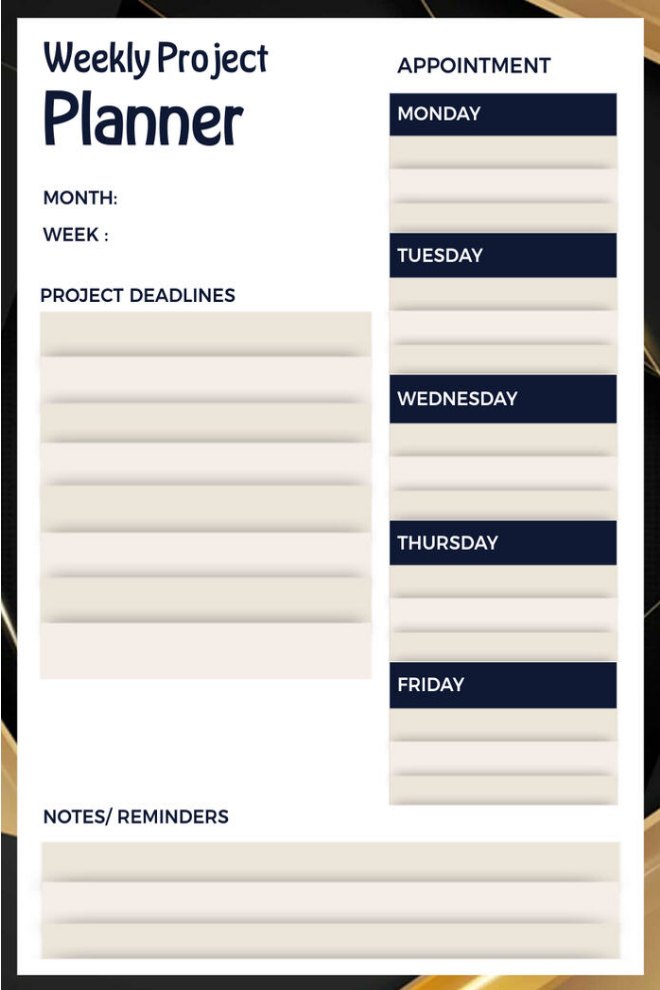
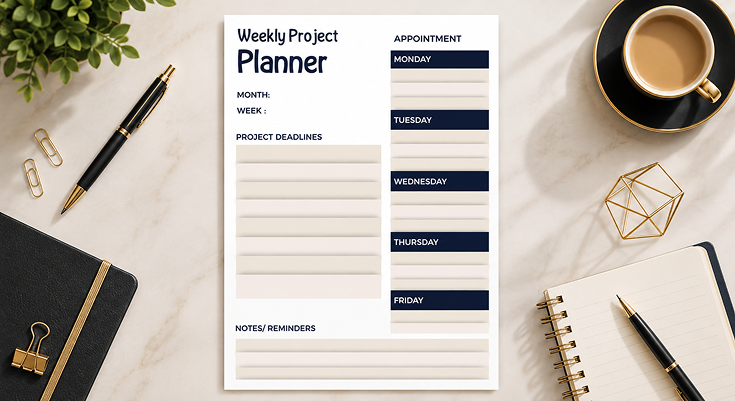
The modern weekly project planner template features a stylish, modern aesthetic with a black, white, and gold color scheme. Its clean and professional design improves readability, while the well-defined sections create a visually appealing structure. The combination of bold typography and subtle shading enhances clarity, ensuring a seamless planning experience with an elegant and sophisticated touch.
How Can Section Dividers Improve This Modern Weekly Project Planner Template?
Section dividers enhance readability, structure, and organization within the planner. By clearly separating tasks, goals, and appointments, they create a streamlined workflow. Additionally, they contribute to the planner’s modern aesthetic, making it more professional and visually appealing while supporting effective task prioritization techniques for planners to boost productivity.
- Enhanced Readability and Organization: Section dividers play a vital role in structuring content within the Modern Weekly Project Planner Template. By segmenting different areas such as goals, tasks, appointments, and deadlines, they create a clear layout that improves readability.
- Streamlining Task Prioritization: With distinct sections for daily and weekly planning, users can prioritize their workload effectively. Dividers visually separate different categories, ensuring that essential tasks and milestones are easily distinguishable. For more focused task organization, consider using dedicated task planner templates that offer detailed task breakdown and priority management features.
- Aesthetic Appeal and Professionalism: A well-designed planner should not only be functional but also visually appealing. Section dividers contribute to a polished, modern look that enhances user experience. With the black, white, and gold color scheme, these dividers add a touch of elegance while maintaining a structured layout that aligns with professional standards.
- Increased Efficiency in Scheduling Appointments: The appointment section benefits from well-placed dividers. Separating meetings from tasks prevents overlaps and ensures preparation. Incorporating time management tips for professionals helps maximize efficiency and make the most of each scheduled commitment.
What’s the Best Way to Modify This Modern Weekly Project Planner Template?
Users can adjust their planner through customization features, which enable personalization of the planning system. The choice of colors along with custom fonts and labels improves the usability as well as adds personification to the planner interface. The combination of icons with stickers along with highlights creates more efficient organization within the planning tool.
Choosing the Right Color Scheme
Starting the customization process requires the selection of a color scheme that matches your style. The planner’s default black, white, and gold theme is customizable. The use of properly selected color schemes elevates the planner’s visual appeal to match personal needs better.
Adjusting Font Styles and Sizes
The planner’s readability heavily depends on typography design features. Clear presentation becomes easier when users change font type and dimension, which enables quick scanning of essential information. Headers in bold improve the structural organization along with subheadings that help organize the sections effectively. Custom fonts add personality while keeping the planner professional and readable.
Adding Custom Labels and Sections
Creating custom sections enhances personalization. The planner provides users with space allocation capabilities to suit different workflow needs so they can create sections for notes, reminders, progress tracking, and project phases. The flexible design creates an organized structure that ensures productivity enhancement. Labels improve navigation by allowing faster access to key information.
Including Icons and Symbols for Quick Navigation
Visual organization through icons and symbols makes both scheduling operations more efficient and planning space more appealing to the viewer. The addition of deadlines and meeting and task indicators creates an efficient system of visual identification of critical elements. The minor modifications work to enhance workflow dynamics while preserving a streamlined appearance.
Utilizing Stickers and Highlighters
Using stickers and highlighters during planning tasks enables users to focus on the vital aspects. Highlighters and stickers highlight critical deadlines for focus. Stickers that use different colored codes offer an interactive visual way of scheduling that proves more efficient. This creative method enhances organization in the weekly lesson planner.
How Can Strong Contrast Improve This Modern Weekly Project Planner Template?
Strong contrast enhances visual hierarchy, readability, and clarity in the planner. Bold typography, dark headers, and subtle shading create an organized layout. Contrast helps differentiate sections, ensuring easy navigation. A balanced color scheme reduces eye strain, enhancing function and style. While highlighting the benefits of a weekly planner template for IT professionals managing complex tasks.
- Enhancing Visual Hierarchy: Contrast plays a significant role in guiding the user’s eye through the planner. A strong contrast design ensures that headers, subheadings, and key details stand out, making the template easier to navigate. Bold typography and subtle shading contribute to a visually appealing structure.
- Improving Readability and Focus: A well-balanced contrast between text and background enhances readability. The black and gold accents in the planner provide a professional yet stylish touch, ensuring that important details are easily noticeable.
- Differentiating Sections Clearly: Section dividers attain greater definition through contrasting elements so every planner section fulfills its purpose correctly. The use of contrasting elements helps distinguish task areas from appointment spaces while making every piece of information simple to understand.
- Elevating the Planner’s Aesthetic Appeal: A modern aesthetic is key to making a planner visually appealing. The use of high-contrast design elements, such as dark headers against a lighter background, enhances the planner’s premium look. This design approach contributes to a polished and sophisticated layout, making it ideal for professionals and students alike.
- Ensuring Accessibility for All Users: Users with visual impairments need especially high-contrast text for proper visibility. A well-contrasted planner creates an inclusive design feature that enhances the visibility of text sections. The small yet vital aspect of enhanced contrast functionality makes the planner usable by a broader audience, leading to accessibility for all users.
Conclusion
The PlanWiz planner app enhances productivity with its modern weekly project planner template. Section dividers organize tasks efficiently, while customization features allow a personalized planning experience. Strong contrast improves readability, ensuring a seamless workflow. Whether scheduling meetings or tracking deadlines, this planner helps you stay organized and in control of your schedule.