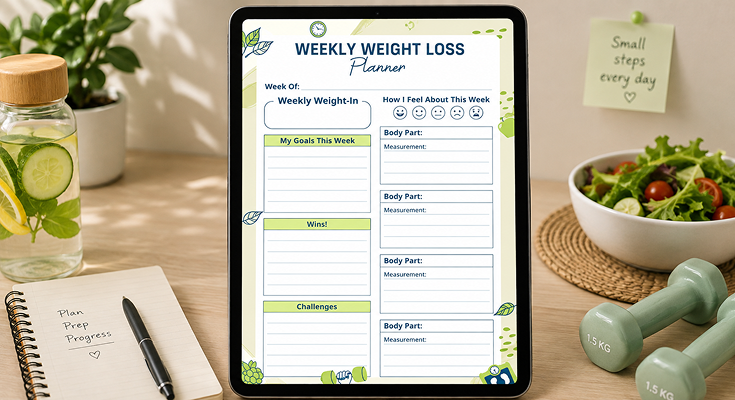
The weight loss planner template helps you organize and track your meals, workouts, and progress to stay focused on your fitness goals. This printable weekly weight loss planner template simplifies your planning process and keeps motivation high throughout your weight loss journey.
For easy consistency and goal tracking, use a weekly schedule maker, a simple tool designed to help you plan your week and stay on track. It pairs perfectly with your weekly weight loss planner template to keep your progress organized and motivation strong.
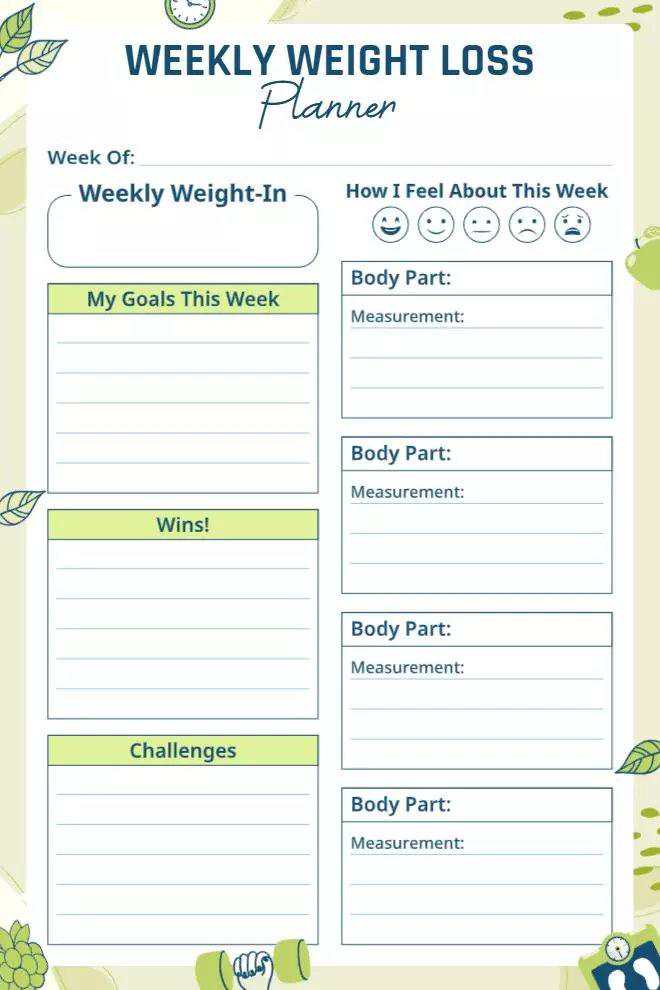
With a soft green theme, the natural weekly weight loss planner template brings a refreshing and calming feel. Its clean layout and subtle patterns ensure a stress-free journaling experience. The well-spaced sections make it easy to log progress, while the minimal yet engaging design keeps tracking simple and enjoyable. Explore the versatile printable planner templates to create a weekly system that feels personal, effective, and truly motivating.
Why This Planner’s Design Is So Awesome for Your Weight Loss Goals
Okay, first off, let’s talk about why the design of this planner is such a big deal. It’s not just about looking cute (though it does)—it’s about making your life easier and keeping you excited to use it every day. The natural weekly weight loss planner template nails this by mixing a beautiful look with a setup that’s so easy to use, you’ll want to stick with it.
Making It Easy to Read and Fun to Use
I love how this planner keeps things simple and stress-free. Here’s why it’s so easy to use:
- Soft, Happy Colors: The light green theme is so calming—it’s like a little hug every time you open it! Green is all about health and growth, which is perfect for your weight loss journey.
- No Clutter Here: The layout is super clean, with sections like “Weekly Weight-In” and “My Goals This Week” nicely spaced out. You won’t feel overwhelmed trying to figure out where to write stuff.
- Fonts That Feel Friendly: The headings are in a clear, simple font, and the title has this cute handwritten vibe that makes it feel personal, like it’s made just for you.
- Quick Mood Check: There’s a “How I Feel About This Week” section with smiley faces (from happy to sad). It’s such a fun way to jot down how you’re feeling without overthinking it! It’s a feature inspired by mood tracker templates, helping you stay in tune with both your mood and your goals.
Keeping You Pumped with a Pretty Look
Let’s be real—when something looks good, you’re more likely to use it, right? This planner is so pretty, it’ll make you excited to track your progress every week. Here’s how it keeps you motivated:
- Calm Green Vibes: The soft green color makes you feel relaxed, which is awesome because weight loss can be stressful sometimes. It’s like a little reminder to chill and focus on your goals.
- Cute Little Details: There are tiny drawings of leaves, a clock, and a scale that make it feel so cheerful. They’re small but give the planner a lot of personality!
- Celebrate Your Wins: There’s a “Wins!” section (highlighted in green) where you can write down your victories. Maybe you walked 10,000 steps every day, or you lost a pound—yay, you! Writing these down feels so good.
Hey, Just So You Know: Writing down your wins, even the small ones, can give you such a confidence boost. It’s like giving yourself a high-five for all your hard work!
Whether you’re using this planner on paper or your iPad, it’s so nice to look at. The digital version on an iPad makes the colors pop even more, and it’s super easy to scroll through. If you’re looking for a beautiful and functional fitness planner template, this one makes tracking feel more like a reward than a chore.
Helping You Stay Organized Like a Pro
This planner is like your personal weight loss coach—it keeps everything so organized, so you don’t have to stress about figuring things out. It’s got sections for everything you need to track your progress. Let’s check them out:
- Week of & Weekly Weight-In: At the top, you can write the date and your weight for the week. It’s great to do this at the same time each week (like Wednesday mornings) so you can see your progress.
- How I Feel About This Week: There’s a row of smiley faces to pick from—a super quick way to note if you’re feeling awesome or a bit down. If you’re feeling sad, you can dig into why in the “Challenges” section.
- My Goals This Week: This is where you set your goals for the week. Think of things like:
- “Drink 8 glasses of water every day.”
- “Go for a 30-minute walk 5 days this week.”
- “Lose half a pound by next weigh-in.”
- Body Part & Measurement: You can track measurements for different areas like your waist, hips, or thighs. Sometimes the scale doesn’t budge, but losing an inch around your waist is a huge win!
- Wins!: A spot to write down what you rocked this week—like “I skipped late-night snacks!” or “I hit my step goal!”
- Challenges: A place to jot down what was tough, like “I had a lot of cravings” or “I was too busy to work out.”
- Space to Reflect: There’s plenty of room to write down your thoughts, like “I felt so good after eating more veggies—let’s do that again next week.”
You can also explore different planner organization ideas to personalize your setup, like color-coding each section, using stickers to highlight your wins, or adding tabs for quick access to your weekly logs.
Why This Planner Is Your Best Friend for Tracking Weight
Tracking your weight isn’t just about the numbers—it’s about seeing your progress, figuring out what’s working, and tweaking things as you go. The Natural Weekly Weight Loss Planner Template makes this so easy, whether you’re doing this for yourself or you’re a fitness coach helping clients. It’s got all the sections you need to stay on top of your journey.
Making Weigh-Ins a Regular Thing
Staying consistent with weigh-ins is super important, and this planner makes it a breeze. It encourages you to weigh yourself at the same time each week, like Wednesday mornings after you wake up and use the bathroom, before you eat or drink anything. That way, you’re getting a true picture of your progress without little things like water weight messing with the numbers.
- Weekly Weight-In Spot: Right at the top, there’s a space to write down your weight each week.
- Check In on Your Feelings: The “How I Feel About This Week” section lets you pick a smiley face to show how you’re feeling. Maybe you gained a little but feel stronger—pick a happy face and focus on the good stuff!
- Focus on the Big Picture: Weighing in weekly helps you see the overall trend, so you don’t stress about small ups and downs.
Just So You Know: If you’re a fitness coach, this planner is awesome for keeping tabs on your clients. You can look at their weekly weigh-ins and how they’re feeling to give them tips, like tweaking their meal plan or workouts. It also pairs perfectly with an exercise planner template to offer a full picture of their routine.
Setting Goals That Feel Totally Doable
Setting goals is one of the best ways to stay motivated, and the “My Goals This Week” section in this planner helps you make goals that are specific and totally doable. Here are some ideas:
- “Lose 1 pound by next Wednesday.”
- “Hit 10,000 steps every day.”
- “Eat 5 servings of veggies daily.”
You can also use this section to track other stuff that helps with weight loss, like what you’re eating, how much you’re moving, or how much water you’re drinking. Practicing good task prioritization, like deciding which habits to focus on first, can help you build momentum and avoid overwhelm. For example, you might write down your workout plan for the week:
- Monday: 30-minute jog in the park.
- Wednesday: Strength training at home.
- Friday: Yoga to stretch and relax.
This planner helps you focus on all the things that lead to weight loss, not just the scale. If you’re a fitness coach, you can share this with your clients to give them a clear plan to follow each week.
Spotting Patterns and Making Smart Changes
One of my favorite things about this planner is how it helps you see patterns in your progress so you can make smart changes. The weekly setup lets you look at everything at once—your weight, measurements, and even how you’re feeling.
- Check Your Weight Trends: If you notice your weight loss has slowed down for a couple of weeks, look at the “Challenges” section. Maybe you’ve been skipping workouts or snacking more than usual.
- Track More Than the Scale: The “Body Part” and “Measurement” sections let you see changes in places like your waist or thighs. Maybe your weight hasn’t changed, but you lost 2 inches around your waist—that’s amazing!
- Make a Plan: Use what you learn to set new goals, like “I’ll make sure to get 3 workouts in this week” or “I’ll only have one snack a day.”
Hey, Just So You Know: Tracking measurements can be so motivating, especially if the scale isn’t moving. Seeing your waist or thighs get smaller can keep you going!
This way of looking at your data helps you figure out what’s working and what needs a little tweak, so you can keep making progress.
How This Planner Keeps Things Calm and Stress-Free
Nobody wants a planner that feels chaotic—that’s a sure way to lose motivation! The Natural Weekly Weight Loss Planner Template is designed to be super calming and easy to use, so you can focus on your goals without stress. It’s also great for planning your workouts, like a fitness schedule, making sure you stay on track.
Using Colors That Make You Feel Relaxed
I love the soft green theme of this planner—it’s like a breath of fresh air every time you open it! Here’s why it works so well:
- Soothing Green: Green makes you think of nature and health, and it’s super relaxing. It’s perfect for keeping you calm while you work on your weight loss goals.
- Easy on the Eyes: The light green background with white spaces and blue text looks great and is easy to read. The green highlight in the “Wins!” section makes your successes pop without being too loud.
- Less Stress: The calm vibe helps you focus without feeling overwhelmed, which is so important when you’re working on something big like weight loss.
Keeping It Simple and Super Easy to Use
This planner is all about keeping things simple, so you’re not stressing about how to use it. Here’s what makes it so easy:
- No Messy Stuff: The layout is clean, with clear sections like “Body Part” and “Measurement” that give you plenty of space to write.
- Super Easy to Navigate: The bold headings and lined spaces make it a breeze to find what you need. Like, the “Challenges” section has enough room to write down something like, “I was too tired to work out after work—maybe I’ll try mornings.”
- Lots of Space: There’s plenty of white space, so it doesn’t feel crowded, even if you have a lot to write.
Just So You Know: Fitness coaches can use this planner to make a workout schedule for clients. Just fill in the “My Goals This Week” section with things like “Monday: Cardio, Wednesday: Strength training” to keep them on track.
Adding a Simple, Pretty Touch
The Natural Weekly Weight Loss Planner Template is so pretty without being over the top. Here’s what I love about its style:
- Cute Little Details: There are tiny drawings of leaves and a clock that add a bit of charm without taking over the whole page. They remind you of health and staying on schedule.
- Looks Modern and Nice: The handwritten title feels personal, but the clean lines keep it organized. It’s like the perfect mix of fun and professionalism.
- No Stress Vibes: The simple design makes it so easy to use, so you’re not distracted by anything extra.
Conclusion
The Natural Weekly Weight Loss Planner Template is more than just a weight tracker—it’s a goal-setting companion that fosters consistency, motivation, and long-term success. Its structured tracking, balanced design, and calming visuals make weight loss stress-free. Download the PlanWiz planner app today and take the first step toward a healthier, more mindful lifestyle!
FAQs
It’s got a calming green theme that promotes relaxation, plus a clean layout with sections like “Weekly Weight-In” and “My Goals This Week” to keep things organized and stress-free.
Anyone looking to lose weight, whether you’re a beginner, a fitness enthusiast, or even a fitness coach, should track clients’ progress. It’s super versatile and easy to use!
It helps you set weekly goals, track your weight and measurements, celebrate successes, and reflect on challenges, so you can stay consistent and make smart adjustments along the way.
It’s got sections for “Week Of,” “Weekly Weight-In,” “How I Feel About This Week,” “My Goals This Week,” “Body Part & Measurement,” “Wins!,” “Challenges,” and space for reflections.
Yes! Use the “My Goals This Week” section to plan your workouts, like “Monday: Cardio, Friday: Yoga.”