Your inbox is full. You’ve got three meetings in your day, though you are not entirely sure when the second meeting is. Your kid has an appointment with the dentist, although that is sometime this week. The project deadline that you agreed to keep is either Thursday or Friday.
If all this sounds crushingly familiar, trust me, you’re not alone. In a world where a whopping 83% of workers value work-life balance over money in the modern workplace, it’s no longer just a question of accomplishing more in a busy world but being able to handle it all while staying completely sane in the bargain.
An organizer planner isn’t a magic wand that will give you more hours in the day. However, it might be the difference between drowning and having control.
Why Does Using an Organizer Planner Actually Matter in 2026?
Let me tell you something interesting: there’s a difference in how your brain deals with the information you write down on paper as opposed to what you write down on a computer screen. What cognitive research has found is that planning in physical space involves different parts of your brain than planning using digital technology, resulting in greater retention of memories and a commitment to your objectives.
Key Statistics That Matter:
- 21% increase in productivity for people who plan their days
- 35% more engagement in work compared to non-planners
- 42% more likely to achieve goals when written down
Consider for a moment what it is that your brain is capable of. It is a highly functional tool for problem-solving, connection-making, and idea-generation. But it is a horrible filing cabinet. Every time you try to keep track in your head of your deadlines, your chores, your social obligations, and your personal objectives, you’re wasting mental calories that you could be using for their completion. Daily planner templates help you offload this mental burden and create a reliable external system for managing your commitments.
What Planning Actually Does:
- Reduces mental clutter by creating an external storage system
- Eliminates background anxiety about forgetting important tasks
- Free cognitive energy for creative and strategic thinking
- Provides visual clarity on priorities and time allocation
What Types of Organizer Planners Actually Exist?
The simple act of entering a store or searching for planners on the computer can be overwhelming. There are literally hundreds of planners out there, all vying for the title of “perfect.” The fact of the matter is that the “perfect” planner for the user is the one that reflects the way the person thinks.
1. Daily Planners:
These daily planners provide a whole page per day, in hourly slots. Just what busy people who have organized daily lives want and need to list appointments and activities down to the minute detail. These allow ample room for writing notes and reflecting, but are rather bulky tocarry around, and even intimidating in an unbusy daily life. Timetable maker provides a similar hourly structure if you need detailed time blocking without the bulk of a full daily planner.
Pros:
- Hour-by-hour planning
- Detailed task tracking
- Space for notes and reflections
Cons:
- Can feel overwhelming for beginners
- Bulkier to carry
- Pressure to fill every day
Best for: Busy professionals, Hourly planning requirements
Digital Alternatives: If digital daily planning is more suitable for you, I recommend Google Calendar for hourly planning, Fantastical for thorough time blocking, or Any.do for managing tasks and calendar views together
2. Weekly Planners:
The weekly planner allows you to view your entire week on two pages with a space allocated for each day of the week. The reason it is the most preferred type of planner is that it allows you to see your whole week at a single glance, so it is very easy to manage work and personal life. You get less space than a daily planner, but it is adequate. Weekly planner templates are the most popular choice because it strikes the perfect balance between detail and overview.
Pros:
- See the entire week at a glance
- Spot scheduling conflicts early
- Balance different life areas
- Most versatile format
Cons:
- Less space per day than daily planners
- May need supplemental pages for detailed planning
Best for: The majority of people balancing their working lives with personal ones
Digital Alternatives: For doing your weekly planning digitally, PlanWiz has an intuitive weekly view with task management; Todoist and TickTick are great at organizing tasks for the week, with calendar integrations.
3. Monthly Planners:
In month planners, the entire month is laid out like a calendar. Each day has a small box. Excellent for managing appointments and tracking patterns. Compact and easy to carry, but it can’t be used for jotting down notes.
Good for use as an auxiliary tool for planning. Monthly schedule planner templates give you that bird’s-eye view that’s essential for spotting patterns and planning strategically.
Pros:
- Month Overview-Bird’s Eye View
- Perfect for tracking patterns
- Great for planning ahead
- Compact size
Cons:
- Insufficient detail for daily planning
- Limited space for task lists
- Best used as a complement rather than the primary tool
Best for: Long-term planning, managing recurring occurrences
Digital Alternatives: Google Calendar and Apple Calendar are great for viewing the calendar every month, viewing appointments with Calendly, and planning the family calendar with TimeTree.
4. Combination planners:
Combination planners contain the monthly, weekly, and sometimes daily planning areas all within the same book. They provide planners the ability to focus on the big picture, and then, when necessary, plan down into the specifics. They are great things for someone with a busy, ever-changing schedule, but much more expensive, heavier, and harder to master.
Pros:
- Views per month, week, and day
- Zoom in/out as needed
- Comprehensive planning system
- Balancing of short-run and long-run goals
Cons:
- Can be more expensive
- Larger and heavier
- Learning curve for using all sections
Best for: Those balancing many obligations
Digital Alternatives: PlanWiz andNotion are great for combination planning with customizable views. Trello provides flexible board views, while Microsoft To Do integrates seamlessly with Outlook for comprehensive planning across all time frames.
Should You Choose Paper or Digital Planning?
This question sparks surprisingly passionate debates among planning enthusiasts. The honest answer? Both have legitimate strengths, and neither is objectively “better.”
Paper vs. Digital: The Complete Breakdown
| Aspect | Paper Planners | Digital Planners |
|---|---|---|
| Memory Retention | ✅ Superior – handwriting engages the brain differently | ⚠️ Lower retention with typing |
| Distraction Level | ✅ No notifications or apps to distract | ❌ Easy to get sidetracked |
| Customization | ⚠️ Limited to physical decorations | ✅ Infinite digital customization |
| Search Function | ❌ Must flip through pages manually | ✅ Instant search capability |
| Sharing Ability | ❌ Cannot share easily with others | ✅ Seamless calendar sharing |
| Rescheduling | ❌ Requires erasing or crossing out | ✅ Drag and drop functionality |
| Battery/Power | ✅ Always accessible | ❌ Requires charging |
| Cost | ⚠️ Annual replacement needed | ⚠️ One-time purchase or subscription |
| Satisfaction Factor | ✅ Tactile experience, checking off tasks | ⚠️ Less satisfying digitally |
The Hybrid Approach (Most Popular): Many successful planners use both systems strategically:
- Paper planner for weekly planning, daily priorities, and brainstorming
- Digital calendar for shared events, automatic reminders, and appointments
This combination lets you get the cognitive benefits of handwriting while maintaining practical digital conveniences. A digital planner for iPad can bridge this gap perfectly, giving you the handwriting experience with digital functionality.
How Do You Actually Set Up a Planner That Works?
Getting started with a planner can feel daunting, especially if you’ve tried and abandoned planners before. The key is building a system that’s simple enough to maintain but comprehensive enough to actually help.
Step 1: Identify Your Core Life Categories
Most effective planners organize around 5-7 key life areas:
Essential Categories:
- Work & Career: Projects, meetings, deadlines, professional development
- Home Management: Cleaning, maintenance, bills, household projects
- Family: Kids’ activities, appointments, quality time, events
- Health & Wellness: Exercise, meal planning, medical appointments, self-care
- Personal Growth: Hobbies, learning, creative projects, social connections
- Financial: Budget tracking, bill due dates, financial goals
Pro Tip: Use these categories to audit your weekly plan. If everything falls under “Work,” you’re neglecting other important areas.
Step 2: Create Your Weekly Planning Ritual
When: Pick a consistent time (Sunday evening or Monday morning works best)
Duration: 15-30 minutes
What to Do:
1. Review Last Week
- Take a moment to note what was actually accomplished.
- Identify the tasks that fell through the cracks.
- Consider whether your time estimates were realistic.
- Reflect on the factors that caused delays or challenges.
2. Plan the Week Ahead
- Begin by listing all appointments and commitments.
- After that, identify the top three priorities for the week.
- Time-block important tasks to stay focused.
- Review the schedule for any possible conflicts.
- Allow buffer time between tasks to avoid overwhelm.
3. Balance Check
- Check whether all key areas of life are represented.
- Make sure personal time is included in the schedule.
- Confirm that time for self-care is protected.
Step 3: Daily Planning That Takes 5 Minutes
Every morning (or night before):
- Review your day’s appointments: Know what’s fixed on your schedule
- Choose 3 must-do tasks: Not 10, not 15, just THREE priorities
- Estimate time needed: Be realistic about how long tasks actually take
- Identify potential obstacles: Plan around known challenges
The 3-Task Rule: If everything else falls apart but you complete your three priority tasks, the day was successful. This prevents overwhelming to-do lists and creates achievable daily wins. The daily task journal is specifically designed for this approach, helping you focus on what truly matters each day.
What Should Your Work Planning System Include?
Professional life requires structure, but it also needs flexibility for the inevitable surprises and changing priorities.
Project Management in Your Planner
| Planning Element | How to Implement | Example |
|---|---|---|
| Break Down Projects | Convert vague projects into specific actions | Instead of “Marketing campaign,” write “Draft email copy – 2 hours.” |
| Time Block Tasks | Assign specific time slots for focused work | “Deep Work: Strategy Report – 9 am-11 am Monday” |
| Track Milestones | Note completion of project phases | “Phase 1 Complete ✓ – Start Phase 2 on Thursday.” |
| Identify Dependencies | Mark what’s waiting on others | “Review pending – Sarah’s feedback needed.” |
Meeting Management System
Before Each Meeting:
- Review the agenda and prepare questions
- Gather necessary documents or data
- Note discussion points to raise
- Block 15 minutes prep time in planner
After Each Meeting:
- Record action items immediately
- Assign deadlines to each task
- Note who’s responsible (if team meeting)
- Schedule follow-up if needed
Pro Tip: Create a “Meeting Notes” section in your planner to capture important details without cluttering your task list. Work schedule maker helps you organize meetings, project deadlines, and focused work time in one comprehensive view.
Time Blocking for Productivity
What is Time Blocking? Allocating specific time blocks for different types of tasks or activities. This prevents context-switching and protects focus time.
How to Time Block Effectively:
- Identify your peak energy hours: Schedule demanding work during these times
- Group similar tasks: Answer all emails in one block, not sporadically
- Protect deep work blocks: Treat them as unmovable appointments
- Include buffer time: Add 10-15 minutes between blocks for transitions
Sample Time-Blocked Day:
- 8:00-9:00 am Morning routine + email check
- 9:00-11:30 am DEEP WORK: Client proposal (no interruptions)
- 11:30-12:00 pm Break + quick tasks
- 12:00-1:00 pm Lunch
- 1:00-2:00 pm Team meetings
- 2:00-3:30 pm Project work + collaboration
- 3:30-4:00 pm Admin tasks, planning tomorrow
- 4:00-5:00 pm Wrap up + next-day prep
How Can an Organizer Planner Help Manage Home Life?
Your home shouldn’t be another source of stress, but somehow, household management often feels like a second full-time job. A planner helps create systems that keep things running without consuming your entire weekend.
Weekly Cleaning Schedule Template
| Day | Tasks (15-20 min each) | Why This Works |
|---|---|---|
| Monday | • Laundry • Vacuum main areas | Start the week with clean clothes and floors |
| Tuesday | • Clean bathrooms • Change towels | Mid-week bathroom refresh |
| Wednesday | • Kitchen deep clean • Appliance wipe-down | Keep food areas sanitary |
| Thursday | • Dust all surfaces • Change bed linens | Fresh environment before the weekend |
| Friday | • Quick tidy all rooms • Weekend meal prep | Weekend-ready home |
| Weekend | • Yard work (if applicable) • Deep clean rotation | Tackle bigger projects |
The Result: Never spending entire weekends cleaning. Small daily investments keep your home consistently manageable.
Meal Planning That Actually Works
Basic Weekly Meal Planning Structure:
| Element | How to Plan | Time Saved |
|---|---|---|
| Theme Nights | Monday: Pasta, Tuesday: Tacos, etc. | Eliminates daily decisions |
| Batch Cooking | Double recipes, freeze half | 2-3 future meals prepared |
| Grocery List | Based on the meal plan | Single shopping trip weekly |
| Prep Day | Sunday veggie chopping, marinating | Weeknight cooking: 15-20 min |
Example Week in Your Planner:
- Monday: Spaghetti with salad (30 min)
- Tuesday: Taco Tuesday (20 min)
- Wednesday: Leftover remix
- Thursday: Sheet pan chicken & veggies (40 min)
- Friday: Pizza night (takeout or homemade)
- Weekend: Meal prep for next week
The meal planner templates take the guesswork out of dinner by helping you plan meals, organize your grocery list, and ensure you always have the right ingredients on hand. It saves time, reduces last-minute stress, and makes eating healthier and more consistent.
Family Command Center System
Color-Coding by Family Member:
- 🔵 Dad’s activities and appointments
- 🟢 Mom’s schedule
- 🟡 Child 1
- 🟣 Child 2
- 🔴 Whole family events
What to Track: ✓ School events and holidays ✓ Sports practices and games ✓ Medical appointments ✓ Social commitments ✓ Pick-up/drop-off schedules ✓ Important deadlines
The family planner templates help coordinate everyone’s schedules in one place, ensuring that, amidst all the family obligations, you’re managing everyone’s commitments without losing track of important events and appointments.
Where Does Personal Growth Fit Into Your Organizer Planner?
Here’s where many people fail with planners: they use them exclusively for obligations, work meetings, household tasks, other people’s needs, and completely forget to schedule the things that matter to them personally.
Non-Negotiable Self-Care Scheduling
Types of Self-Care to Schedule:
| Category | Examples | Frequency to Schedule |
|---|---|---|
| Physical | Exercise, sleep, and medical check-ups | Daily/weekly |
| Emotional | Therapy, journaling, social time | Weekly/monthly |
| Mental | Reading, learning, puzzles | 3-4 times weekly |
| Creative | Art, music, hobbies | Weekly |
| Spiritual | Meditation, nature, reflection | Daily/weekly |
How to Protect This Time:
- Write self-care appointments in your planner FIRST, before adding obligations
- Treat them as seriously as work meetings, don’t cancel on yourself
- Set boundaries: “I have an appointment” (with yourself counts!)
- Track consistency to build the habit
The self-care planner templates make it easy to prioritize your wellness by helping you intentionally schedule rest, healthy habits, and moments of recharge into your routine. It encourages you to treat personal time as non-negotiable, reduce burnout, and maintain balance by consistently checking in with your physical, mental, and emotional well-being.
Goal Tracking System
Quarterly Goal Framework:
Step 1: Choose 1-3 Big Goals per Quarter
- Too many goals = no progress on any
- Focus creates momentum
Step 2: Break Into Monthly Milestones
Q1 Goal: Run a 5K
- January: Run 2 miles comfortably
- February: Run 3 miles consistently
- March: Complete practice 5K, register for race
Step 3: Schedule Weekly Actions
- Monday: 20-minute run
- Wednesday: 30-minute run
- Friday: 25-minute run
- Sunday: Long slow distance
Step 4: Track in Your Planner
- ✓ Check off completed workouts
- 📊 Note the distance and time
- 💪 Record how you felt
- 🎯 Celebrate milestone achievements
The goal planner templates help you break down ambitious targets into manageable weekly actions and track your progress consistently.
Social Connection Planning
Why Schedule Social Time? When life gets busy, friendships disappear unless you actively protect them. Research shows that social connections significantly impact happiness and longevity.
How to Schedule Friendships:
| Frequency | Activity | Example |
|---|---|---|
| Weekly | Casual connection | Coffee date, phone call, workout together |
| Bi-weekly | Quality time | Dinner, movie, activity |
| Monthly | Deeper connection | Day trip, longer hangout, meaningful catch-up |
| Quarterly | Special events | Birthday celebrations, weekend trips |
Which Organizer Planner Templates Can Transform Your Organization?
Templates provide your planner with a framework. Rather than having to come up with something on your own each week, below are a variety of templates that can help organize your plan, as well as your time.
Template 1: Basic Monthly Organizer with Note Space Planner
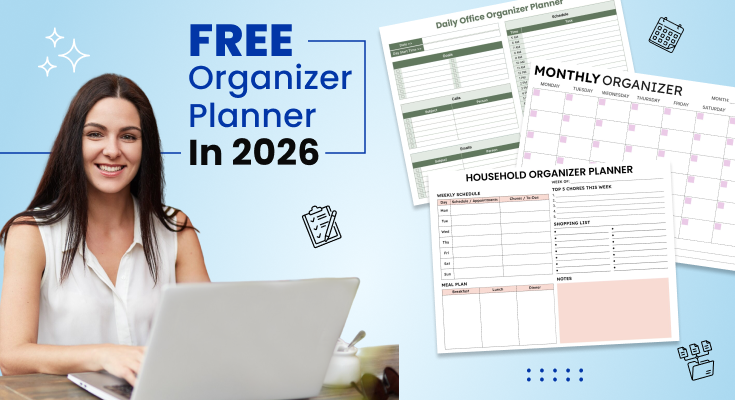
This clean month calendar provides you with a comprehensive view of the whole month on a single sheet. Each day is provided with a box to hold a small purple square in the corner, ideal for jotting down notes on key dates. Space is provided to input the month’s name and the days of the week along the header row. The abundance of space provided within each date box allows you to write down your appointments or reminders without any space constraints. Then there is a space provided at the bottom to input notes that you may require later on within the month.
Best For: People who want to view the entire month at a glance on a single page, planners who track repeat events, and those who use the calendar as a tool to schedule the activities of their whole family.

Template 2: Comprehensive Household Organizer Planner
This complete household organizer helps keep your entire week organized. There is a weekly event table where you can record appointments and chores for each day of the week. It allows you to note the top three priorities for the week, so important matters won’t fall by the wayside. This layout includes a two-column shopping list with bullet points, making it easy to organize items by store or category. Meal planning is simplified with dedicated boxes for breakfast, lunch, and dinner. Additionally, a large pink notes section provides space to jot down important reminders or tasks that need attention.
Best For: Busy parents, home managers, or anyone trying to manage family schedules, meals, and home management duties, all in the same application.

Template 3: Office Priority and Task Organizer Planner
This planner is very useful as it enables you to keep everything under control during the day, with the provision of proper sections to write down everything important to you. You can also jot down your top seven to-do lists so that you know exactly what you have to focus on the most. There is also a section to match your top seven to-do lists to appointments with times or details. The today to-do list section is accompanied by a tomorrow to-do list section, where you can make plans while remaining focused on the things that need to be done today and at the end of the day. There is also a section to jot down your ideas at the end.
Best For: People who work in the office and others who work online and have to juggle their activities, appointments, and things to do the next day.

Template 4: Daily Personal Management Organizer Planner
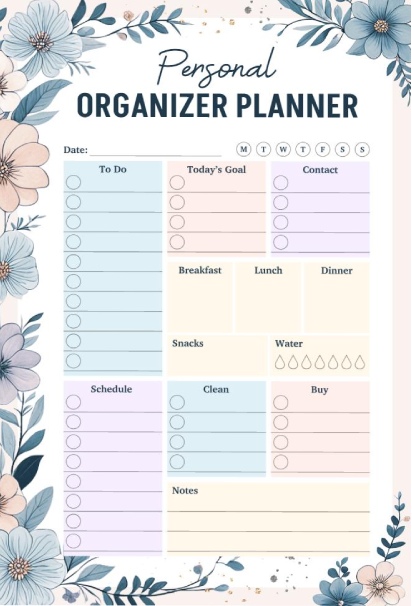
This beautifully designed daily planner comes with blue and peach floral borders that make planning an enjoyable experience. You have a to-do checklist marked with circles for completion, an area for your daily target, and a contacts section for all those whom you want to contact. The meal planning areas allow you to plan out breakfast, lunch, dinner, and snacks, with a water droplet indicator to ensure that you are drinking plenty of water. There are other areas for planning out your events, house cleaning, and the things you require to buy. The notes section at the end has space for all your loose ideas. The use of pastel colors for organizing and segregating various areas helps to go through all the sections quickly.
Best For: Those who want a cute and feminine planner to incorporate both personal to-do lists as well as self-care aspects, such as meals and water intake.
Template 5: Daily Work Schedule and Task Management Planner
The bright work planner is designed with pastel colors and fun graphics that make your workday look inviting instead of daunting. To start, you can list down your gratitude at the top of the page, and list your priorities and deadlines side by side. In addition, there is an area to organize your to-do list and calendar that helps you allocate your time effectively by creating tasks. One can track their calls, emails, and meetings by using check marks to ensure nothing is left behind. The area allotted for reminders is accompanied by a notes page featuring the fun paperclip symbol. A graphic of an analog clock is positioned in the corner to remind one of time management. The colorful geometric patterns add visual appeal without going overboard.
Best For: Remote employees, freelancers, and professionals who have a positive and organized way of planning their daily activities, including the use of the communication and tasks sections.

Template 6: Minimal Daily Office Organizer Planner
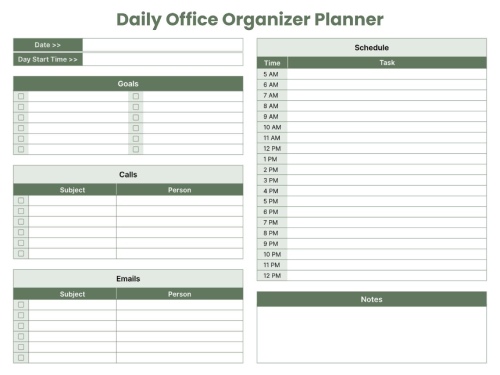
This office calendar comes with an organized structure. In terms of design and color choices, it has an official green and white color combination. You can fill out the date and start time for your day at the top. The space marked for your goals allows you to check off your accomplishments. It also includes tables for calls and emails, with space marked for subject and person so that you can evaluate all your communications. The rightmost side allows for an hourly calendar ranging from 6 AM to 12 AM so that you can allocate time for your entire day. There’s an allowance for notes at the bottom. All are systematically laid out to give an organized feel.
Best For: People in detailed work, administrative assistants, or people who are expected to monitor communication and have a very tight schedule with regard to their daily performance.
Template 7: Daily Organizer Planner
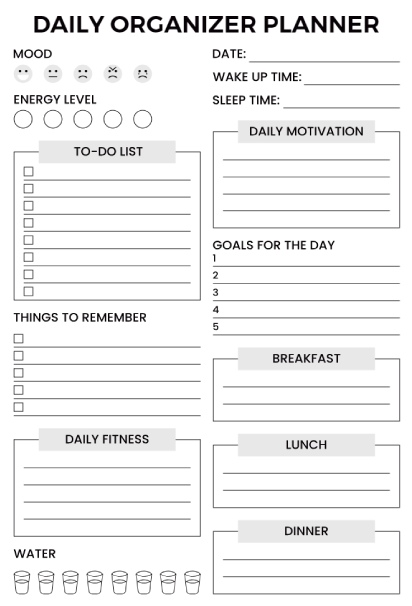
This wellness-focused daily planner starts with mood and energy level trackers using emoji faces and circles so you can check in with yourself. You write your wake-up and sleep times to monitor your rest patterns. There’s a box for writing your daily motivation to keep yourself inspired throughout the day. The five goals section helps you focus on what matters most. You can plan your meals with dedicated boxes for breakfast, lunch, and dinner. The daily fitness section gives you space to note your workout or movement. A water tracker with eight glass icons helps you hit your hydration goals. The things to remember checklist ensures nothing important gets forgotten. This planner treats your well-being as important as your productivity.
Best For: Health-conscious individuals, wellness enthusiasts, or anyone working on building better daily habits around sleep, nutrition, fitness, and self-care.
Frequently Asked Questions
An organizer planner is an offline or online tool that you can use to organize your tasks, time, and goals in one place. You will need an organizer planner because your brain cannot store this much information in it. Organizer planner tools provide you with a clutter-free brain and a stress-free life by allowing you to see how you are spending your time.
If it is a beginner, then the best planner to use will be the one that is used every week. The reasons are that it will be able to view the whole week in one single look, whereas if the planner is used on a daily, weekly, or monthly basis, it will get more jumbled. However, it will be a little confusing to use the planner that is used daily, and the monthly planner will probably not be able to provide sufficient information so that the habit of planning is maintained.
There are three things that you need to focus on each day. Firstly, you need to record down appointments and commitments that you have. Secondly, you need to write down the top three things that you believe need doing. Thirdly, you need to record things that you believe are important or reminders that you need to remember. It is also important to ensure that the lists that you create are not too cumbersome.
Yes. By using an organizer planner, you are creating an imbalance that becomes visible simply by looking at areas in which you are spending time. If the areas are just work, then you are aware that a balance needs to be achieved. By planning activities involving yourself, activities, family, or resting, a balance can also be planned. There are other ways that a balance can be achieved simply through color-coding, which has been learned through other questions. These include areas that are possibly monopolizing time.
Conclusion
You now have all the information you need different formats, templates, and systems for work, home, and personal life. But knowledge without action changes nothing.
Begin small. Simply choose the most suitable format (weekly is clearly more viable in general) and stick to it. The goal is to plan each day for a week, writing down your three key priorities. Just don’t hit the whole list right off the bat.
Top Digital Planning Apps
If you like planning digitally or are interested in combining planning methods to use both paper and digital planners, here are some options that you may like:
- PlanWiz: Combines task management, scheduling, and goal tracking in one intuitive platform with ready-made planner templates for easy daily and goal planning.
- Notion: Highly customizable workspace for planning, notes, and project management
- Todoist: Simple, powerful task management with helpful productivity tracking
- Google Calendar: Free, reliable scheduling that syncs across all devices
- Trello: Visual board-based planning perfect for managing projects
Many people find success using both paper for weekly planning and reflection, and digital for reminders and shared schedules.
Your next step? Choose your planner. Set up your first week. Start tomorrow.
The planner that changes your life isn’t the fanciest or most expensive one; it’s the one you’ll still be using three months from now.