
Hurrying to grocery stores with no clear direction ends up costing you time and money while you get frustrated when you get back home and remember you forgot half of the necessary items. Roaming around in the grocery stores, having to make numerous trips in a week, and coping with impulse buys that exceed your budget could be some of the challenges you undergo in your busy lifestyle. Without a shopping list planner or organized program, grocery shopping becomes a chore, not an activity you do efficiently, causing you to buy items you have and miss items you needed to cook.
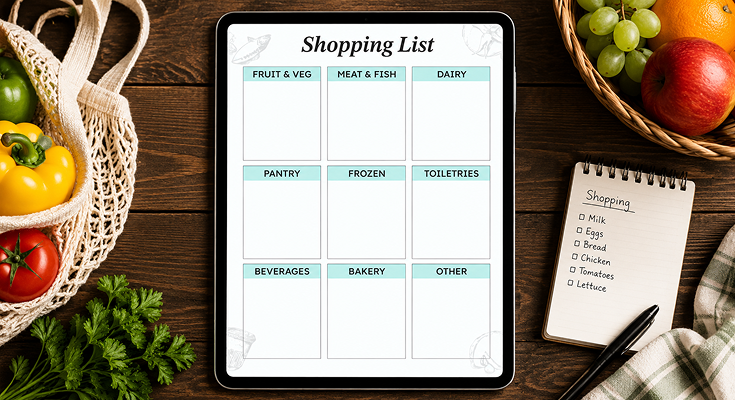
The shopping list organizer template allows for a structured way of planning grocery shopping according to different sections in the grocery store, ensuring a calculated way of purchasing groceries and reducing missed purchases. This template can be downloaded from Planwiz both in downloadable PDF and editable file forms and has been divided into sections such as produce, proteins, dairy, pantry, freezer, and household. This highly organized way of performing the chaotic task of grocery shopping reduces grocery shopping hassles and discomforts associated with disorganization.

What Is a Shopping List Planner?
A shopping list planner is an organizational instrument that you pre-structure to assist you in categorizing your grocery list before a visit to the store or even during your visit to the store. As opposed to a haphazard list that you jot down on a piece of paper or even type into your cellular device, a shopping list templates enables you to break down your groceries into rational categories such as produce, proteins, dairy products, pantry products, frozen goods, and household products. This way, your list is similar to how a grocery store sets out its sections.
A shopping list organizer typically has 8, 10 main categories of essential products, for example: Fruits & Vegetables, Meat & Fish, Dairy Products, Pantry (rice, canned foods), Frozen Foods, Toiletries, Drinks, Bakery, and Miscellaneous articles. These organizers are a help to you in checking what you have, evaluating what you need, and arranging according to the store layout which saves you time, helps you limit impulsive buying, and control your grocery expenses. In order to have meal planning run smoothly, take the pleasure of using a meal planner templates along with it.
How to Use the Shopping List Planner Template?
Step 1: Download and Prepare Your Template
You can download a copy of the shopping list template in whatever format you like, whether it is a PDF that you can print out for use with physical paper or edit for use from a digital device. You can print out a few copies for future use, while you can laminate a copy for use with a dry erase marker. Keep a copy of this shopping list template in a location where you can easily access it, perhaps inside your refrigerator or from the top of your kitchen countertop, where family members can add things throughout a given week.
Step 2: Check Your Current Inventory
Start in your kitchen to check each storage container before putting anything down in your shopping list template. Look at your pantry to check your levels for grains such as rice and pasta, canned foods, and baking supplies. Your refrigerator is where you should check for produce that is wilting, condiments that are almost out, as well as your levels for dairy products. Your freezer should be assessed for proteins such as meats or fish, as well as frozen vegetables that you might already have in stock, which can then be used in your meals as recorded in food journal templates.
Step 3: Plan Your Weekly Meals
Review recipes you want to cook in the coming days and write down the main meals for each day using a weekly planner templates. By doing this, you will be certain that every entry in your shopping list template will be utilized properly instead of buying stuff that you haven’t planned for just because you see them at the grocery store. Explore options to combine the requirements for the overlapping ingredients in different recipes so that you will not need to buy too many different items in total.
Step 4: Fill in the Fruit & Veg Section
Start your grocery list with the Fruit & Veg section. You will be detailing all the fruits and vegetables that are needed for your meal plans. It is very important to weigh the products in accurate quantities, for example, “3 tomatoes” or “2 bunches of spinach, ” rather than using vague terms. By doing this, you will be sure to have the fruits that are required for the snacks as well as the vegetables that are necessary for preparing the sides.
Step 5: Add Proteins to Meat & Fish
List the proteins from the Meat & Fish category based on your meal plan for the week. Be specific when listing-”2 lbs chicken breast” or “1 lb ground beef” to accurately get what you need. This is to avoid buying too much and to ensure that you have the right proteins for the meals that you are preparing.
Step 6: Complete Dairy, Pantry, and Frozen Sections
The following products-milk, cheese, yogurt, and eggs-can then be added to the Dairy category. The items found under the pantry, such as oils, spices, and other food items containing oils or spices that a person needs to restock in their storehouse, fall into the next category.
Step 7: Add Remaining Categories
You need to fill the Toiletries section of the shopping list with the essentials which you consume in the home, e.g. soap, shampoo, and cleaning products that you have to replenish. You should also check the shopping list template for the Beverages for the week, Bakery products such as bagels or bread, and miscellaneous products in the category of Other products.
Step 8: Shop Following Your List
Bring the shopping list organizer to the store in either digital form on the phone or hard copy form. Organize the lists according to the store’s layout to save time. The lists should be visible throughout the entire shopping experience for easy reference purposes.
Step 9: Check Off Items as You Shop
Check off each item on the shopping list template the moment after adding it inside the basket. This ensures there are no mix-ups on the picked-up items and keeps a tab on progress on the list. Keep eyes locked on the planned purchases, avoiding impulse goodies which are not part of the shopping list template.
Step 10: Review and Refine for Next Time
Once you have finished shopping, compare what you have bought with the items on your shopping list. Identify patterns, for example, things you always forget and categories of products that you do not use. Use this information in your planning for the next week.
Frequently Asked Questions
A shopping list schedule is basically an organized template that breaks down grocery items by store section to make your shopping experience easier. It takes items like produce, dairy, meat, and pantry goods and puts them into the sections that correspond to typical grocery store layouts.
With this method of shopping you are able to move quickly through the store as it allows you to eliminate going back and forth through the aisles.
The template is a brand that can be used over and over again and that you can fill in each week taking into account meal plans and the needs of your household.
Shopping list organizers cut the time spent on shopping by between 30% and 40% if compared to random notes or mind maps. Organizing your lists protects you from missing items and minimizes impulse buys that generally exceed the budget.
Planned organization will also ensure good meal preparation and minimize the amount of food wasted. With careful listing, you will end up purchasing just what you want, and you will use all of what you have purchased.
The plan with this template allows for shopping consistency, which saves funds in the long run. Those who use it on a regular basis notice that they spend between 15% and 20% less on their shopping simply because they stay on course with their shopping list rather than meandering around stores.
The majority can finish compiling a shopping list schedule during weekend meals planned before the regular grocery purchasing excursion for the week.
It is helpful to keep a copy of the template on your refrigerator to jot down products when levels run low in your home supplies throughout the week.
Budget-conscious shoppers might create the list right before payday using the budget planner when allocating purchases based on the budget. People who are involved in meal prep may complete the budget planner templates after choosing the meals for the upcoming week.
Begin by organizing such perishable items as vegetables and meats before anything else, as these will decide what options you prepare for eating. Second, you should start your organizing process by noting such often-forgotten items as spices in prominent places in the pantry section so that you do not forget them.
Organize the ingredients for particular recipes together based on category for easier meal prep in the future. Use an asterisk or highlight urgent items that you have used up completely.
This priority system that you have on your shopping list organizer ensures that you do not run out of supplies. This feature can also be helpful when you are on a tight budget and you have to prioritize what to buy.
Follow the shopping list organizer in the order that corresponds to the actual layout of the store for efficiency purposes. Cross off the item the moment you put it into the cart to eliminate confusion and repeating purchases.
The list should be kept visible at all times during the shopping trip through the use of the phone or clipping it to the shopping cart. Some consumers also take a photo of the completed list prior to leaving the house as a backup reference.
First, schedule five or seven meals using daily planner templates, making sure to include the meals for each day. Next, list the ingredients for each meal in the appropriate sections of your daily planner.
To reduce the total number of items on the grocery list, identify the locations that use the same ingredients. Check your refrigerator and pantry to see if you already have any items before you confirm the planner list.
This approach is a great way to ensure that every item on your list is a necessary part of your meals every single day of the week.
Organize categories based on your dietary needs, and your plant-eater categories might include renaming “Meat & Fish” to “Plant Proteins and Tofu.” Include categories specific to your dietary needs, such as “Allergen-Free Items” and “Organic Produce.”
You are capable of editing the printable version of this list planner to suit the size of sections according to what you purchase most.
You might see families with young children add to the dairy category while cutting back on beverages or bakery categories, or utilize family planner templates in addition to your grocery list to coordinate meals and activities in your household.
Additionally, digital customization allows you to create versions specific for stores, where categories can be tailored exactly to the layout for each retailer. This personalization allows your template to be even more optimized for weekly shopping rituals.
Include a small price column for estimating the costs alongside every item in your shopping list planner. After that, calculate the total for every category to see which areas allocate the highest amount of your grocery expenditure.
You can write down your spending limit on the template above and go shopping. In fact, some individuals set up a two-column table for the categories in order to monitor their expenses on a timely basis.
First, take an analysis of your usual groceries store layout and come up with categories that relate to your grocery shopping list. Employing a word processor or a spreadsheet application, design a grid format whose boxes are labeled, comprising ample room for writing in each section.
Consider organizing the list with necessary categories such as produce, proteins, dairy, and pantry products, and also include 2-3 categories that would suit the household requirements. Try arranging the list in a manner that would accommodate the layout on one page only.
It would be good to keep this list throughout the week as opposed to starting afresh each time. It will help save time, and you would be able to write down things as they come into mind.
Don’t list items too vaguely-writing “vegetables” instead of “2 bell peppers, 1 cucumber” leads to wandering and forgotten items. Avoid skipping inventory checks before creating your list, which results in duplicate purchases and wasted food.
Many shoppers fail to organize their shopping list schedule in the order they encounter items in their specific store. This negates the main efficiency benefit of using a categorized template system.
Plan entire meals prior to filling out your shopping list organizer so that you can shop with intention instead of winging it. Organize your items to fit their store’s exact layout by perhaps going there once to see what the department order is.
It is a good practice to keep a list throughout the week instead of starting every time from scratch. It not only helps you save your time, but you can write down your tasks even as you remember them, instead of trying to do so at one single instant.
Review your shopping list schedule monthly to assess whether categories match your actual shopping patterns and dietary changes using monthly schedule planner templates to track your review dates.
Seasonal adjustments might be necessary-expanding produce sections in summer or adding holiday-specific categories in December.
Update whenever you switch primary grocery stores since different retailers have varying layouts that affect optimal list organization. Most households find quarterly reviews sufficient to refine categories and remove unused sections based on evolving needs.






