
Need a Halloween weekly planner template to stay organized while enjoying the spooky season? Whether you’re planning a party, managing events, or simply trying to keep your October week stress-free, having the right halloween template makes all the difference.
A well-crafted Halloween planner template helps you map out to-do lists, activities, and events with ease, so you can focus more on fun and less on chaos.
With Planwiz’s weekly schedule maker, you can customize your Halloween planning experience to suit your needs, whether you’re hosting a Halloween bash or just staying on top of tasks. From party prep to pumpkin carving schedules, everything stays on track in one place.
Let’s explore. The smart planning tips, editable template, and expert insights to help you create a Halloween plan that’s festive, fun, and fully under control.

Overview of the Halloween Weekly Planner Template
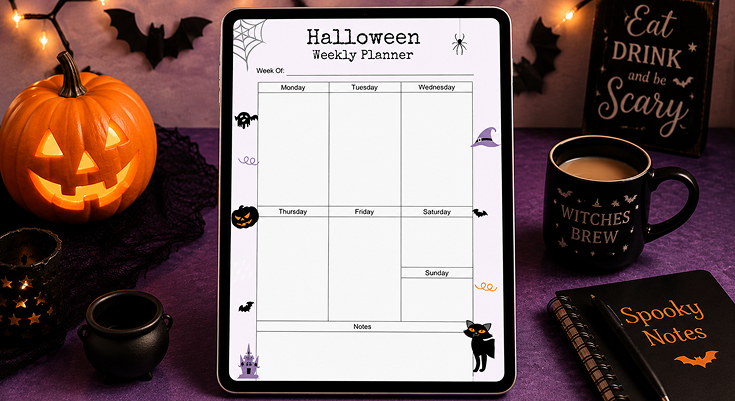
This Halloween Weekly Planner Template is part of a user-friendly planning tool that lets you create a customized planner in minutes. With a drag-and-drop interface, you can adjust the template’s layout, colors, and icons to suit your needs.
The template features a clean weekly grid with sections for each day of the week, a notes area for extra details, and Halloween-themed decorations that make planning a festive experience. Whether you’re a parent, teacher, or event organizer, this tool simplifies your Halloween scheduling while keeping the spooky vibes alive.
- Key Features:
- Weekly grid layout for Monday to Sunday.
- Dedicated notes section for reminders or ideas.
- Customizable Halloween icons and borders.
- Exportable in PDF or PNG for digital or print use.
Start planning your spooky season with ease and style!
Practical Use Cases for Your Halloween Weekly Planner
This planner is versatile for various Halloween planning needs. Here are some scenarios where it shines:
- Haunted Party Planning: Schedule tasks for a Halloween party, such as decorating on Monday, buying snacks on Tuesday, and confirming RSVPs by Friday. Use the notes section for a guest list or party theme ideas.
- Family Trick-or-Treat Coordination: Map out trick-or-treating routes for Wednesday, costume fittings on Thursday, and a family pumpkin carving session on Saturday. Jot down candy preferences or safety tips in the notes area.
- Classroom Halloween Events: Teachers can plan a costume parade on Friday, a spooky story session on Thursday, and a craft activity on Wednesday. Use the notes section for parent volunteer schedules.
- Personal Spooky Projects: Track DIY costume creation on Monday, baking Halloween treats on Thursday, and watching scary movies on Sunday. Add recipe ideas or movie lists in the notes section.
This planner adapts seamlessly to your unique Halloween plans, making organization effortless and ensuring you stay on top of every spooky detail with ease and confidence.
Inspiring Design Elements of the Halloween Weekly Planner Template
The Halloween Weekly Planner Template is packed with eerie design elements that enhance its functionality and festive appeal:
- Spider Webs for a Chilling Frame: A spider web in the top-left corner, complete with a dangling spider, frames the planner with a haunting touch. This subtle design element sets the spooky tone without cluttering the layout.
- Black Cats for Mystical Accents: A black cat with glowing eyes sits at the bottom-right, adding a mystical vibe near the notes section. Its sleek silhouette complements the planner’s soft purple borders.
- Jack-o’-Lanterns for Festive Warmth: A carved pumpkin with an eerie grin adorns the left side near Thursday’s section, bringing a pop of orange that makes the planner feel lively and thematic.
- Flying Bats for Dynamic Details: Bats are scattered along the edges, like near Saturday and the left border, adding a sense of movement and excitement to break up the grid layout.
- Haunted House for a Spooky Scene: A haunted house silhouette at the bottom-left adds a storytelling element, enhancing the planner’s eerie aesthetic while keeping the design balanced.
Using Icons to Visually Prioritize Halloween Tasks
Turn the Halloween icons in this planner into practical tools for task management. These visual markers, enhanced with additional icons, help you prioritize and organize your spooky schedule with a festive twist. For more tips, explore the task prioritization guide to structure your schedule with clarity and confidence.
🎃 Jack-o’-Lantern: Spotlight Your Most Important Tasks
Use It As: A bright beacon for your highest-priority to-dos.
How to Apply: Draw a bold circle around the jack-o’-lantern near Thursday to immediately call attention to your most urgent or time-sensitive tasks.
Why It Works: This visual cue helps you mentally prioritize, ensuring nothing crucial gets missed during the week’s chaos.
Example: Add “Buy costumes for kids” here so it jumps off the page and reminds you before stock runs low.
🦇 Bat Icon: Flag Festive Halloween Activities
Use It As: Your go-to symbol for themed events and seasonal fun.
How to Apply: Draw a star, underline, or highlight the bat next to Saturday’s schedule to bring attention to joyful events.
Why It Works: Amid busy schedules, this helps ensure fun doesn’t get forgotten in the flurry of logistics.
Example: Planning a pumpkin carving night or trick-or-treating? Mark it with the bat so you never miss the magic.
🕸️ Spider Web: Anchor Weekly Goals & Big-Picture Plans
Use It As: A strategic reminder for overarching goals or start-of-week priorities.
How to Apply: In the top-left section near the spider web graphic, list out the broader, foundational tasks for the week.
Why It Works: By visually separating big-picture tasks from daily actions, you keep long-term plans in focus.
Example: “Finalize guest list and party plans by Monday” fits perfectly here to set your week in motion.
🐾 Black Cat: Draw Attention to Urgent or Overdue Tasks
Use It As: A clever prompt for time-sensitive or overlooked reminders.
How to Apply: Use the space beside the black cat in the notes section to list anything that needs to be done now.
Why It Works: The visual alert feels playful yet effective, turning to-dos into tasks you’ll actually notice and complete.
Example: “Pick up decorations and candy by Friday” becomes unmissable with a little help from your feline friend.
🏰 Haunted House: Celebrate Progress and Completed Tasks
Use It As: A motivational tool for recognizing wins, big or small.
How to Apply: Check off or decorate the haunted house at the bottom left each time you complete a major task.
Why It Works: Turning progress into celebration helps boost momentum and builds satisfaction as the week unfolds.
Example: Cross off “Decorating done by Wednesday” and enjoy a mini moment of spooky success!
This method transforms your planner into a functional and festive tool, making task management a delightful Halloween experience by using the icons to visually prioritize and celebrate your progress in a way that keeps the spooky spirit alive throughout the season.
Seasonal Organization Tips for Halloween
Maximize your Halloween Weekly Planner with smart strategies and planner organization ideas designed to simplify your schedule, reduce stress, and help you enjoy every spooky moment. Whether you’re planning parties, school events, or seasonal fun, these tips ensure you stay organized, efficient, and creatively inspired throughout the week.
- Schedule Key Events First: Block out major activities like trick-or-treating or parties on specific days (e.g., party setup on Friday, trick-or-treating on Saturday). Use the notes section for backup plans. Also, you can use a notes planner template to note down your notes in an effective way.
- Plan Costume Prep: Dedicate days for costume shopping or DIY tasks (e.g., Monday for shopping, Tuesday for sewing). List materials or steps in the notes section to stay prepared.
- Organize Spooky Meals: Schedule Halloween-themed meals or baking sessions (e.g., baking ghost cookies on Wednesday). Add a grocery list in the notes section for quick reference.
- Set Reminders for Decorations: Plan decoration setup (e.g., Thursday for indoor decor, Friday for outdoor lights) to avoid last-minute chaos. Note decoration ideas or locations in the planner.
These practical Halloween planning tips keep your week organized, festive, and stress-free. Use your Halloween Weekly Planner to manage activities, costumes, meals, and decorations, freeing mental space to create magical memories. Balance fun and function effortlessly this season.
Benefits of Using the Halloween Weekly Planner Template
This spooky planner offers a wide range of practical advantages that ensure a seamless, stress-free, and enjoyable Halloween experience from start to finish:
- Time-Saving Design: The pre-structured weekly grid and notes section let you start planning immediately, saving you time on layout creation.
- Festive Engagement: Halloween icons like bats and jack-o’-lanterns make planning exciting, encouraging consistent use throughout October. Pair it with an easy-to-use October planner template to map out important dates alongside your weekly plans.
- Customizable Layout: Adjust the template to fit your needs, whether by adding more sections or changing icon placements.
- Cost-Effective Solution: Create a professional, themed planner without hiring a designer, perfect for individuals or small groups.
- Practical and Fun: Balances functionality with a festive aesthetic, ensuring your plans are both organized and enjoyable.
With this versatile and user-friendly template, Halloween planning transforms into a delightful and engaging task. It keeps you motivated and organized throughout the entire season!
Step-by-Step Guide to Customizing Your Halloween Planner
Follow these clear and easy-to-follow steps to fully personalize your Halloween Weekly Planner Template, tailoring it to fit your unique needs and making your planning experience both efficient and enjoyable:
Download the PlanWiz Planner App
Download the PlanWiz app on your device so you can create your halloween template anytime, anywhere.
Access the Template
Access the Halloween Weekly Planner Template easily to start organizing your spooky season with a ready-to-use layout that simplifies your planning process.
Adjust the Layout
Add or remove sections as needed, perhaps include a “To-Do” list for each day, or expand the notes area for more details.
Enhance with Icons
Drag and drop additional Halloween icons like ghosts or witches’ hats into the planner. Place them near day headers for a festive touch.
Choose Colors and Fonts
Use Halloween-inspired colors (orange, purple, black) for text entries, and select a gothic or bold font to match the theme.
Preview, Edit, and Download
Check the planner for clarity and balance, ensuring icons don’t overcrowd the grid and text remains legible. Then, export it as a PDF for digital use or print on A4 paper to have a physical planner for the week.
Conclusion
The spooky halloween weekly planner template offers a perfect blend of festive charm and functionality. With eerie icons and structured sections, it simplifies planning. The PlanWiz planner app enhances usability, ensuring seamless task management. Stay organized, embrace Halloween vibes, and enjoy effortless scheduling with this creatively designed planner!
FAQs
Anyone planning Halloween activities, including parents, teachers, event organizers, or Halloween enthusiasts.
It has a weekly grid for Monday to Sunday and a dedicated notes section for extra details.
Yes, you can adjust the layout, colors, and icons using the drag-and-drop tool.
Schedule tasks like decorating on Monday or confirming RSVPs by Friday, and use the notes section for guest lists.
Yes, print it on A4 or letter-sized paper for a tangible planner.






