
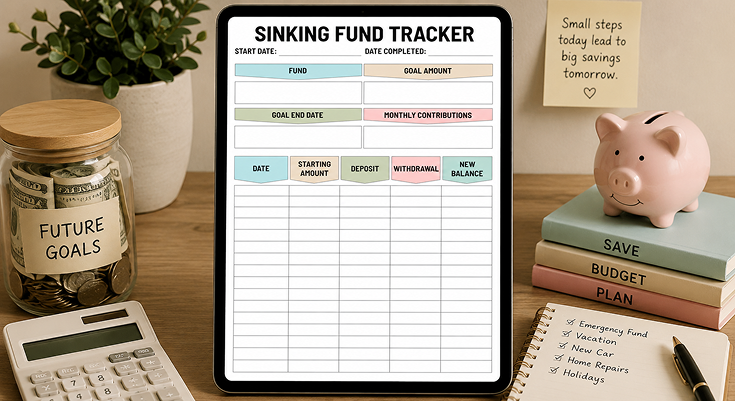
Large expenses do not give you a pleasant announcement or a predictable timing in relation to your pay checks. Property taxes, car insurance, holiday shopping, or home repairs are expenses that hurt your budget when you are less prepared. Having a sinking fund savings tracker eliminates these problems since large expenses are broken down into smaller saving targets every month.
Managing irregular expenses effectively is essentially your way of saying goodbye to feelings of despair in December or when the water heater breaks down unannounced. A location version of this template will allow you to process several savings goals at the same time in a very systematic way from bare necessities car repairs and health care to luxuries vacations and new technology. Planwiz, through this printout, expedites your journey to financial security by means of a dedicated, goal, oriented savings regimen that helps you get rid of debt and anxiety associated with predictable expenses.
What is a Sinking Fund Savings Tracker?
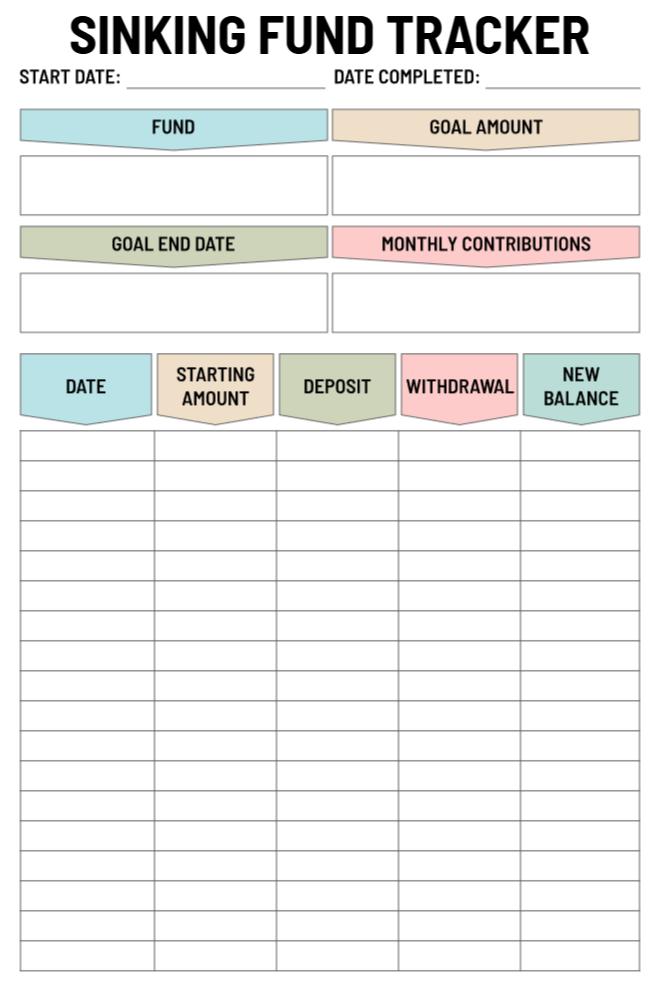
A sinking fund savings tracker is a financial planning worksheet that helps you monitor dedicated savings for specific future expenses. Unlike a general savings account where money sits without clear purpose, this tracker assigns every dollar to a named goal with a target amount and deadline. It includes columns for recording dates, deposits, withdrawals, and running balances so you can see exactly how much you’ve saved toward each planned expense.
How it works – it essentially involves breaking down big expenses that can be predicted into smaller portions that you can afford every month. For instance, instead of waiting for the last minute to raise $1,200 every time you have to pay car insurance premiums, you simply set aside $100 every month. This ensures that you do not have to rely on loans every time expenses you can predict come up.
What Are Sinking Fund Saving Categories and Why Do You Need Them?
Life brings predictable expenses throughout the year, but they rarely arrive on convenient monthly schedules. A sinking fund savings tracker helps you manage these timing mismatches by breaking large costs into affordable monthly amounts. These 8 essential categories cover the most common financial challenges that surprise people and cause unnecessary debt or stress.
Start with these core funds before adding specialized categories. Track each one separately in your fund savings tracker while keeping all money in one high-yield savings account for simplicity and maximum interest earnings.
1. Vehicle Expenses
What it covers: Auto insurance premiums, registration fees, regular maintenance, tire replacement, unexpected repairs
Why you need it: Cars require $1,500-$3,000 annually in combined costs. Semi-annual insurance bills of $800-$1,200 catch people off guard without dedicated savings.
Monthly savings target: $125-$250 depending on vehicle age and condition
2. Medical & Dental Costs
What it covers: Insurance deductibles, copays, dental procedures, vision care, prescription medications not fully covered
Why you need it: Unexpected medical expenses averaging $1,000-$2,500 annually happen to everyone. Dental crowns, root canals, and emergency visits don’t wait for payday.
Monthly savings target: $85-$200 based on health status and insurance coverage
3. Home Repairs & Maintenance
What it covers: HVAC repairs, plumbing issues, appliance failures, roof leaks, pest control
Why you need it: Homeowners need 1-2% of home value annually for repairs. Even renters face security deposit replacements and moving costs every few years.
Monthly savings target: $100-$300 for homeowners, $50-$100 for renters
4. Holiday & Gift Fund
What it covers: Christmas shopping, birthday gifts, wedding gifts, anniversary celebrations
Why you need it: The average family spends $800-$1,500 on year-end holidays alone. Use christmas planner templates alongside your holiday fund to organize gift lists, track purchases, and stay within budget.
Monthly savings target: $100-$165 to avoid December debt stress
5. Annual Subscriptions & Memberships
What it covers: Amazon Prime, Costco membership, software subscriptions, streaming services, professional dues, gym memberships
Why you need it: These “small” costs add up to $500-$1,200 yearly. Paying annually often saves 15-20% compared to monthly billing.
Monthly savings target: $40-$100 depending on your subscriptions
6. Technology Replacement
What it covers: Smartphone upgrades, laptop/computer replacement, tablet purchases, essential software updates
Why you need it: Technology needs replacing every 2-4 years. Phones cost $700-$1,200, computers run $800-$2,000. Spreading these costs prevents financial shock.
Monthly savings target: $50-$100 for gradual upgrades
7. Vacation & Travel
What it covers: Annual family vacation, weekend getaways, travel for weddings or family events
Why you need it: Americans who vacation spend $1,500-$4,000 annually on travel. Saving monthly makes trips guilt-free and debt-free.
Monthly savings target: $125-$335 based on travel preferences. Once you’ve saved enough, traveling planner templates helps you organize itineraries, bookings, and daily activities for your trip.
8. Irregular Bills & Annual Expenses
What it covers: Property taxes, HOA fees, annual insurance (life, umbrella), professional licenses, school tuition payments. Budget planner templates helps you organize all these irregular expenses alongside your regular monthly bills.
Why you need it: These predictable-but-irregular bills average $2,000-$5,000 annually. Monthly savings of $165-$415 eliminates payment shock.
Monthly savings target: $165-$415 depending on your specific obligations
Frequently Asked Questions
A sinking fund tracker is a budgetary aid that assists you in setting aside for future expenses. This tool uses a methodology to break down a future purchase into a monthly contribution that can be afforded by you.
The tracker helps you keep tabs on deposits, withdrawals, and your own balances in relation to each savings target. Through this system, you document every transaction with dates and amounts, keeping you informed on your progress every step of the way.
This approach helps ensure you always withdraw cash when you need it without having to use credit cards and borrow cash.
A sinking fund tracker allows for a level of organization in terms of savings that a standard savings account cannot, as it assigns a purpose to your money.
In a standard savings account, all money is combined, whereas a sinking fund tracker allows for separation based on purpose, so a person cannot use vacation money for home repairs when using a sinking fund tracker.
Visualization of saving progress helps make saving a habit by motivating efforts in this area. It also helps make a person accountable for achieving economic goals. It is possible to assess accurately how much money has been saved toward a goal and how much money is left for its achievement.
Firstly, you have to prioritize your saving targets. Once you have prioritized, you will be able to determine the total sum of money you require to attain the goals.
You also have to set a deadline for the completion of the goals. Based on the total sum of money and the time available, you calculate the monthly contribution.
Enter the fund, goal, end date, and contribution on the top section of the sinking fund calculator. If you currently have a balance of money for the same purpose, do not forget to enter it on the top section corresponding to the starting balance.
Start entering the transactions on the table section every time you make a contribution or withdraw your funds.
Track five essential data points: the transaction date, starting amount before the transaction, deposit amount added, withdrawal amount taken, and the new balance after the change. These columns provide a complete financial history of your savings journey toward each goal.
Include the fund name and goal amount at the top for quick reference and motivation. Record your target end date and planned monthly contributions to stay on schedule. Additional notes about why you made withdrawals can help you analyze spending patterns and improve future planning.
Update your sinking fund savings tracker immediately after each deposit or withdrawal to maintain accurate records. Most people make monthly updates when they transfer funds on payday, though weekly updates work better for those with multiple income streams.
Set a consistent schedule that matches your pay frequency to build a reliable habit. Many people find success using yearly planner templates to mark quarterly review dates for all their sinking funds at once.
Even if you have missed making a contribution to your goal, you need to note it to learn about your actual saving behavior. You can avoid any confusion regarding your position on different goals. This way, you always know what your actual position is.
Yes, there are ways to track more than one goal through the use of separate sections or even making copies of the budget for each of the different funds.
You can also print several copies of the budget templates and bind them together through the use of tabs or even colored pens to differentiate between vacation savings, car repairs, and holiday money.
Users can set up multiple spreadsheets or even utilize budgeting software that has the capability to break down categories.
Use identifiable names such as “Emergency Car Fund” or “Insurance Fund for a Year” for sinking fund spreadsheets. This helps to avoid confusion when setting aside funds upon receiving income.
Change your sinking fund savings tracker to make contributions based on percentages rather than fixed monthly numbers.
For instance, set a goal to set aside 10% of all payments that come in rather than a fixed sum. Use the total sinking fund goal and the actual income that comes in to create a new timeframe.
Record variable deposits in the same manner and accept that the levels of contribution will vary each month. You simply have to check your progress every month and see if you have to raise the percentages based on how much you are earning at that time.
Make column headers for date, starting amount, deposit, withdrawal, and new balance. Then add cells above for fund name, goal amount, goal date, and monthly contributions.
Use equations to automatically calculate new balance by adding deposits to the starting amount while subtracting withdrawals.
Organize the sinking fund tracker to emphasize the borders and utilize color-coding. Use the conditional format feature to indicate achievement of milestones such as 25%, 50%, and 75% of the targeted amount.
Use a progress bar or graph to represent the savings process. This will be a motivating factor when tracking the savings towards the targeted amount.
The first problem may be setting unreasonable contribution levels that put a crunch on your budget, causing you to forego your objectives.
Yet another common issue may be “borrowing” from an individual sinking fund to pay for something else. The last problem may lie in not considering small price hikes or simply not calculating the true cost.
A third mistake is to try to create too many funds at one time, and this dilutes your funds. Begin with 3-5 goals and add more when you finish previous goals.
Failing to keep a sinking fund goal tracker up to date leads to incorrect goals and poor financial decisions based on wrong goals.
A common recommendation from most finance experts is to keep between 3 and 7 sinking funds active at a time, depending on your income and expenses.
Beginners will find it helpful to start with 2-3 necessary funds to start with because a novice may find it overwhelming to keep track of numerous funds. The most urgent or costly targets in most cases are insurance payments and home repairs.
Once you are comfortable with the system, add more money to fund for more pressing needs. Make sure that the sinking fund list you have is realistic to the needs of your monthly budget. Too few sinking funds can put you in a position where you are caught unawares by the needs that arise throughout the year.
First, prioritize by deadline, so those with funding needs sooner should be funded before those with later deadlines.
Also, take into consideration the impact of not having the funds available when needed, as necessary expenses such as property taxes are considered above discretionary spends like buying a TV, for example.
Lastly, quarterly changes mean reviewing your list of priorities every quarter, adapting funding levels as appropriate through the savings tracker for your sinking fund. Quarterly planners are useful tools for organizing fund reviews.
Allocate using the 50/30/20 rule, where you allocate 50% to short-term needs, 30% to medium-range targets, and 20% to long-range desires.
This will provide a good combination of meeting short-term requirements and working towards long-range goals. Remember to save for your mandatory expenses first before your desires.






