Teachers need more than just good intentions to manage their busy schedules—they need structure. A well-designed teacher planner template helps educators map out their week with clarity, balancing lesson planning, classroom activities, and administrative duties.
Whether you’re handling multiple grade levels or teaching subjects back-to-back, a consistent schedule can make all the difference. This teacher class schedule template is editable, easy to use, and ideal for creating a daily class schedule template for teachers.

What Is a Teacher Class Schedule Planner Template?
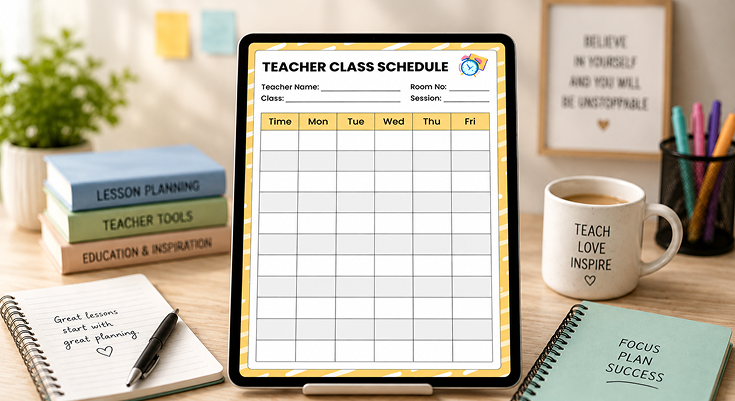
A teacher class schedule planner template is a structured tool designed to help educators plan their lessons across a school week. The template you’re using features a clear layout with:
- Header Fields: Spaces to note your name, room number, class, and session (e.g., “Teacher Name: Ms. Carter,” “Room No.: Lab 204,” “Class: 10th Grade Biology,” “Session: Spring 2025”).
- Weekly Grid: Columns for Monday through Friday and rows for time slots, allowing you to block out lessons for each period.
- Design: A clean, minimalist look with a yellow and white striped border and a clock graphic in the header, emphasizing time management.
This template provides a week-at-a-glance view, making it easy to organize lessons, track classroom locations, and manage your teaching schedule effectively. For more specialized templates, check out school planner templates.
Why Should Teachers Use a Schedule Planner Template?
Teachers often face chaotic schedules with little room for error. A schedule planner template helps by:
- Organizing Lessons: Map out what you’ll teach each day, ensuring you cover all curriculum goals.
- Managing Time: Assign specific time slots for lessons, activities, and transitions to keep classes on track.
- Reducing Prep Stress: Plan ahead to avoid last-minute scrambles for materials or lesson ideas.
- Tracking Logistics: Note room numbers and session details, especially if you teach in multiple classrooms.
- Supporting Continuity: Provide a clear schedule for substitutes to follow if you’re absent.
For example, a middle school teacher can use the template to schedule math lessons on Monday at 8:00 AM in Room 102, ensuring they’re prepared for the week ahead. To complement this weekly view, you might also benefit from a class schedule maker to automate your timetable creation.
How Do You Set Up the Planner Template?
Getting started with the template is straightforward:
- Fill in the Header:
- Write your name, room number, class, and session. For instance: “Teacher Name: Mr. Patel,” “Room No.: 305,” “Class: 8th Grade Science,” “Session: Fall 2025.”
- This personalizes the planner and provides context for anyone referencing it.
- Label Time Slots:
- In the “Time” column, add your school’s period schedule, such as 8:00 AM, 9:00 AM, and so on.
- Adjust intervals to match your class periods (e.g., 45-minute or 60-minute blocks).
- Add Basic Details:
- Note any fixed events, like assemblies or duties, to avoid scheduling conflicts.
- For example, mark “Assembly: 10:00 AM” on Thursday to plan around it.
This setup ensures your planner is ready for detailed lesson planning. If you’re looking for a more granular approach, explore schedule planner templates for additional formats
How Can You Plan Lessons Using the Teacher Planner Template?
The grid is the heart of the template, with columns for Monday to Friday and rows for time slots. Here’s how to use it:
- Block Out Lessons:
- For each time slot and day, write the lesson topic and key activities. For example, on Tuesday at 9:00 AM, note “Photosynthesis Lab (Set up microscopes).”
- Be concise but specific to ensure clarity.
- Include Resources:
- Add materials or notes in parentheses, like “(Handout: Cell Diagram)” or “(Prep: Slides 1-5).”
- Account for Transitions:
- If you move rooms, note the change, such as “Wed, 1:00 PM: Move to Lab 305.”
For instance, a 7th-grade English teacher might schedule “Persuasive Writing: Thesis Practice (Worksheet)” for Monday at 8:00 AM, ensuring they’re ready to start the week. For more detailed lesson breakdowns, consider using a lesson planner template alongside this weekly schedule.
What Does a Sample Teacher Schedule Look Like?
Here’s how Ms. Carter, a 10th-grade Biology teacher, uses the template for a week in May 2025:
Teacher Name: Ms. Carter
Class: 10th Grade Biology
Room No.: Lab 204
Session: Spring 2025
| Time | Mon | Tue | Wed | Thu | Fri |
|---|---|---|---|---|---|
| 8:00 AM | Cell Structure Lecture (Slides 1–10) |
Photosynthesis Intro (Video: 5 min) |
Review Cell Cycle (Whiteboard Q&A) |
Assembly (No class) |
DNA Extraction Lab (Strawberries, soap) |
| 9:00 AM | Cell Diagram Activity (Handout) |
Photosynthesis Lab (Microscope prep) |
Mitosis Model Activity (Clay models) |
DNA Structure Lecture (Slides 11–15) |
Unit 3 Quiz (30 min) |
| 10:00 AM | — | ||||
| 11:00 AM | — | ||||
| 12:00 PM | — | ||||
| 1:00 PM | Group Discussion (Cell Functions) |
Lab Data Analysis (Graph results) |
Room Change (Lab 305 – Review) |
DNA Extraction Prep (Gather materials) |
Quiz Review + Reflection (Exit ticket) |
For example, a high school teacher might note room changes for different periods, while an elementary teacher could block out time for transitions like lining up. To further customize your planning experience, explore academic planner templates for more tailored options.
How Can You Customize the Template for Your Needs?
The template’s simplicity makes it easy to adapt:
- Adjust Time Slots: Change the intervals to match your schedule, such as adding a row for “Recess: 10:30 AM – 11:00 AM” for elementary teachers.
- Add More Days: Extend the grid to include Saturday if your school has a six-day week.
- Color-Code: Highlight subjects (e.g., yellow for Science, blue for Math) to visually organize the grid.
- Include Notes: Use the margins to jot down reminders, like “Fri: Submit grades by 3:00 PM.”
- Tailor by Grade:
- Elementary: Add specials like “Art at 10:00 AM.”
- High School: Note multiple preps, such as “AP Bio vs. General Science.”
- Special Ed: Schedule IEP meetings or interventions.
For example, a high school teacher might note room changes for different periods, while an elementary teacher could block out time for transitions like lining up.
How This Teacher Class Schedule Planner Simplifies Lesson Planning?
A well-structured schedule is essential for effective lesson planning and classroom management. This Teacher Class Schedule Planner Template helps educators stay organized, allocate time efficiently, and ensure a smooth flow of lessons throughout the week. Here are the descriptive and key features of the planner template.
Theme & Design
The template features a professional yet simple design, perfect for organized lesson planning. It has a clean layout with a yellow and white striped border, adding a cheerful touch without clutter. A small clock graphic in the header highlights the focus on time management, making it easy to keep your day on track.
Color Scheme
The template uses soft yellow tones paired with a white background, ensuring clear readability. The light colors help you quickly spot lesson details and time slots, even during a busy teaching day.
Structured Sections
This planner template is designed with practical sections to streamline your weekly planning:
- 📋 Teacher & Class Details
Spaces at the top let you fill in your name, room number, class, and session. For example, you can write “Teacher Name: Ms. Carter,” “Room No.: Lab 204,” “Class: 10th Grade Biology,” “Session: Spring 2025.” This keeps all key information in one place for quick reference. - ⏰ Time Slots
A dedicated column on the left allows you to list your school’s periods, such as 8:00 AM, 9:00 AM, and so on. This helps you schedule lessons and activities by the hour, ensuring a balanced and well-timed day. - 📅 Weekday Columns (Monday–Friday)
The grid layout includes columns for each day of the school week, from Monday to Friday. You can easily assign subjects, lessons, or tasks to each day, keeping your week organized and structured. - ✏️ Blank Rows for Flexibility
Each time slot has blank rows where you can add lesson details, breaks, or special activities. For example, you might note “Photosynthesis Lab (Prep microscopes)” or “Recess: 10:30 AM – 11:00 AM,” giving you the freedom to personalize your schedule.
By using this teacher class schedule planner template, you can efficiently plan your week, ensure a steady flow of lessons, and boost classroom productivity. It’s a simple yet powerful tool to help teachers stay organized and make the most of their teaching time.
How Does This Teacher Class Schedule Planner Boost Productivity?
A well-organized class schedule is key to effective teaching. This Teacher Class Schedule Template helps educators stay on track, manage time efficiently, and simplify lesson planning with a weekly planner for a structured and engaging classroom.
✅ Better Time Management
- Helps teachers allocate time efficiently for each lesson.
- Minimizes last-minute lesson rushes and confusion.
- Reduces classroom distractions by following a structured plan.
🎯 Organized Lesson Planning
- Keeps lessons aligned with learning objectives.
- Ensures smooth transitions between different subjects.
- Supports personalized lesson pacing for different student needs.
🏫 Adaptable to Various Teaching Styles
- Suitable for primary, secondary, and higher education levels.
- Can be customized for individual or group lesson planning.
- Works well for in-person and online teaching environments.
By using this class schedule maker, teachers can create a structured workflow, reduce stress, and maximize their teaching efficiency.
Why Is This Teacher Class Schedule Planner Essential for Educators?
A well-designed class schedule is more than just a time management tool—it’s essential for creating a structured, efficient, and engaging learning environment. This Teacher Class Schedule Planner simplifies planning, keeps lessons on track, and enhances overall classroom productivity.
📊 Reduces Administrative Burden
- Simplifies daily teaching schedules by providing a clear, organized structure.
- Saves time on manual lesson organization, reducing the need for last-minute planning.
- Keeps lesson plans structured and easily accessible, ensuring smooth lesson flow.
- Minimizes paperwork by offering a centralized scheduling system.
✨ Enhances Classroom Organization
- Provides a clear roadmap for teaching, helping educators stay on schedule.
- Helps track lesson completion and student progress, ensuring curriculum coverage.
- Encourages consistency in daily schedules, reducing disruptions.
- Allows for easy adjustments, making it adaptable to changes in lesson plans.
🔄 Ensures Teaching Consistency
- Maintain a structured routine for both teachers and students, fostering stability.
- Supports continuity in lesson delivery, ensuring seamless progression of topics.
- Improves overall classroom discipline and engagement by keeping students on track.
- Aligns with educational goals, helping teachers meet learning objectives effectively.
With this class schedule maker, educators can reduce stress, save time, and create a more organized and productive classroom environment. A well-structured teacher planner for goals and priorities ensures that lessons stay on track while aligning with educational objectives.
Conclusion
The Teacher Class Schedule Planner Template is a powerful tool for educators who want to streamline lesson planning and classroom management. With its structured format, clear time slots, and practical sections, this template ensures better organization, productivity, and consistency in teaching. Start using PlanWiz today and experience a more efficient and stress-free teaching routine!
FAQs
It’s a structured tool to help teachers plan lessons across a school week. The template includes header fields for your name, room number, class, and session, plus a weekly grid with Monday-to-Friday columns and time slots to schedule lessons.
It organizes lessons by day and time, ensuring you cover curriculum goals, manage time effectively, and reduce prep stress. For example, you can schedule a science lab on Tuesday at 9:00 AM and note the required materials.
Fill in the header with your name, room number, class, and session. Then, label the time slots in the “Time” column (e.g., 8:00 AM, 9:00 AM) and note fixed events like assemblies to avoid conflicts.
For each time slot and day, write the lesson topic and activities, like “Cell Structure Lecture (Slides 1–10)” on Monday at 8:00 AM. Include resources and note transitions, such as room changes.
They can schedule IEP meetings or small-group interventions in the grid, ensuring dedicated time slots for individualized support alongside regular lessons.