Planning lessons effectively is essential for every educator, and a structured weekly teacher planner template can make that process easier. Whether you’re managing subjects, setting goals, or organizing tasks, the right planner helps streamline your day.
Explore helpful tips, practical design ideas, and access to free, editable resources such as a teacher lesson plan template and a blank lesson plan template. A well-designed weekly schedule maker also supports better classroom organization and time management.
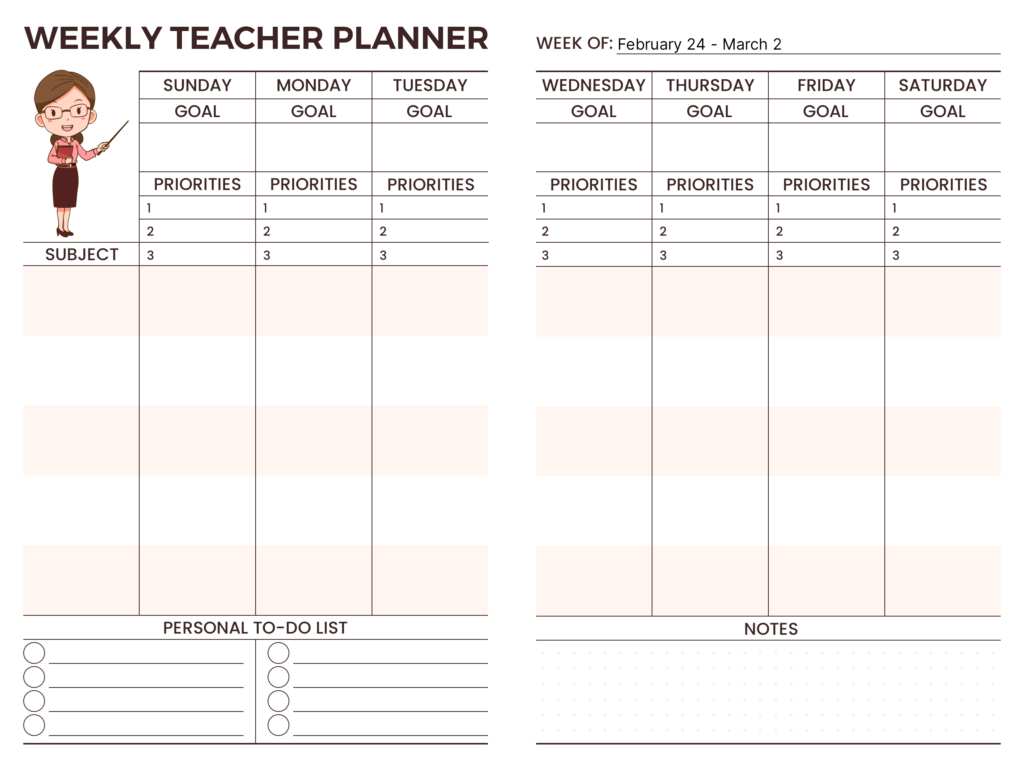
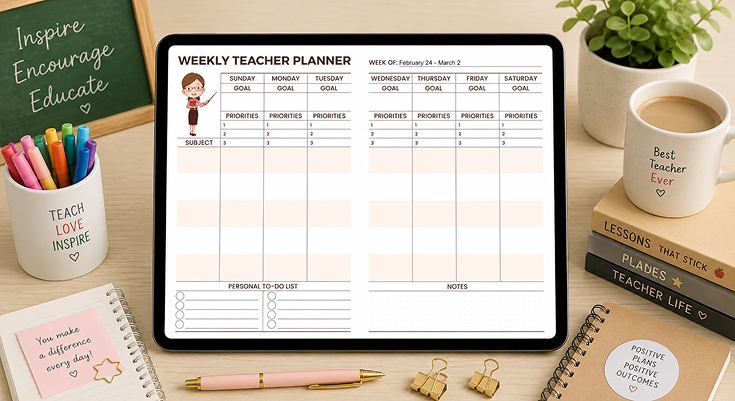
The Weekly Teacher Planner helps educators organize lessons, set goals, and focus on task prioritization efficiently. With daily sections, a subject column, and a to-do list, it ensures a structured workflow. Ample space allows for detailed planning while balancing tasks effectively, helping you optimize your weekly goals with task prioritization.
Incorporating features typical of a premium weekly planner template, this design includes a notes section for reminders and reflections. Its clean, professional layout ensures seamless planning and reduced stress. Whether tracking lesson objectives or maintaining personal tasks, this planner is a practical tool to boost productivity and keep teaching goals on track.
Why Do Teachers Need a Weekly Planner?
A weekly teacher planner is more than just a scheduling tool—it’s a roadmap that helps educators manage their workload efficiently. With multiple subjects to teach, lesson objectives to meet, and student progress to track, having a structured planner can make a significant difference. Here’s why every teacher can benefit from a weekly planner:
Streamlines Lesson Planning
A weekly planner app for teachers helps educators organize lessons for each subject in advance, ensuring a smooth and structured approach throughout the week. By using such an app, teachers can maintain consistency in their teaching and ensure that all necessary topics are covered effectively.
Example: A science teacher can plan lessons as follows:
- Monday: Introduce a new concept through theory-based learning.
- Wednesday: Conduct hands-on experiments to reinforce the theory.
- Friday: Assess students’ understanding through quizzes or written assignments.
Tip: Allocate specific days for review sessions to help students reinforce their learning and improve retention before moving on to new topics.
Set Clear Goals and Priorities
A teacher planner helps define learning objectives and ensures that educators stay focused on key topics and curriculum goals for the week. Clear goals also aid in tracking student progress.
Example:
- Math teacher’s goal: “Introduce and explain the concept of fractions.”
- English teacher’s goal: “Ensure all students submit their book reports by Friday.”
Tip: Keep goals realistic and achievable within the given timeframe, ensuring they align with curriculum requirements and student learning levels.
Manages Classroom Activities Efficiently
A planner helps schedule a variety of classroom activities, including quizzes, group discussions, and interactive projects. This ensures that lessons are engaging and cater to different learning styles.
Example:
- English: Schedule interactive storytelling sessions to enhance creativity.
- History: Plan a debate or role-play activity on historical events.
- Science: Organize lab work for hands-on learning experiences.
Tip: Incorporate different learning methods (visual, auditory) to keep students actively engaged and make lessons more effective.
Reduces Last-Minute Stress
A well-structured weekly planner prevents last-minute scrambles by ensuring that lesson materials, assignments, and deadlines are prepared in advance. This allows teachers to stay ahead of schedule and maintain a stress-free teaching environment.
Example: A history teacher can prepare PowerPoint presentations, worksheets, and reference materials in advance, avoiding last-minute pressure.
Tip: Dedicate at least an hour per week to preparing lesson materials, organizing handouts, and updating lesson plans. This will save time and reduce the workload during busy teaching days.
Tracks Personal and Administrative Tasks
Besides lesson planning, a weekly planner helps teachers stay on top of administrative responsibilities such as meetings, grading, and professional development.
Example:
- Wednesday: Attend the weekly staff meeting.
- Friday: Submit student progress reports to the school administration.
Tip: Schedule time for professional growth activities such as teacher training workshops, online courses, or peer collaboration sessions to stay updated with new teaching strategies.
What Are the Features of This Effective Weekly Teacher Planner?
A well-designed teacher notes planner includes lesson planning sections for organizing topics, a goal-setting area to define teaching priorities, and a task tracker for assignments and deadlines. It should also have a student progress log, a notes section for reflections, and a customizable layout to adapt to different teaching needs efficiently.
Goal-Setting Section
The goal-setting section enables teachers to define clear weekly objectives for their classes, ensuring they stay on track with their lesson plans. By setting specific goals, educators can maintain focus on key learning outcomes, effectively manage their time, and ensure students progress toward important academic milestones.
Example:
| SUNDAY GOAL |
MONDAY GOAL |
TUESDAY GOAL |
WEDNESDAY GOAL |
THURSDAY GOAL |
FRIDAY GOAL |
SATURDAY GOAL |
|---|---|---|---|---|---|---|
| Planning DayPrepare weekly materials and objectives | Writing SkillsIntroduce persuasive writing techniques | Language FocusReview past tense verbs in Spanish | Science ActivityExperiment: Observing evaporation | HistoryDiscuss causes of the American Revolution | Math ReviewComplete algebra unit and review session | Creative DayFree reading and art project |
Priorities List
This section provides a dedicated space for teachers to prioritize tasks based on their importance, helping them manage their workload efficiently. By ranking assignments, quizzes, and student interventions, educators can ensure that critical responsibilities are not overlooked, leading to a more organized and effective teaching approach.
Example:
| SUNDAY PRIORITY | MONDAY PRIORITY | TUESDAY PRIORITY | WEDNESDAY PRIORITY | THURSDAY PRIORITY | FRIDAY PRIORITY | SATURDAY PRIORITY |
|---|---|---|---|---|---|---|
| Prepare lesson plans | Grade math tests | Meet with parent | Plan science experiment | Update student records | Organize class party | Rest and recharge |
| Organize classroom | Teach new vocab | Review history essay | Attend staff meeting | Prepare art supplies | Submit attendance | Plan next week’s goals |
| Email parents | Check homework | Practice spelling quiz | Order lab materials | Help struggling student | Print worksheets | Professional development |
Subject-Wise Breakdown
This section offers a structured layout for planning lessons across multiple subjects or class periods, making it easier for teachers to stay organized. By aligning daily lessons with broader curriculum goals, educators can ensure a cohesive and well-structured learning experience for their students.
Example:
| SUBJECT | SUNDAY | MONDAY | TUESDAY | WEDNESDAY | THURSDAY | FRIDAY | SATURDAY |
|---|---|---|---|---|---|---|---|
| Teacher Name Class |
Ms. Smith 5A |
Ms. Jones 4B |
Mr. Brown 6C |
Ms. Taylor 3A |
Dr. Lee 5B |
Mr. Davis 4A |
Ms. Wilson 6A |
| Math | Prepare worksheets | Fractions lesson | Geometry quiz | Multiplication review | Algebra basics | Math games | – |
| English | – | Essay writing | Reading comprehension | Spelling test | Poetry analysis | Grammar review | – |
| Science | – | – | Water cycle experiment | – | Plant growth observation | Physics basics | – |
Personal To-Do List
This section provides a dedicated space for managing non-teaching tasks such as meetings, workshops, and self-development activities. By keeping track of these commitments, teachers can balance their professional responsibilities while continuing to grow and improve in their field. Effective task management with to-do list app can further streamline these responsibilities, ensuring that no important task is overlooked.
Example:
Notes Section for Reflection
This section enables teachers to reflect on their lessons by noting what worked well and identifying areas for improvement. By keeping track of these insights, educators can refine their teaching strategies and enhance student learning outcomes over time.
Example:
- Student X needs extra help with reading; try phonics game next week.
- Discuss field trip budget with principal by Wednesday.
- Order new science kits for next month’s experiments.
- Parent meeting with Mr. Jones on Friday at 3 PM.
- Plan reward system for Class 5A’s good behavior.
How Can You Effectively Use a Weekly Teacher Planner Template?
A weekly teacher planner helps you stay organized by providing a structured overview of your teaching schedule, student progress, and essential tasks. Instead of focusing on daily checklists, this planner allows you to see the bigger picture, helping you balance lesson planning, classroom activities, and administrative work efficiently.
1. Set Weekly Teaching Goals
- At the start of the week, define your key objectives.
- Example: “By the end of the week, students should understand the basics of fractions and complete a short quiz.”
- Tip: Break down large goals into smaller, achievable steps across the week.
2. Plan Weekly Lesson Themes
- Organize subjects around a central theme for consistency.
- Example: If teaching a science unit on plants, Monday can focus on photosynthesis, Wednesday on plant life cycles, and Friday on hands-on experiments.
- Tip: Align weekly lessons with curriculum standards to ensure progress.
3. Track Student Progress Weekly
- Use the planner to monitor students’ understanding and participation.
- Example: Note students who need extra help in math by midweek and plan a review session by Friday.
- Tip: Mark strengths and areas needing improvement to adjust future lessons.
4. Prepare Weekly Classroom Activities
- Schedule group projects, discussions, and assessments.
- Example: Assign a debate on Tuesday, a Thursday’s hands-on activity, and a Friday’s quiz.
- Tip: Keep a balance between lectures, interactive sessions, and evaluations.
5. Organize Teacher Tasks for the Week
- List out non-teaching responsibilities like meetings, grading, and lesson planning.
- Example: “Monday: Grade last week’s assignments. Wednesday: Staff meeting. Friday: manage task with notes planner”
- Tip: Set specific days for admin work to avoid last-minute stress.
6. Reflect on the Week
- Use the notes section to evaluate what worked and what didn’t.
- Example: “Students struggled with word problems; next week, I’ll add more practice exercises.”
- Tip: Adjust teaching strategies based on weekly reflections for continuous improvement.
Conclusion
A well-structured weekly teacher planner helps educators streamline lessons, set goals, and manage tasks efficiently. Whether minimalist, detailed, or digital, the right planner enhances productivity and reduces stress. With the PlanWiz planner app, teachers can use customizable planner templates to set objectives, track progress, and reflect on teaching strategies to create a more organized and engaging learning experience.
FAQs
A weekly teacher planner template is a structured tool that helps educators organize lesson plans, set weekly goals, and prioritize tasks for efficient classroom management.
It provides dedicated sections for each day, allowing teachers to outline lessons, schedule activities, and ensure all subjects are covered in advance.
The template features daily goal boxes, priority lists, subject planning rows, a personal to-do list, and a notes section for reflections.
Yes, the template is editable, so you can tailor it to your subjects, teaching style, and personal preferences.
Absolutely. The template is designed to be both editable and printable for convenience.