

Managing IT tasks efficiently is essential for ensuring smooth operations, maintaining security, and adhering to compliance requirements. IT professionals handle various responsibilities, from troubleshooting issues to managing security audits and system updates. A to-do list app for IT Professionals can help structure workflows, prioritize critical tasks, and automate recurring duties, ensuring improved efficiency and organization in IT management.
Key Challenges in IT Task Management
IT task management comes with its own set of challenges, from handling complex workflows to balancing urgent and routine tasks. With numerous responsibilities, tight deadlines, and collaboration requirements, staying organized and efficient can often feel like a constant struggle. In this section, we’ll explore the key challenges IT professionals face when managing tasks and how to overcome them.
Task Overload and Prioritization Issues
IT teams manage multiple responsibilities, from software updates to compliance audits. Without a structured prioritization system, important tasks may be delayed, impacting security and operations. The planwiz to-do list app helps classify tasks based on urgency, ensuring high-priority issues receive immediate attention while routine and long-term projects remain on track for completion.
Meeting Compliance and Security Standards
Regular security checks, GDPR compliance, and ISO 27001 audits require IT teams to track due dates and complete necessary actions on time. A lack of structured task management can lead to missed deadlines, increasing security vulnerabilities. A to-do list app helps IT teams organize compliance-related tasks, set deadlines, and ensure nothing is overlooked.
Lack of Centralized Task Management
Without a centralized task management system, IT professionals may rely on scattered notes, emails, or spreadsheets, leading to confusion and inefficiencies. A to-do list app consolidates all IT tasks into a single, structured view, ensuring easy tracking, better collaboration among team members, and seamless integration with existing IT workflows and project management tools.
Incident Response and Change Management
Managing IT incidents and system changes requires a fast, organized approach. Without proper tracking, critical issues may remain unresolved, leading to downtime and security risks. A to-do list app enables IT professionals to log, assign, and monitor incidents effectively, ensuring each issue is prioritized and resolved within the required timeframe, improving response efficiency.
Monitoring Recurring and Ad-hoc Tasks
Routine IT tasks, such as firewall rule reviews, system health checks, and software patching, require consistent monitoring. Additionally, unexpected high-priority tasks, like cybersecurity threats, require immediate attention. A to-do list app helps automate recurring task reminders while also allowing IT professionals to add and track urgent, unplanned tasks efficiently without disrupting workflow management.
How a To-Do List App Helps IT Professionals Stay Organized
A to-do list app is an essential tool for IT professionals to maintain organization and stay on top of tasks. By centralizing tasks, setting priorities, and tracking deadlines, the app helps ensure nothing is overlooked. It also allows for seamless collaboration, efficient task delegation, and tracking of recurring duties, making it easier to manage both short-term and long-term projects.
Task Categorization and Prioritization
A to-do list app allows IT teams to categorize tasks by urgency, importance, and department. Features like color-coded labels, high-priority tags, and deadlines help professionals quickly identify and focus on time-sensitive tasks. This ensures that critical security patches, compliance audits, and troubleshooting requests are handled efficiently while low-priority tasks are scheduled accordingly.
Reminders and Notifications
Missing a compliance audit or security update can have serious consequences. To-do list apps provide customizable reminders and notifications that keep IT teams aware of approaching deadlines. By setting automated alerts for routine maintenance, software updates, and security patches, professionals ensure that every task is completed on time, reducing risks and improving workflow consistency.
Collaboration and Team Coordination
Many IT projects require collaboration across teams. A to-do list app facilitates task delegation, progress tracking, and real-time updates, ensuring that every team member is aware of their responsibilities. Integration with communication tools like Slack, Microsoft Teams, and project management software streamlines workflow coordination, enhancing productivity and reducing miscommunication-related delays.
Recurring Task Management
Tasks like checking backup retention policies, monitoring networks, and performing system audits are performed regularly. A to-do list app automates recurring task scheduling, eliminating the need for manual tracking. IT professionals can create pre-defined workflows with scheduled reminders, ensuring all recurring tasks are executed on time while keeping track of past completions for better documentation.
Incident Tracking and Resolution
IT support teams manage multiple issues simultaneously, from minor software bugs to major server downtimes. A to-do list app helps structure incident response workflows, assigning priority levels and tracking resolution progress. By integrating with helpdesk ticketing systems, IT teams can track, resolve, and document issues efficiently, reducing the risk of unresolved tickets impacting business operations.
Features to Look for in a To-Do List App for IT Professionals
For IT professionals, managing tasks efficiently is key to maintaining smooth operations and ensuring that critical processes are handled on time. Well-designed best to-do list apps can be game-changer, helping to streamline workflows, improve team collaboration, and reduce errors. In this section, we’ll explore the essential features that an IT-focused to-do list app should offer, from customizable templates to time tracking and analytics, to enhance productivity and task management.
- Customizable Task Templates
- Pre-built templates for IT tasks, such as:
- Security audits
- Software deployment
- Troubleshooting workflows
- Customizable templates for:
- Onboarding
- Compliance tracking
- Incident resolution
- Benefits:
- Standardizes processes
- Reduces errors
- Improves efficiency
- Pre-built templates for IT tasks, such as:
- Task Prioritization and Labels
- Key features:
- Priority indicators to differentiate critical vs. low-importance tasks
- Color-coded labels for various IT activities (e.g., security updates, maintenance, support tickets)
- Deadline settings for:
- Urgent tasks
- Long-term projects
- Key features:
- Recurring Tasks and Automation
- Manage repetitive tasks with:
- Automatic recurrence (e.g., server maintenance, software patching, compliance checks)
- Recurrence settings for daily, weekly, or monthly tasks
- Automated notifications for upcoming responsibilities
- Manage repetitive tasks with:
- Collaboration and Integration
- Seamless integration with:
- Helpdesk platforms (e.g., Jira, ServiceNow)
- Cloud storage services (e.g., Google Drive, OneDrive)
- Communication tools (e.g., Slack, Microsoft Teams)
- Benefits:
- Real-time updates
- Shared checklists
- Improved task coordination
- Seamless integration with:
- Time Tracking and Analytics
- Key features:
- Track task durations to identify bottlenecks
- Data-driven decisions for resource allocation
- Analytics reports to:
- Improve project planning
- Boost productivity
- Key features:
IT Task Management Strategies with a To-Do List App
Effective task management is crucial for IT professionals to stay organized and meet deadlines. A well-structured to-do list app can streamline workflows, prioritize critical tasks, and enhance team collaboration. In this section, we’ll explore key strategies for managing IT tasks using a to-do list app.
Organize Tasks Based on Priority and Urgency
Using labels like High Priority, Medium Priority, and Low Priority helps IT teams manage workloads effectively. High-priority tasks like cybersecurity threat responses should be addressed first, while lower-priority items, such as documentation updates, can be scheduled for later. Prioritization ensures urgent matters are handled swiftly, reducing downtime and security risks.
Use a Checklist for View Task Progress
A Kanban board helps visualize IT task progress, moving tasks through stages like To-Do, In Progress, and Completed. Checklist views are useful for structured processes like system deployments, network configuration, and troubleshooting workflows. These visual task management methods enhance clarity and allow IT teams to track task completion status efficiently.
Automate Routine and Recurring Tasks
By setting up automated reminders for IT compliance audits, network security assessments, and software license renewals, teams can prevent missed deadlines. Automated workflows minimize manual input and ensure consistent completion of critical IT tasks. To-do list apps with AI-powered automation can even suggest optimized scheduling based on past task completion patterns.
Use To-Do List Planner Templates for Task Management
Using predefined planner templates can simplify organization and ensure no task is overlooked. You can categorize IT tasks by priority, set reminders for critical deadlines, and track progress efficiently. Templates allow structured scheduling, ensuring routine checks like audits and security reviews stay on track. Here’s how you can use different to-do list templates effectively:
Daily IT Task Planner (For Routine Tasks)
A daily IT task planner helps IT teams manage regular maintenance, ensuring consistent performance and timely task completion. By scheduling recurring tasks, assigning priorities with color codes, and tracking progress, teams can stay organized and improve workflow efficiency.

✅ How to Use It:
- Schedule recurring daily maintenance tasks at fixed times.
- Use color codes to mark priorities.
- Track progress with status updates (Completed, In Progress, Not Started).
Weekly IT Project Planner (For Larger Initiatives)
For larger IT projects, a weekly planner ensures structured progress. Assigning team members to specific tasks, setting deadlines, and monitoring progress weekly keeps projects on track, minimizing delays, and ensuring every milestone is achieved on time and within scope.

✅ How to Use It:
- Assign specific team members to each task.
- Set deadlines to prevent delays.
- Monitor project progress weekly to keep initiatives on track.
IT Incident Response & Troubleshooting Tracker
This tracker helps log, manage, and resolve IT incidents efficiently. By categorizing incidents with severity levels and assigning engineers deadlines, teams can prioritize responses, reduce downtime, and ensure systematic resolutions, leading to better service continuity and reduced risk.

✅ How to Use It:
- Log every IT incident or outage for tracking.
- Assign severity levels (Critical, High, Medium, Low) to prioritize response.
- Assign a responsible engineer and set resolution deadlines.
IT Compliance & Documentation Checklist
An IT compliance checklist ensures ongoing audits and adherence to regulatory requirements. By reviewing policies periodically, assigning responsibilities for updates, and maintaining transparency, teams can ensure consistent compliance, avoiding issues and reducing risks associated with non-compliance.
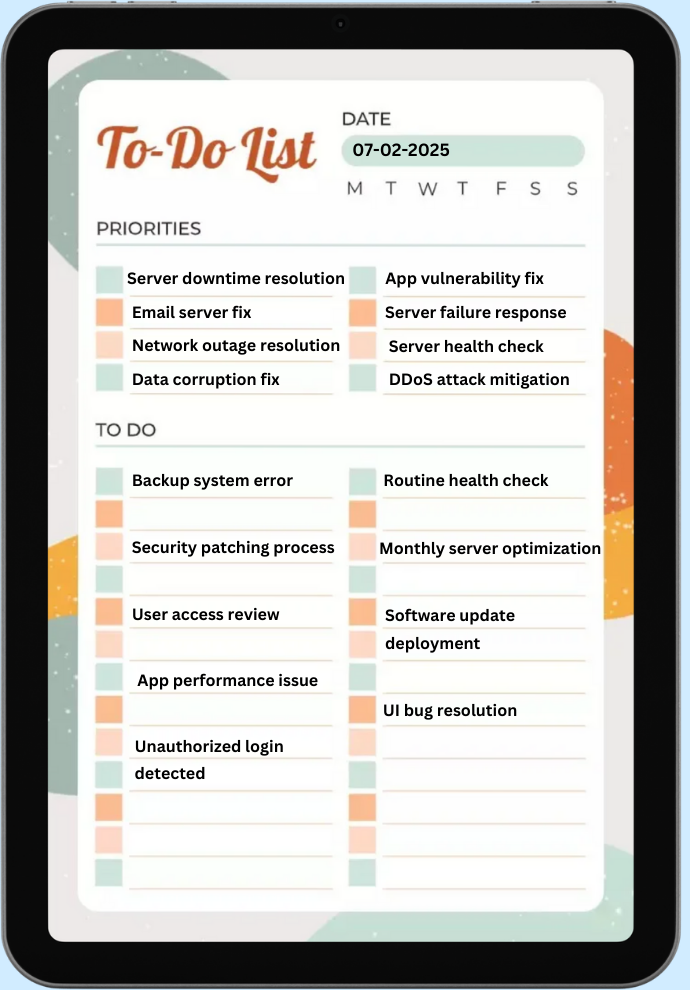
✅ How to Use It:
- Ensure that compliance tasks are reviewed periodically.
- Assign responsible team members for audit & policy updates.
- Maintain transparency in compliance adherence.
Prioritize Your IT Tasks Efficiently with the To-Do List App
IT professionals must prioritize tasks effectively to address critical issues first and prevent smaller tasks from piling up. A to-do list app can greatly enhance task prioritization by providing several key features:
- Priority Indicators: Use priority markers (e.g., high, medium, low) to quickly identify and focus on the most urgent tasks. Whether it’s a system security update or an urgent support ticket, these indicators help direct attention to what matters most.
- Color-Coded Labels: Categorize tasks using color-coded labels to visually separate different types of IT activities. For instance, assign different colors to tasks like security patches, routine maintenance, troubleshooting, and software deployments. This visual distinction helps you quickly assess the workload and tackle tasks in the right order.
- Deadline and Reminder Features: The app allows you to set clear deadlines for tasks and receive automated reminders, ensuring you stay on track and meet critical timelines. It can also alert you ahead of time about impending due dates, helping you manage your time and avoid last-minute scrambles.
- Task Dependencies and Sequencing: Some tasks are dependent on the completion of others. A to-do list app allows you to define task dependencies, ensuring you complete foundational tasks first before moving to the next stage. This feature helps prevent confusion and ensures workflows run smoothly.
- Recurring Task Scheduling: For tasks that occur regularly, such as software updates or server maintenance, the app’s recurring task feature automates scheduling. This ensures essential tasks don’t get overlooked or forgotten, improving overall productivity and consistency.
Conclusion
A to-do list app is essential for IT professionals to streamline task management, enhance productivity, and ensure critical tasks are timely. These apps simplify complex workflows with features like task prioritization, recurring reminders, and seamless team collaboration. Additionally, incorporating time management tips alongside these tools helps optimize efficiency, ensuring tasks are handled effectively without burnout. By organizing, tracking, and automating IT tasks, teams can stay focused, minimize errors, and ensure smooth operations, improving overall efficiency and performance in IT management.






