

Staying organized and productive is easier than ever with the right to-do list apps. Whether you’re managing work tasks, planning personal goals, or tracking daily habits, having a structured system can make all the difference.
In this blog, we’ll explore ten powerful to-do list planners that help you streamline your schedule, boost efficiency, and stay on top of your tasks. So you can conquer your day with confidence.
List of the best to-do list apps in 2026
- PlanWiz: Best Free Template-Based To-Do List App
- Todoist: Best for Team Collaboration & Productivity Automation
- Microsoft To Do: Best Simple Daily Planner for Beginners
- To-Do List – Schedule Planner: Best All-in-One Daily Routine Organizer
- TickTick: Best To-Do App with Built-In Pomodoro & Habit Tracking
- Errands To-Do List: Best Minimal & Straightforward Task Manager
- Any.do: Best Cross-Device To-Do List with Smart Reminders
- Focus To-Do: Best App for Pomodoro Technique Users
- Google Tasks: Best To-Do List for Gmail & Google Workspace Users
- My Tasks – To Do List: Best Lightweight To-Do App for Quick Planning
1. Planwiz: Best Free Template-Based To-Do List App
PlanWiz is a powerful and beautifully designed daily and weekly planner that helps you organize your tasks, schedule, and reflections with ease. It offers a wide range of ready-made to-do list templates that you can customize for work planning, study routines, habit tracking, journaling, or personal goal-setting.
Whether you need a structured planner or a flexible digital notebook, PlanWiz gives you a clean, distraction-free space where productivity feels simple and enjoyable.
Key Features:
- Smart Task Management – Easily organize, categorize, and prioritize tasks.
- Daily & Weekly Planner – Plan your schedule with customizable planner templates.
- Project & Work Planner – Manage projects with structured task breakdowns.
- Routine & Habit Tracker – Build consistency with habit tracking with routine planner templates and habit tracker planner templates.
- Mood & Productivity Tracking – Stay motivated with tracking tools.
Pros:
- Comprehensive planner templates for all needs
- User-friendly interface
- Combines task management and journaling features
- Great for personal and professional planning
- Offers a free version with useful features
Cons:
- A subscription is required to unlock all premium features
- Ads in the free version
Best For:
- Users who need an all-in-one planner for tasks, digital journaling, and a schedule maker
- Individuals looking for structured task management and habit tracking
- Professionals and students who want to stay organized
Rating:
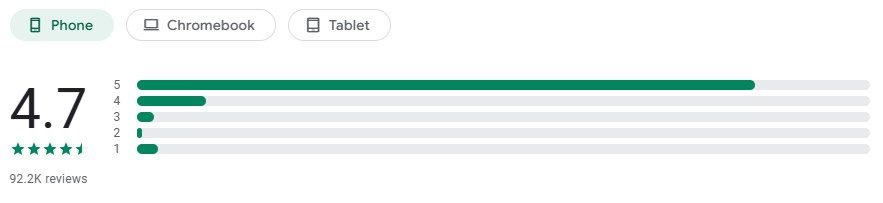
Pricing and Plans:
- Weekly Joy: $3.99 per week
- Yearly Growth: $39.99 per year
- Lifetime Achievement: $47.99 (one-time payment)
User Reviews: “PlanWiz has been a game-changer for my daily productivity. The planner templates make organizing my tasks so much easier.”
2. Todoist: Best for Team Collaboration & Productivity Automation
Todoist is one of the most popular and feature-rich task management apps available today. With over 30 million users worldwide, it offers a perfect balance between simplicity and powerful functionality. Whether you’re managing personal tasks or collaborating with a team, Todoist provides the tools you need to stay organized across all your devices.
Key Features:
- Natural Language Processing – Add tasks quickly by typing “tomorrow at 3 pm” or “every Monday.”
- Project Organization – Create unlimited projects with sections and sub-sections.
- Priority Levels – Assign priority levels (P1-P4) with color-coded flags.
- Productivity Tracking – Visualize your productivity trends with detailed statistics.
- Team Collaboration – Share projects, assign tasks, and comment with team members.
Pros:
- Excellent cross-platform support (iOS, Android, Windows, Mac, Web, browser extensions)
- Integrates with 80+ apps, including Gmail, Slack, Alexa, and Google Calendar
- Karma system gamifies productivity and motivates consistent task completion
- Supports labels, filters, and advanced search for complex workflows
- Clean, intuitive interface that’s easy to learn
Cons:
- Best features require a premium subscription
- No built-in time tracking or Pomodoro timer
- Limited customization options compared to competitors
Best For: Power users and teams who need advanced labels/filters, seamless tool integrations, and collaborative management of multiple complex projects.
Rating:
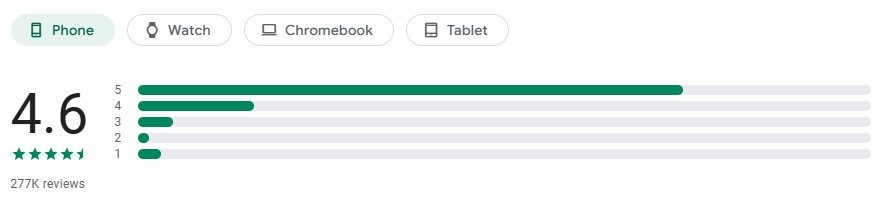
Pricing and Plans:
- Free: Basic task management with up to 5 active projects
- Pro: $4 per month or $36 per year
- Business: $6 per user per month or $72 per year
User Reviews: “Todoist is the perfect balance of simple and powerful. The natural language input saves me so much time, and seeing my productivity stats keeps me motivated.”
3. Microsoft To Do: Best Simple Daily Planner for Beginners
Microsoft To Do is a smart, intuitive task management app that seamlessly integrates with the Microsoft 365 ecosystem. Built on the foundation of the popular Wunderlist app (which Microsoft acquired), it offers a clean, modern interface with intelligent features like My Day planning and personalized suggestions to help you focus on what matters most.
Key Features:
- My Day Feature – Start each day with a clean slate and personalized task suggestions.
- Intelligent Suggestions – AI-powered recommendations help you plan your day effectively.
- Microsoft 365 Integration – Syncs with Outlook tasks, Teams, and Planner automatically.
- List Sharing – Collaborate with family, friends, or colleagues on shared lists.
- File Attachments – Add files up to 25MB to any task for reference.
Pros:
- Completely free with all features included
- Seamless sync across all devices (Windows, Mac, iOS, Android, Web)
- Perfect integration with Outlook for email-to-task conversion
- Beautiful, modern interface with customizable themes and backgrounds
- Works offline with automatic sync when reconnected
Cons:
- Limited advanced features compared to specialized task managers
- No time tracking or Pomodoro functionality
- Fewer third-party integrations than competitors
Best For: Microsoft 365 users who want seamless integration, a free full-featured task manager with visual list-based organization, and easy email-to-task conversion.
Rating:

Pricing and Plans:
- 100% Free: No premium tier or subscription required
- Included with a Microsoft 365 subscription
User Reviews: “As someone deep in the Microsoft ecosystem, To Do is perfect. I love how my Outlook tasks sync automatically, and the My Day feature helps me focus on what’s actually important.”
4. To-Do List – Schedule Planner: Best All-in-One Daily Routine Organizer
A straightforward yet powerful task manager and planner that helps users prioritize tasks efficiently. This app is ideal for those who prefer a minimalistic yet feature-packed experience. With its intuitive design and smart organization features, users can easily manage their daily and weekly to-do lists with ease.
Key Features:
- Quick Task Entry – Add and categorize tasks effortlessly.
- Daily Reminders & Notifications – Never forget an important task.
- Color-coded Organization – Customize your lists for better clarity.
- Sync Across Devices – Access your to-dos anytime, anywhere.
Pros:
- Simple, user-friendly interface
- Effective notification and reminder system
- Works well for short-term and long-term planning
Cons:
- Lacks advanced tracking features like habits and journaling
- The free version contains ads
Best For: Busy professionals and students who need a clean, easy-to-use task manager.
Rating:

Pricing and Plans:
- Free: Available with ads
- Pro Version: $3.99 per month
- Annual Plan: Approximately $39.99 per year (varies by region)
User Reviews: “A simple yet effective app for keeping my daily tasks organized.”
5. TickTick: Best To-Do App with Built-In Pomodoro & Habit Tracking
TickTick is a feature-packed productivity app that combines task management, calendar scheduling, habit tracking, and a Pomodoro timer in one comprehensive package. Despite offering premium features, it maintains an intuitive interface that doesn’t overwhelm users. With one of the most generous free tiers in the market, TickTick has become a favorite among productivity enthusiasts.
Key Features:
- Built-in Pomodoro Timer – Stay focused with customizable work sessions and break intervals.
- Calendar View – Visualize your tasks and schedule in daily, weekly, or monthly views.
- Habit Tracker – Build positive habits with streak tracking and reminders.
- Smart Lists – Create dynamic lists based on tags, priorities, or due dates.
- Multiple Reminders – Set location-based, time-based, or recurring reminders.
Pros:
- Extremely generous free version with most features included
- Excellent Pomodoro timer integration for time management
- Beautiful calendar view that rivals dedicated calendar apps
- Natural language input for quick task creation
- Supports subtasks with unlimited nesting depth
Cons:
- The interface can feel cluttered with so many features
- Premium subscription required for calendar integration and some advanced features
- Learning curve steeper than simpler alternatives
Best For: Users who want an affordable all-in-one productivity solution with a built-in Pomodoro timer, task + habit tracking, and premium-level features on a budget.
Rating:

Pricing and Plans:
- Free: Basic task management features
- Premium: $27.99 per year (often discounted to $17.99)
- Monthly Option: $2.99 per month
User Reviews: “TickTick gives me everything I loved about expensive productivity apps, but at a fraction of the price. The built-in Pomodoro timer is a game-changer.”
6. Errands To-Do List: Best Minimal & Straightforward Task Manager
Errands To-Do List is designed for those who need powerful task organization with a sleek, easy-to-use interface. Perfect for managing personal and work-related tasks, this app excels in task prioritization.
Key Features:
- Task Prioritization – Set task importance levels with color-coded categories.
- Folders & Subtasks – Organize tasks in nested lists for easy management.
- Auto-Sync & Cloud Backup – Keep your lists safe and accessible.
- Recurring Task Reminders – Never miss a deadline with automated alerts.
Pros:
- Clean and intuitive design
- Smart categorization options
- Works well for both personal and professional use
Cons:
- No collaboration features
- Limited free version functionality
Best For: People who want a structured and detailed to-do list.
Rating:

Pricing and Plans:
- Free: Basic version available
- Premium: $2.99 per month
- Annual Plan: Approximately $29.99 per year
User Reviews: “The best app for breaking down tasks into subtasks and keeping everything structured.”
7. Any.do: Best Cross-Device To-Do List with Smart Reminders
Any.do combines elegant design with powerful AI features to help you manage tasks, calendar events, and reminders in one beautifully designed app. What sets Any.do apart is its unique Daily Planning feature that prompts you each morning to review and organize your tasks for the day. With voice input and smart suggestions, it makes task management feel effortless and natural.
Key Features:
- AI-Powered Planning – Smart suggestions help you prioritize and schedule tasks automatically.
- Daily Planning Moment – Morning reminder to review and plan your day.
- Voice Entry – Add tasks hands-free using voice commands.
- Location-Based Reminders – Get notified when you arrive at or leave specific places.
- Integrated Calendar – View tasks and events together in one unified timeline.
Pros:
- Stunning, minimalist interface that’s a pleasure to use
- Excellent mobile experience with intuitive gestures
- Strong focus on daily planning and task review
- WhatsApp integration for sharing lists and assigning tasks
- Available on all platforms, including Apple Watch and Web
Cons:
- Many useful features are locked behind a premium subscription
- Free version limited to basic task management
- It can feel too simple for users needing complex project management
Best For: Design-conscious users who want a beautiful interface, daily planning routines, quick voice-input task capture, and simple personal project management.
Rating:

Pricing and Plans:
- Free: Basic task management with limitations
- Premium: $5.99 per month or $26.99 per year
- Family Plan: $8.99 per month (up to 4 users)
User Reviews: “Any.do is gorgeous and gets out of my way. The morning planning moment helps me start each day intentionally instead of reactively.”
8. Focus To-Do: Best App for Pomodoro Technique Users
Focus To-Do seamlessly integrates the Pomodoro Technique with a to-do list, helping users manage time effectively with time management tips. Combining timed work sessions with structured task management enhances focus, reduces distractions, and boosts productivity. Ideal for students and professionals, it ensures tasks are completed efficiently with improved concentration and organization.
Key Features:
- Pomodoro Timer – Stay focused with 25-minute work intervals.
- Task & Subtask Management – Organize projects efficiently.
- Goal Setting & Tracking – Set milestones and monitor progress.
- Focus Mode – Reduce distractions while working.
Pros:
- Unique focus-driven productivity tool
- Helps beat procrastination
- Simple and easy to use
Cons:
- Not ideal for complex task management
- No cloud sync in the free version
Best For: Individuals who struggle with focus and procrastination.
Rating:

Pricing and Plans:
- Free: Basic features without cloud sync
- Premium: $4.99 per month or $11.99 per year
- Lifetime: $34.99 (one-time payment)
User Reviews: “The Pomodoro timer helps me stay on track with my work.”
9. Google Tasks: Best To-Do List for Gmail & Google Workspace Users
Google Tasks is Google’s official, lightweight task management app that integrates seamlessly with Gmail, Google Calendar, and the entire Google Workspace ecosystem. While it may lack the advanced features of dedicated task managers, its simplicity and deep integration with Google services make it an excellent choice for users already invested in the Google ecosystem.
Key Features:
- Gmail Integration – Convert emails into tasks with one click, maintaining the original message link.
- Calendar Sync – Tasks appear in Google Calendar alongside your events.
- Subtasks Support – Break down tasks into manageable subtasks with indentation.
- Mobile Widgets – Quick access to your tasks from your home screen.
- Voice Entry – Use Google Assistant to add tasks hands-free.
Pros:
- Completely free with no ads or premium upsells
- Automatic sync across all devices signed into your Google account
- Minimal learning curve – works exactly as you’d expect
- Perfect for converting emails to actionable tasks
- Available directly in the Gmail sidebar for quick access
Cons:
- Very basic compared to feature-rich alternatives
- No priority levels, tags, or labels
- No collaboration features for sharing tasks
- Limited customization and organization options
Best For: Gmail/Google Workspace users who want a simple, distraction-free, free task manager with easy email-to-task conversion.
Rating:

Pricing and Plans:
- 100% Free: No premium version or paid features
- Completely free as part of Google Workspace
User Reviews: “Google Tasks does exactly what I need without any fuss. I love being able to turn emails into tasks right from my inbox.”
10. My Tasks – To Do List: Best Lightweight To-Do App for Quick Planning
A lightweight yet powerful task management app designed for simplicity and efficiency. With a clean and intuitive user interface, it offers essential features to help users organize tasks, set reminders, and manage daily responsibilities without distractions. Perfect for those who prefer a straightforward and effective to-do list solution.
Key Features:
- Customizable Task Lists – Create lists for work, home, and personal goals.
- Recurring Tasks – Set up repeating reminders.
- Dark Mode Support – Reduce eye strain.
- Widgets for Quick Access – View tasks without opening the app.
Pros:
- Easy to use and visually appealing
- Works well for simple and recurring tasks
- The free version offers good functionality
Cons:
- Lacks integrations with third-party apps
- No advanced productivity tracking
Best For: Users who want a basic, distraction-free to-do list app.
Rating:

Pricing and Plans:
- Free: Available with basic features
- Pro Plan: $2.49 per month
- Annual Plan: Approximately $24.99 per year
User Reviews: “A great app for simple task tracking without unnecessary features.”
Quick Comparison Table: Which Best To-Do List App Is Right for You?
| App Name | Best For | Key Strength | Pricing |
|---|---|---|---|
| PlanWiz | Professionals, students, habit trackers | All-in-one planning with journaling | Free with ads; Premium starts at $3.99/week, $39.99/year, $47.99 lifetime |
| Todoist | Power users, teams, and multi-project management | Advanced organization with labels & filters | Free; Pro $4/month; Business $6/month per user |
| Microsoft To Do | Microsoft 365 users | Seamless Outlook and Teams integration | Completely Free |
| To-Do List – Schedule Planner | Busy professionals and students | Simple, reliable notification system | Free with ads; Pro $3.99/month |
| TickTick | Budget-conscious power users | All-in-one with Pomodoro & habit tracking | Free; Premium $2.79/month |
| Errands To-Do List | Solo users needing structure | Unlimited subtasks and hierarchy | Free; Premium $2.99/month |
| Any.do | Design-conscious users | AI-powered daily planning | Free; Premium $2.99/month (annual) |
| Focus To-Do | Procrastinators needing focus | Integrated Pomodoro technique | Free; Premium $4.99/month |
| Google Tasks | Gmail users, minimalists | Email-to-task conversion | Completely Free |
| My Tasks | Users wanting simplicity | Fast, distraction-free interface | Free; Pro $2.49/month |
Frequently Asked Questions
For the best completely free experience, PlanWiz, Microsoft To Do, and Google Tasks stand out as they offer all features without premium tiers or advertisements. Microsoft To Do provides more features and customization, while Google Tasks excels in simplicity and Gmail integration.
PlanWiz excels for students needing comprehensive planning with study schedules and habit tracking. TickTick offers incredible value with its free Pomodoro time, perfect for study sessions. Microsoft To Do is ideal for students using Microsoft 365 for Education.
Yes, Todoist, PlanWiz, Microsoft To Do, Any.do, and TickTick all support list sharing. Microsoft To Do is particularly good for family use since it’s fr,e e and everyone likely has a Microsoft account. AnyDoo offers WhatsApp integration for easy family collaboration.
Yes, all to-do list apps support cross-device sync. PlanWiz, To-Do List, Errands, and My Tasks offer free syncing, while Focus To-Do unlocks full multi-device sync with premium. Sync works quickly across both iOS and Android.
Conclusion
Choosing the right to-do list app can make your daily planning easier and more productive. Each app offers something unique, so pick the one that matches your style and workflow.
- PlanWiz and TickTick – great for feature-rich planning
- Google Tasks and To-Do List – Schedule Planner – ideal for simple task management
- Focus To-Do – perfect for Pomodoro and focus-based productivity
- Todoist – best for team collaboration and cross-platform use
Most apps offer free plans or trials, so you can test them before choosing. The key is simple: the best app is the one you use consistently.
These ten apps cover everything from habit tracking to project planning, helping you stay organized and productive every day. Choose the one that fits your needs and start achieving your goals with confidence.
Learn More:
11 Best To-Do List Apps for Travel Packing in 2026
Manage Your Meeting Workflow More Effectively with a To-Do List AppStreamline Task Management for Teachers with a Smart To-Do List App






